
You are here:
Share Alignments in PDF Files
Encourage feedback on alignments from sales and service leadership. Sharing alignments in PDF files from Territory Planning gives stakeholders opportunities to provide guidance for fine-tuning your territory models.
Required Editions
| Available in: both Salesforce Classic (not available in all orgs) and Lightning Experience |
| Available in: Professional, Enterprise, Performance, Unlimited, and Developer Editions with Web Services API enabled |
| User Permissions Needed | |
|---|---|
| To publish alignments: | Sales Planning Ops Analyst permission set AND Query for Datapipelines User for Sales Planning permission set AND SF Maps Territory Planning for Sales Planning permission set |
-
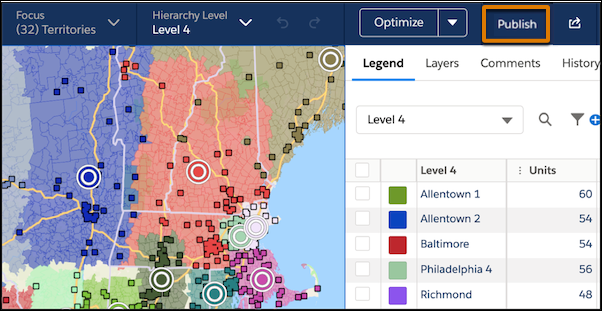
From the map, click Publish.
-
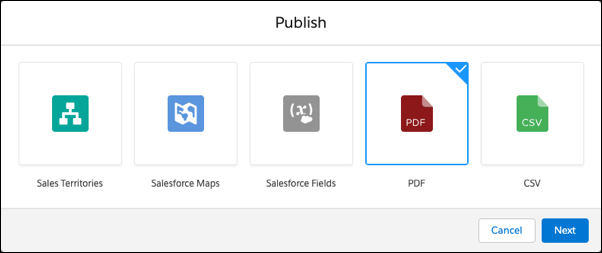
Select PDF, and click Next.
-
Select the scope of what to publish.
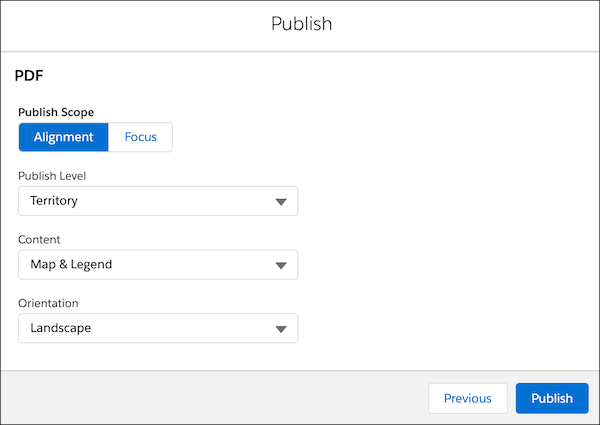
For Example, to Publish... Select... The entire alignment when you create hierarchies for the first time or transition to a new planning model Alignment Your current focus when you change one area and want to publish those changes Focus - Select the level to publish. Children of the selected level are published along with the level. For example, your hierarchy is Region | District | Territory. When you publish a district, you also publish its territories.
-
Select the type of content to publish.
For Example, to Print... Select... The map on one page and the legend on another page in a single PDF file Map & Legend The map to a single PDF file Map The legend to a single PDF file Legend The maps and legend to a single PDF file for each area in a focus, determined by hierarchy level Individual Areas - Click Publish.
Did this article solve your issue?
Let us know so we can improve!
