Maximize your company’s unique products and services when you incorporate attributes
into unit formulas in Territory Planning. Analyze territories using metrics that, for example,
combine and weight fields so you can prioritize sales of one product over another. Then use those
numbers to inform your sales plan and assign accounts to territories.
Required Editions
Available in: both Salesforce Classic (not available in all orgs) and Lightning Experience
Available in: Professional, Enterprise, Performance, Unlimited, and Developer Editions with Web Services API enabled
User Permissions Needed
To modify alignments:
Sales Planning Ops Analyst permission set
AND
Query for Datapipelines User for Sales Planning permission set
AND
SF Maps Territory Planning for Sales Planning permission set
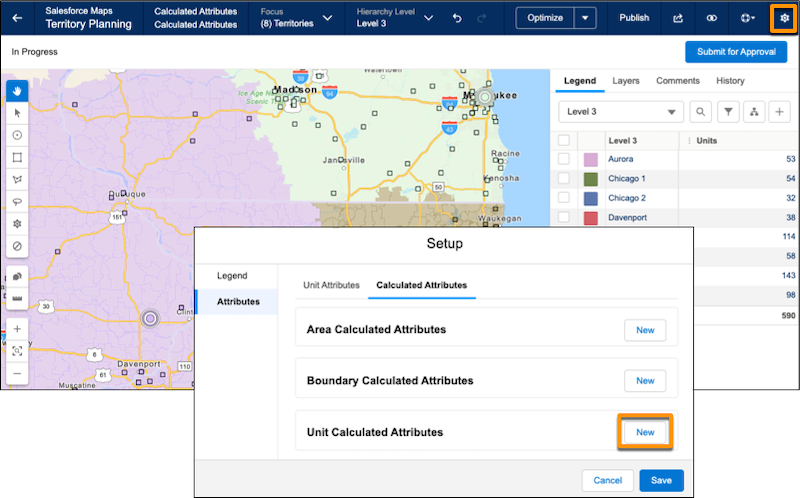
Open an alignment and set the focus.
In Settings, select Attributes | Calculated Attributes.
Click New next to the unit level.
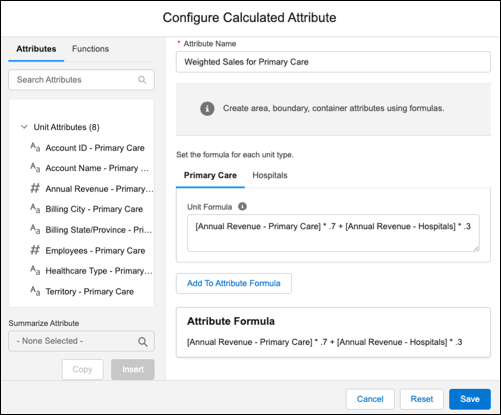
Name your attribute.
Use the Attributes and Functions tabs to start building your formula. To add an aggregated
attribute, select a value in Summarize Attribute. The value represents the aggregate for that
attribute in the alignment. For example, selecting MIN for annual revenue references the
minimum value for annual revenue in the alignment.
This example combines and weights annual revenue from primary care locations and
hospitals. A medical equipment company has high revenue from successful hospital sales. The
company wants reps to spend more time at primary care locations. So, to prioritize primary care
sales over hospital sales, the formula weights primary care sales higher. Then, when you take
the total of the calculated attributes by territory, territories with higher primary care sales
rank better.
Click Add to Attribute Formula.
Save the formula.
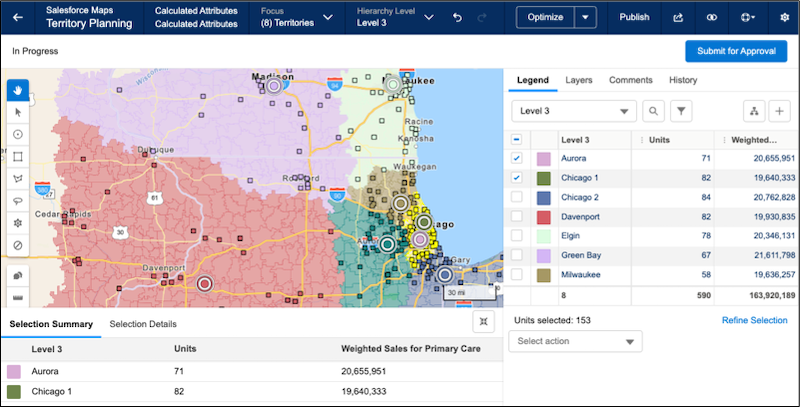
Add columns for the calculated attribute to the legend.
Optimize the alignment based on the calculated attribute.
Did this article solve your issue?
Let us know so we can improve!
Loading
Salesforce Help | Article
Cookie Consent Manager
General Information
Required Cookies
Functional Cookies
Advertising Cookies
General Information
We use three kinds of cookies on our websites: required, functional, and advertising. You can choose whether functional and advertising cookies apply. Click on the different cookie categories to find out more about each category and to change the default settings.
Privacy Statement
Required Cookies
Always Active
Required cookies are necessary for basic website functionality. Some examples include: session cookies needed to transmit the website, authentication cookies, and security cookies.
Functional Cookies
Functional cookies enhance functions, performance, and services on the website. Some examples include: cookies used to analyze site traffic, cookies used for market research, and cookies used to display advertising that is not directed to a particular individual.
Advertising Cookies
Advertising cookies track activity across websites in order to understand a viewer’s interests, and direct them specific marketing. Some examples include: cookies used for remarketing, or interest-based advertising.