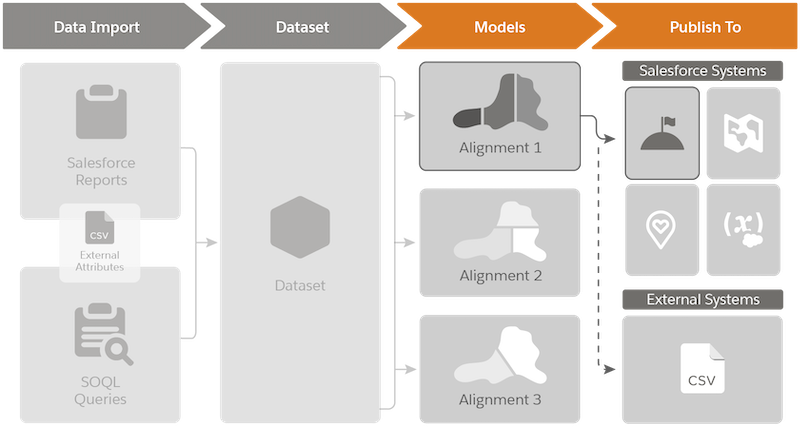
Model your territories in alignments that you create from your datasets in Territory
Planning. You then choose where to publish your alignments within Salesforce. You also get the
choice to map alignment data to specific Salesforce fields or export the data to use in
proprietary and third-party systems.
Required Editions
Available in: both Salesforce Classic (not available in all orgs) and Lightning Experience
Available in: Professional, Enterprise, Performance, Unlimited, and Developer Editions with Web Services API enabled
Territory Planning stores models in alignments, which are visual representations of your sales
and service teams’ territory hierarchies. Alignments serve different purposes, depending on the
system to which you publish them.We see how the data that you import plays a key role in the
alignments that you publish.
What Happens When You Publish Alignments
Sales and service operations publish alignments to any of these destinations, depending on
your teams’ objectives and systems already in place.
Destination
The alignments publish as...
Publishing alignments updates assignments for...
Sales Territories
Territory models, which create Salesforce:
Models
Territories
Assignment rules
Accounts
Opportunities
Users
Salesforce Maps
Shape layers, which reps plot on the map to help them:
Plan and work their schedules.
Take advantage of route optimization.
As many as 5,000 auto assignment rules for any records that include geocoding, such as:
Accounts
Opportunities
Users
Leads
Cases
Field Service
Service territories and polygons.
Accounts
Users
Cases
Alignment Approval Processes
Alignments affect entire teams and their assignments, so it’s important to avoid accidental
changes to or loss of alignment details. To preserve the integrity of alignments, you grant
authority to specific teammates who can then publish new and updated alignments. When you grant
that authority, you:
Require that others request approval for changes to alignments before authorized teammates
publish them.
Let others add comments to alignments pending approval.
Prevent others from making further changes to alignments pending approval.
Give authorized teammates advance notice when others try to publish alignments. You also let
authorized teammates provide feedback about, approve, and deny publish requests.
Did this article solve your issue?
Let us know so we can improve!
Loading
Salesforce Help | Article
Cookie Consent Manager
General Information
Required Cookies
Functional Cookies
Advertising Cookies
General Information
We use three kinds of cookies on our websites: required, functional, and advertising. You can choose whether functional and advertising cookies apply. Click on the different cookie categories to find out more about each category and to change the default settings.
Privacy Statement
Required Cookies
Always Active
Required cookies are necessary for basic website functionality. Some examples include: session cookies needed to transmit the website, authentication cookies, and security cookies.
Functional Cookies
Functional cookies enhance functions, performance, and services on the website. Some examples include: cookies used to analyze site traffic, cookies used for market research, and cookies used to display advertising that is not directed to a particular individual.
Advertising Cookies
Advertising cookies track activity across websites in order to understand a viewer’s interests, and direct them specific marketing. Some examples include: cookies used for remarketing, or interest-based advertising.