
You are here:
Skills Customization
You can change object permissions for the skill and endorsement objects to suit the needs of your organization.
Required Editions
| Available in: Salesforce Classic |
WDC is available for existing WDC customers in Professional Edition, Enterprise Edition, Performance Edition, Unlimited Edition, and Developer Edition. |


Customize the skill and endorsement objects in the same way you edit other objects. This includes adding custom fields, modifying page layouts, and adding triggers, workflow, and validation rules. You can also customize the hovers that appear on skills, so that you expose specific standard and custom fields.
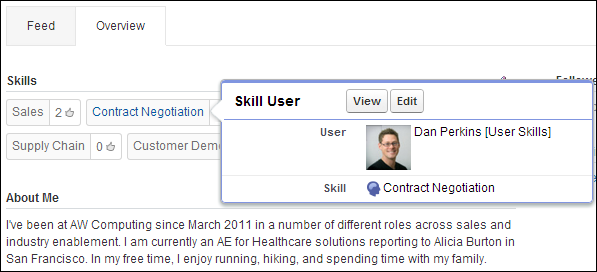
Administrators can change object permissions for the skill and endorsement objects to suit the needs of their organization. For example, you can configure object settings so users can’t create skills, and only skills created by an administrator can be assigned to others. By default, supported user profiles have the ability to see, create, edit, and remove skills, and administrators have “Modify All Data” and “View All Data” permissions.
Additionally, administrators can change some skills settings on the WDC Settings page. From Setup, enter WDC Settings in the Quick Find box, then select WDC Settings.
| WDC Setting | What It Does |
|---|---|
| Edit Skills and Endorsements via record detail pages | Disables inline editing of skills and endorsements on Chatter profiles. Recommended if you have customized these objects with custom required fields. Don’t enable this setting if you want to use skills in Chatter profiles. |
| Generate feed posts when users add a new skill | Automatically creates a Chatter feed post when a user adds a new skill to a profile. |
| Enable Suggested Skills | Automatically suggests skills based on users’ Chatter topics. |
You can also install a package with additional reports and dashboards for thanks and skills features:
