Listen to and Collaborate on Voice Call Recordings
Calls are recorded in dual-channel mode from the perspective of the participating
representative or AI rep. The rep or AI agent’s speech is on one channel, and the customer’s
speech on the other. Recordings are stored on the Salesforce platform in .wav or mp3 format, with
.wav format as the default. Call recordings consume your org’s file storage allotment.
Note A single Voice Call object is created for the entire duration
of a customer call. If the call is transferred from an agent or rep to another rep, a new
recording is created from the perspective of the new participant. All such recordings are mapped
to the single VoiceCall object corresponding to this customer call.
To view the Voice Calls list, open the Voice
Calls tab.
Alternatively, open the App Launcher, enter Voice, and select Voice
Calls.
Click the Voice Call record for the call that you want to listen
to.
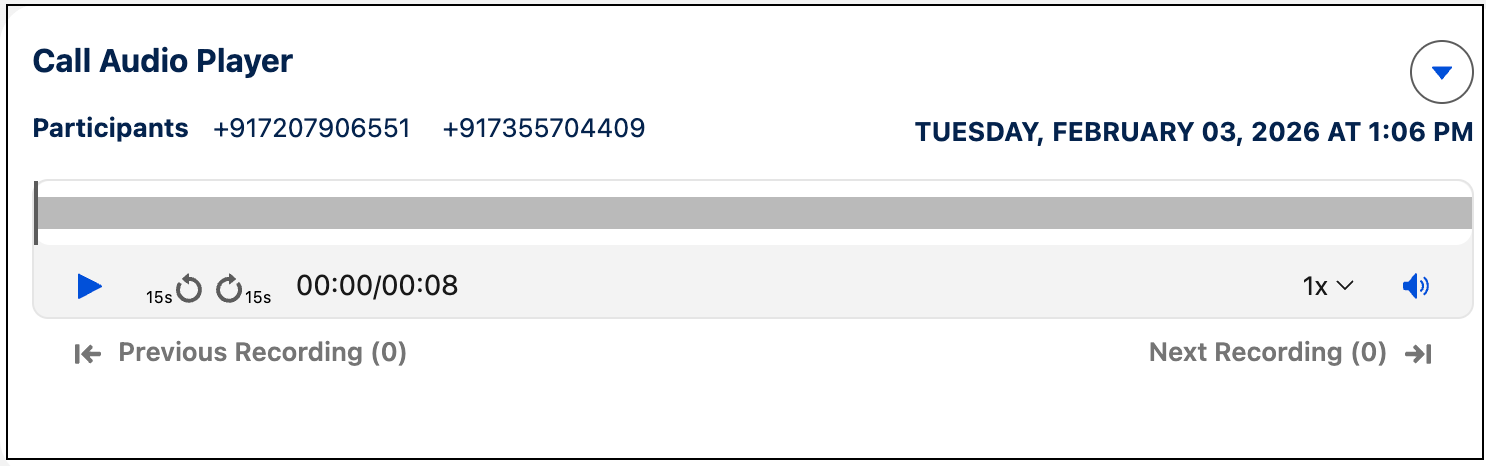
To listen to the recording, click the Play icon on the Call Audio
Player.
To fast forward or rewind by 15 seconds, click the circular
arrows.
To change the playback speed, click 1x .
To skip to a different part of the call recording, click the audio indicator.
The recording for the transfer is stored in the same voice record. To navigate between
transferred calls, use Next Recording and Previous Recording.
Did this article solve your issue?
Let us know so we can improve!
Loading
Salesforce Help | Article
Cookie Consent Manager
Cookie Consent Manager
General Information
Required Cookies
Functional Cookies
Advertising Cookies
General Information
We use three kinds of cookies on our websites: required, functional, and advertising. You can choose whether functional and advertising cookies apply. Click on the different cookie categories to find out more about each category and to change the default settings.
Privacy Statement
Required Cookies
Always Active
Required cookies are necessary for basic website functionality. Some examples include: session cookies needed to transmit the website, authentication cookies, and security cookies.
Functional Cookies
Functional cookies enhance functions, performance, and services on the website. Some examples include: cookies used to analyze site traffic, cookies used for market research, and cookies used to display advertising that is not directed to a particular individual.
Advertising Cookies
Advertising cookies track activity across websites in order to understand a viewer’s interests, and direct them specific marketing. Some examples include: cookies used for remarketing, or interest-based advertising.