Tabs and Navigation in the Salesforce Classic Console
Any items you click on in a console display as tabs. Tabs let you see all the
information you need on one screen without losing context.
Required Editions
Available in: Salesforce Classic
Available in: Professional, Enterprise, Performance,
Unlimited, and Developer Editions
Console Tabs
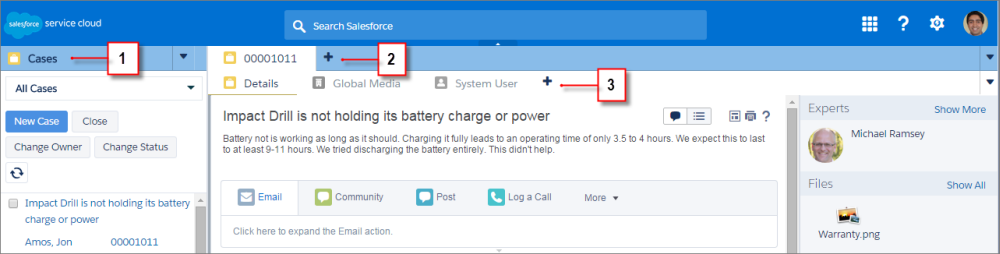
(1) The navigation tab lets you select objects and records to work with. (2) Primary tabs
display the main work items in a console, such as an account. (3) Subtabs display related items
on a primary tab, such as an account’s contact. Use tabs to navigate within the console as you do
your work.
Warning
Browsers’ back buttons aren’t supported for a console and might not work as expected. Console
tabs are saved in browser tabs until you close them.
When you close browser tabs, you lose any open console tabs. If your administrator sets up
saved user sessions for a console, when you log back into Salesforce, any of your previously
open console tabs and console components automatically appear again. Also, if you resize any
sidebar components, interaction logs, or close the global search header, those customizations
appear again too.
If you log out of Salesforce and log in again using the same window, your previously open tabs
reopen in the new session, even when Save User Sessions is disabled.
We use three kinds of cookies on our websites: required, functional, and advertising. You can choose whether functional and advertising cookies apply. Click on the different cookie categories to find out more about each category and to change the default settings.
Privacy Statement
Required Cookies
Always Active
Required cookies are necessary for basic website functionality. Some examples include: session cookies needed to transmit the website, authentication cookies, and security cookies.
Functional Cookies
Functional cookies enhance functions, performance, and services on the website. Some examples include: cookies used to analyze site traffic, cookies used for market research, and cookies used to display advertising that is not directed to a particular individual.
Advertising Cookies
Advertising cookies track activity across websites in order to understand a viewer’s interests, and direct them specific marketing. Some examples include: cookies used for remarketing, or interest-based advertising.