Loading
The online Trailblazer Community becomes read-only Oct 30, 2026Read More
Important Advisory: iOS Update Impacting CG Mobile ApplicationRead More
Salesforce Console
Flow Builder for Service and the Actions & Recommendations Component

Flow Builder for Service and the Actions & Recommendations Component

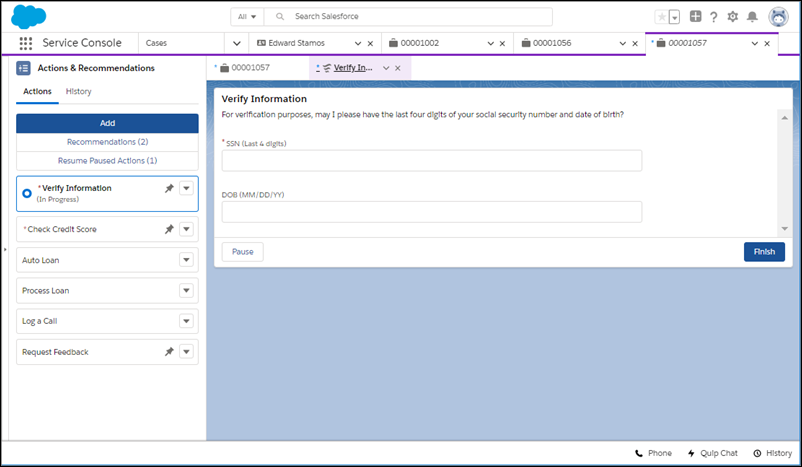
Give your users a to-do list in the Actions & Recommendations component. Show flows, quick actions, and recommendations from your Next Best Action strategies. To create your list, associate actions with a record page using an Actions & Recommendations deployment or Salesforce automation tools. You can create default lists for specific channels, like phone and chat, and show which actions that you want users to complete first and last.

Required Editions

Available in: Lightning Experience

Available in: Essentials, Professional, Enterprise, Performance, Unlimited, and Developer Editions

Lightning console apps are available for an extra cost to users with Salesforce Platform user licenses for certain products. Some restrictions apply. For pricing details, contact your Salesforce account executive.

Tip
Tip Check out how to put the Actions & Recommendations component to work for your agents. The Flow Builder for Service Trailhead module can help you get started.

In the component, you can show these actions.

  • Active screen flows, field service mobile flows, and autolaunched flows
    Note
    Note An autolaunched flow is a type of flow that doesn’t require user input.
  • Quick actions available in the record page layout
  • Recommendations that result from applying a Next Best Action strategy
Clicking a step from the list launches a flow or quick action.

When an agent selects a screen flow, for example, it starts in a subtab for a console app or in a popup window for a standard navigation app. When you confirm the start an autolaunched flow, it runs in the background. Quick actions open in a popup window.

 
Loading
Salesforce Help | Article