Legacy Chat will be retired on February 14, 2026. To avoid service interruptions to your
end users, switch to enhanced Chat (formerly Messaging for In-App and Web). Enhanced Chat
offers many of the legacy Chat features that you love plus asynchronous
conversations that can be picked back up at any time. Learn about migrating in Help and Trailhead.
To customize chat window branding colors, images, and fonts on an Experience site, use the
settings in the Embedded Chat component.
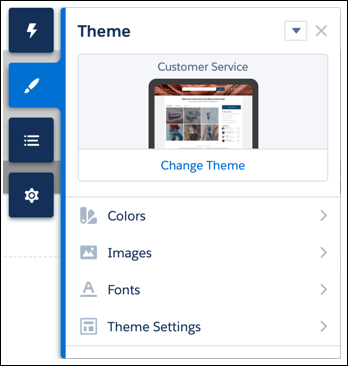
From the Experience Builder make sure that your chat window is selected. Navigate to the
Theme tab.
Select the colors for your chat window.
Note For Experience sites, Action Color maps to the Brand Primary and Brand Secondary colors
for web chat windows. Text Color maps to the Contrast Primary color for a web chat
window.
Select your font and add images to your chat window:
Agent Avatar (recommend 40 px by 40 px)
Logo (recommend 36 px by 36 px)
Pre-Chat Background (recommend 320 px by 100 px)
Waiting State (recommend 250 px by 60 px)
Save your site.
Note These branding tokens are created in Embedded Service Setup and automatically pass to
your site: width, height, header text, and header alternate.
We use three kinds of cookies on our websites: required, functional, and advertising. You can choose whether functional and advertising cookies apply. Click on the different cookie categories to find out more about each category and to change the default settings.
Privacy Statement
Required Cookies
Always Active
Required cookies are necessary for basic website functionality. Some examples include: session cookies needed to transmit the website, authentication cookies, and security cookies.
Functional Cookies
Functional cookies enhance functions, performance, and services on the website. Some examples include: cookies used to analyze site traffic, cookies used for market research, and cookies used to display advertising that is not directed to a particular individual.
Advertising Cookies
Advertising cookies track activity across websites in order to understand a viewer’s interests, and direct them specific marketing. Some examples include: cookies used for remarketing, or interest-based advertising.