
You are here:
Planning for Entitlement Management
Entitlement management is highly customizable, which means you have many choices during setup. Before you begin the setup process, it’s essential to choose an entitlement management model.
Required Editions
| View supported editions. |
Choose What Determines Support Eligibility
You can set up entitlement management so customers are eligible for support based on one or several of the following types of records:
- Accounts: Any contact on the account is eligible for support.
- Contacts: Specific contacts are eligible for support.
- Assets: Specific assets (purchased products) are eligible for support.
- Service contracts: Customers are eligible for support based on a specific service contract.
- Contract line items: Specific products covered by a service contract are eligible for support.
Your approach depends on how detailed you want your support process to be. If you prefer to keep it simple, just have your support reps determine support eligibility based on accounts. Here’s what this approach looks like:
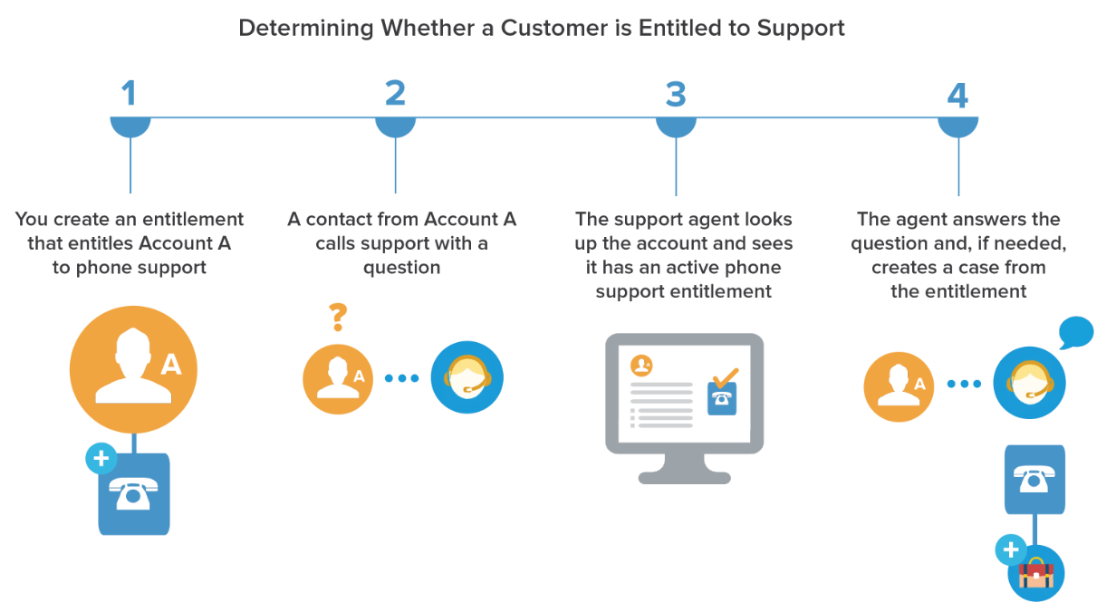
Choose a Setup Model
There are three general ways to set up entitlement management. Once you’ve decided what should determine support eligibility, review the three models and select the one that best meets your business needs. You can always change which model you’re using.
| Entitlement model | What determines support eligibility | Use this model if |
|---|---|---|
| Entitlements only (simplest option) | Support reps determine whether a customer is eligible for support at the account, contact, or asset level. |
|
| Entitlements + service contracts | Support reps determine whether a customer is eligible for support based on their service contract. |
|
| Entitlements + service contracts + contract line items (most complex option) | Support reps determine whether a customer is eligible for support based on the products covered in their service contract. |
|
Regardless of the setup model you choose, you can enhance your support process with other entitlement management features. For example, you can:
- Create entitlement processes to enforce required, time-dependent steps in your support process
- Use entitlement versioning to create and maintain multiple versions of entitlement processes
- Add entitlements to experiences
- Report on entitlements
After you select a setup model, head to the invaluable Entitlement Management Setup Checklist.
