
You are here:
Employee Portal Features
After logging in, the Home page of Employee Portal provides an overview of the website and easy access to the key pages of the website.
Required Editions
| View supported editions. |
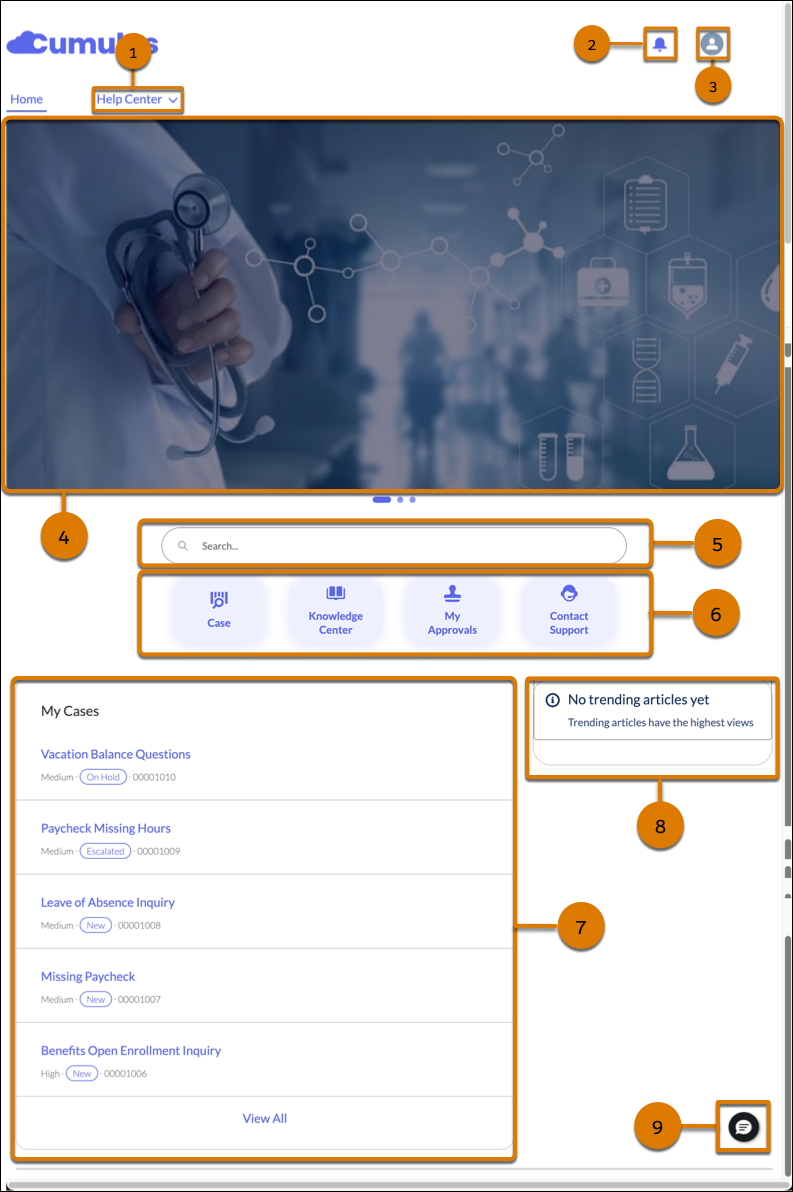
Key features of the Home page are:
- The Help Center menu (1) on the Home page helps you quickly navigate to different pages, including Knowledge Center, Service Catalog, My Cases, and My Approvals.
- The notification bell (2) gives you immediate access to notifications.
- The User Profile Menu (3) gives you access to the My Profile page. It’s also used to log out of Employee Portal.
- Click an item on the carousel (4) to view it. Click
 and
and  to move between the items on the carousel.
 - The Global Search Box (5) helps you find cases and knowledge articles.
- The type-ahead functionality autocompletes the search keywords by providing suggestions based on partial inputs, which help you find relevant results quickly. Select one of the options suggested by the type-ahead functionality.
- The search results page categorizes the results into Knowledge and Cases. Clicking a case number opens the case details page. The case details page also shows Einstein AI-generated search answer. Hovering on a knowledge article link shows the article preview in a window. Clicking a knowledge article link opens the knowledge article.
- Click a tile (6) to open the corresponding page.
- The compact layout of the My Cases record list (7) gives you quick access to your most recent cases from the Home page, and also helps you explore more cases that you have access to by clicking View All in the compact layout.
- On the right sidebar, the Home page shows trending articles (8) that are sorted by topics. These articles are popular among employees.
- Use Embedded Messaging (9) to contact support for instant help. You can access Embedded Messaging from any page in Employee Portal. When a case management bot is configured with Embedded Messaging, you can create cases and track them through the bot, in addition to contacting a service representative for help.
Did this article solve your issue?
Let us know so we can improve!
