Create the Flows for Handling Service Resource Absences in the Legacy Agentforce Builder
Create two flows, one for creating the resource absence, and the other for rescheduling the service appointments.
Required Editions
| Available in: Lightning Experience |
| Available in: Enterprise, Performance, Unlimited, and Developer Editions with Field Service and Foundations, or Einstein 1 Field Service Edition or Agentforce 1 Field Service Edition. |
Resource Absence Flow
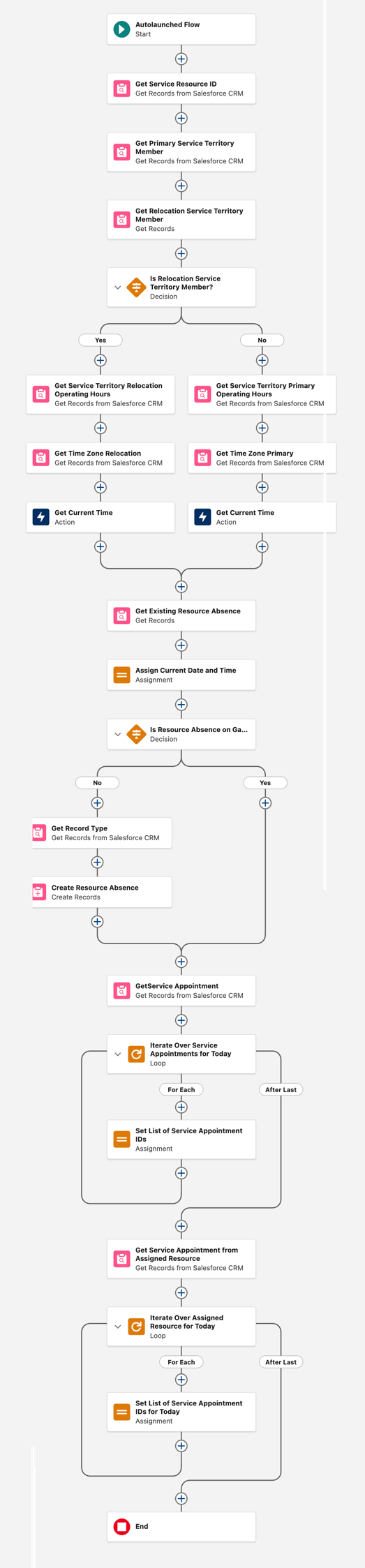
This flow returns a list of today’s service appointments that the service resource who requested the absence is assigned to, and creates a resource absence.
Create an Autolaunched Flow that performs the following:
- Gets the service resource’s ID
- Determines the time zone and the operating hours for the primary service territory
- Determines the time zone and the operating hours for the relocation service territory
- Prevents creating duplicate absence records if the flow runs multiple times on the same day
- Finds all of the appointments assigned to the mobile worker today
Variables
| API Name | Details |
|---|---|
| saIdsFromAssignedResource | Text Select to allow multiple values (collection) |
| serviceResourceSAIds | Text Select to allow multiple values (collection) Available for output |
| currentDateTimeTZ | Data Type: Text |
| STMRelocation | Data Type: Record Object: Service Territory Member |
| timeZone | Note: This variable isn’t used in the flow, but it’s required for the input of the agent action. You can enter a default value here, such as UTC. Data Type: Text Default Value: “” Available for input |
| varEnd | Data Type: Date/Time |
| varRecordTypeId | Data Type: Text |
| varResourceId | Data Type: Text |
| varStart | Data Type: Date/Time |
Formulas
| API Name | Data Type | Formula |
|---|---|---|
| LocalDateTimeEndOfDayFormula | Date/Time | DATETIMEVALUE(TEXT(DATEVALUE({!currentDateTimeTZ})) + " 23:59:59") |
| LocalDateTimeNowFormula | Date/Time | DATETIMEVALUE(TEXT(DATEVALUE({!currentDateTimeTZ})) + " 00:00:00") |
| TodayEndFormula | Date/Time | DATETIMEVALUE(TEXT(DATEVALUE({!currentDateTimeTZ})) + " 23:59:59") |
| TodayStartFormula | Date/Time | NOW() |
Elements
| Flow Element | Configuration |
|---|---|
| Get Records | Label: Get Service Resource ID Salesforce Object: Service Resource Filter: All Conditions Are Met (AND) Field: User ID, Operator: Equals, Value: Running User > id |
| Get Records | Label: Get Primary Service Territory Member Salesforce Object: Service Territory Member Filter: Custom Condition Logic Is Met 1. Field: Resource ID, Operator: Equals, Value: Service Resource from Get Service Resource ID > Resource ID 2. Field: Territory Type, Operator: Equals, Value: Primary 3. Field: Start Date, Operator: Less Than or Equal, Value: TodayStartFormula 4. Field: End Date, Operator: Greater Than, Value: TodayStartFormula 5. Field: End Date, Operator: Is Null, Value: True Condition Logic: 1 AND 2 AND 3 AND (4 OR 5) |
| Get Records | Label: Get Relocation Service Territory Member Salesforce Object: Service Territory Member Filter: Custom Condition Logic Is Met 1. Field: Resource ID, Operator: Equals, Value: Service Resource from Get Service Resource ID > Resource ID 2. Field: Territory Type, Operator: Equals, Value: Relocation 3. Field: Start Date, Operator: Less Than or Equal, Value: TodayStartFormula 4. Field: End Date, Operator: Greater Than or Equal, Value: TodayStartFormula 5. Field: End Date, Operator: Is Null, Value: True Condition Logic: 1 AND 2 AND 3 AND (4 OR 5) How to Store Record Data: Choose fields and assign variables (advanced) Record: STMRelocation |
| Decision | Label: Is Relocation Service Territory Member? Outcome Label: Yes Default Outcome Label: No Filter: All Conditions Are Met (AND) Resource: STMRelocation, Operator: Is Blank, Value: False Default Outcome Label: No (Default) |
| No > Get Records | Label: Get Service Territory Primary Operating Hours Salesforce Object: Service Territory Filter: All Conditions Are Met (AND) Field: Territory ID, Operator: Equals, Value: Service Territory Member from Get Primary Service Territory Member > Territory ID How to Store Record Data: Choose fields and let Salesforce do the rest Field: OperatingHoursId |
| Get Records | Label: Get Time Zone Primary Salesforce Object: Operating Hours Filter: All Conditions Are Met (AND) Field: Operating Hour ID, Operator: Equals, Value: Service Territory from Get Service Territory Primary Operating Hours > Operating Hour ID |
| Action | Action: Get Current Time Label: Get Current Time Primary TimeZone: Operating Hours from Get Time Zone Primary > Time Zone Manually assign variables (advanced) Store Output Values: currentDateTimeTZ |
| Yes > Get Records | Label: Get Service Territory Relocation Operating Hours Salesforce Object: Service Territory Filter: All Conditions Are Met (AND) Field: Territory ID, Operator: Equals, Value: STMRelocation > Resource Territory ID How to Store Record Data: Choose fields and let Salesforce do the rest Field: OperatingHoursId |
| Get Records | Label: Get Time Zone Relocation Salesforce Object: Operating Hours Filter: All Conditions Are Met (AND) Field: Operating Hour ID, Operator: Equals, Value: Service Territory from Get Service Territory Relocation Operating Hours > Operating Hour ID |
| Action | Action: Get Current Time Label: Get Current Time Relocation TimeZone: Operating Hours from Get Time Zone Relocation > Time Zone Manually assign variables (advanced) Store Output Values: currentDateTimeTZ |
| Connect the No and Yes paths > Get Records | Label: Get Existing Resource Absence Salesforce Object: Resource Absence Filter: All Conditions Are Met (AND) 1. Field: Resource ID, Operator: Equals, Value: Service Resource from Get Service Resource ID > Resource ID 2. Field: Start Time, Operator: Less Than or Equal , Value: LocalDateTimeEndOfDayFormula 3. Field: End Time, Operator: Greater Than or Equal, Value: LocalDateTimeNowFormula 4. Field: Type, Operator: Equals, Value: Medical How to Store Record Data: Choose fields and assign variables (advanced) Where to Store Field Values: In separate variables Field: RecordTypeId, Variable: varRecordTypeId Field: ResourceId, Variable: varResourceId |
| Assignment | Label: Assign Current Date and Time Variable: varStart, Operator: Equals, Value: TodayStartFormula Variable: varEnd, Operator: Equals, Value: TodayEndFormula |
| Decision | Label: Is Resource Absence on Gantt? Outcome Label: No Filter: All Conditions Are Met (AND) Resource: varResourceId, Operator: is Null, Value: True Note: You can add more fields that were fetched throughout the flow, check if they’re not Empty or Null, and determine if the resource absence should be created. Default Outcome Label: Yes (Default) |
| No > Get Records | Label: Get Record Type Salesforce Object: Record Type Filter: All Conditions Are Met (AND) Field: Record Type Name, Operator: Equals, Value: Non_Availability |
| Create Records | Label: Create Resource Absence How to set record field values: Manually Salesforce Object: Resource Absence 1. Field: End Time, Value: LocalDateTimeEndOfDayFormula 2. Field: Start Time, Value: TodayStartFormula 3. Field: Record Type ID, Value: Record Type from Get Record Type > Record Type ID 4. Field: Resource ID, Value: Service Resource from Get Service Resource ID > Resource ID 5. Field: Approved, Value: True 6. Field: Type, Value: Medical |
| Connect the No and Yes paths > Get Records | Label: Get Service Appointment Salesforce Object: Service Appointment Filter: All Conditions Are Met (AND) 1. Field: Scheduled Start, Operator: Greater Than or Equal, Value: TodayStartFormula 2. Field: Scheduled End, Operator: Less Than or Equal, Value: TodayEndFormula 3. Field: Territory ID, Operator: Equals, Value: Service Territory from Get Service Territory Primary Operating Hours > Territory ID How Many Records to Store: All records Choose fields and let Salesforce do the rest: Id is entered by default |
| Loop | Label: Iterate Over Service Appointments for Today Collection Variable: Service Appointments from Get Service Appointments Specify Direction for Iterating Over Collection: First item to last item |
| For Each > Assignment | Label: Set List of Service Appointment IDs Set Var Values: saIdsFromAssignedResource, Operator: Add, Value: Current Item from Loop Iterate Over Service Appointments > Service Appointment ID |
| After Last > Get Records | Label: Get Service Appointment from Assigned Resource Salesforce Object: Assigned Resource Filter: All Conditions Are Met (AND) 1. Field: Service Appointment ID, Operator: In, Value: saIdsFromAssignedResource 2. Field: Service Resource ID , Operator: Equals, Value: Service Resource from Get Service Resource ID > Resource ID How Many Records to Store: All records How to Store Record Data: Choose fields and let Salesforce do the rest 1. Field: Id 2. Field : ServiceAppointmentId |
| Loop | Label: Iterate Over Assigned Resource for Today Collection Variable: Assigned Resources from Get Service Appointment from Assigned Resource |
| For Each > Assignment | Label: Set List of Service Appointment IDs for Today Variable: serviceResourceSAIds, Operator: Add, Value: Current Item from Loop Iterate Over Assign Resource for Today > Service Appointment ID |
Your flow should look like this.
Reschedule Service Appointments Flow
This flow attempts to reschedule the service resource’s service appointments one at a time.
Create an Autolaunched Flow with the following details.
Variables
| API Name | Details |
|---|---|
| saResults | Data Type: Text Available for output |
| serviceAppointmentId | Data Type: Text Available for input |
Elements
| Flow Element | Configuration |
|---|---|
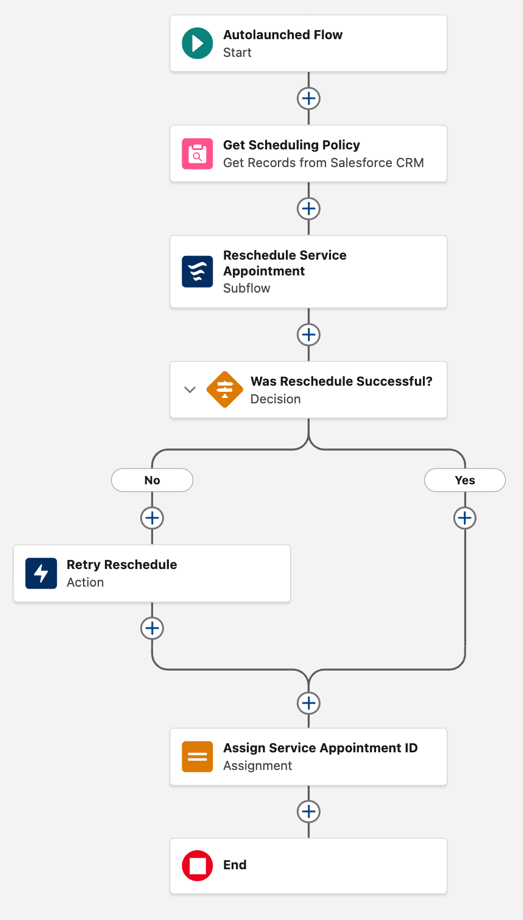
| Get Records | Label: Get Scheduling Policy Salesforce Object: Scheduling Policy Filter: All Conditions Are Met (AND) Field: Scheduling Policy Name, Operator: Equals, Value: Customer First |
| Subflow | Subflow: Field Service: Schedule Service Appointment Label: Reschedule Service Appointment serviceAppointmentId: Included, Value: serviceAppointmentId |
| Decision | Label: Was Reschedule Successful? Outcome Label: No Default Outcome Label: Yes Filter: All Conditions Are Met (AND) Resource: Outputs from Reschedule Service Appointment > serviceAppointmentId, Operator: Equals, Value: Blank Value (Empty String) |
| No > Action | Action: Schedule Service Appointment (scheduleServiceAppointment) Label: Retry Reschedule Scheduling Policy ID: Scheduling Policy from Get Scheduling Policy > Record ID Service Appointment ID: serviceAppointmentId |
| Connect the No and Yes paths > Assignment | Label: Assign Service Appointment ID Variable: saResults, Operator: Equals, Value: Outputs from Reschedule Service Appointment > serviceAppointmentId |
Your flow should look like this.