
Loading
Upcoming Mandatory Changes to Public Key Infrastructure (PKI)Read More
Salesforce Enforces New Security Requirements in Summer 2026Read More
Agentforce Field Service and Operations
Table of Contents
Select Filters

          No results
          No results
          Here are some search tips

          Check the spelling of your keywords.
          Use more general search terms.
          Select fewer filters to broaden your search.

          Search all of Salesforce Help
          Understanding Customer-Initiated Scheduling for Field Service in the New Agentforce Builder

          Understanding Customer-Initiated Scheduling for Field Service in the New Agentforce Builder

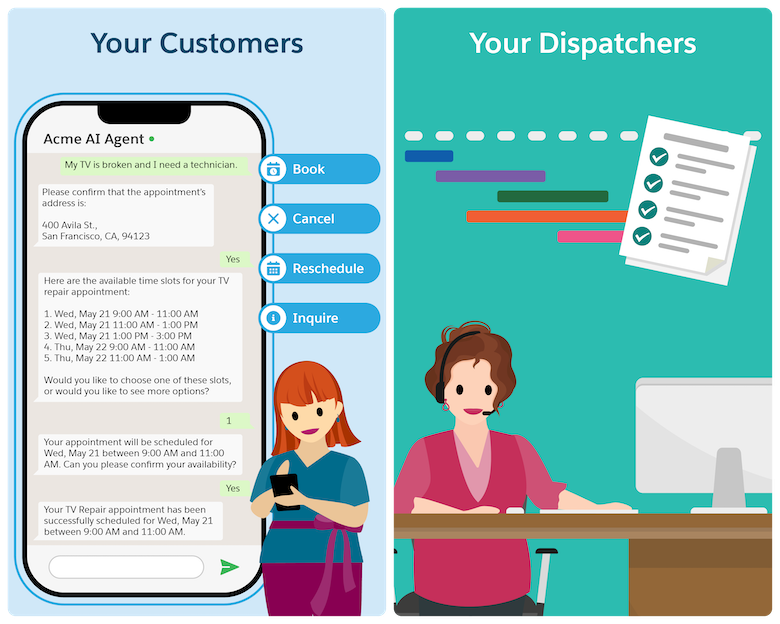
          Let your customers schedule, reschedule, cancel, or inquire about appointments on their own at any time. Customers can directly interact with the AI agent, which shortens appointment management to a third of the time. Agentforce understands your customers’ preferences and handles the request accordingly, while considering your business needs. Customer-Initiated Scheduling helps you meet growing customer demand by reducing the burden on customer service teams so they can work on more complex tasks.
          Required Editions

          Available in: Lightning Experience
          Available in: Enterprise, Performance, Unlimited, and Developer Editions with Field Service and Foundations, or Einstein 1 Field Service Edition or Agentforce 1 Field Service Edition.
          Example conversation between a customer and Agentforce

          By default, Customer-Initiated Scheduling works as described here. However, you can configure the solution to suit your needs.

          1. A customer approaches the AI agent with one of these requests:
            • Schedule a service appointment
            • Reschedule an existing service appointment
            • Cancel an existing appointment
            • Show me information about existing scheduled appointments
          2. If the customer has asked to reschedule or cancel an appointment, the agent checks that the appointment:
            • Doesn’t have an active messaging session
            • Isn’t part of a complex work chain
            • Isn’t pinned
            • Isn’t a bundle service appointment
            • Isn’t a bundle member service appointment
            • Isn’t in the Canceled or Completed status category
          3. The omni-channel flow recognizes that this is an inbound messaging session and directs the request to the Customer-Initiated Scheduling agent.
            The agent shows the welcome message and proceeds to verify the customer’s identity.
          4. An engagement topic that connects between the messaging session and the service appointment is created.
          5. The agent then triggers the subagents and assists the customer.
          6. If the request is successful, the Gantt is updated.
           
          Loading
          Salesforce Help | Article
