Use Agentforce Scheduling Supervisor View in the Legacy Agentforce Builder
To make sure Field Service scheduling operations run smoothly, monitor live
conversations between AI agents and customers.
Required Editions
Available in: Lightning Experience
Available in: Enterprise, Performance, Unlimited, and
Developer Editions with Field Service and Foundations, or Einstein 1 Field
Service Edition or Agentforce 1 Field Service Edition.
Note Agentforce Scheduling Supervisor View is available only when the Field Service Managed
Package is installed.
With Agentforce Scheduling Supervisor View, dispatchers can easily monitor real-time
conversations between AI agents and customers in one place. They can use this view to track
scheduling requests and customer responses and make sure agents complete tasks effectively.
When a representative is needed, dispatchers can also step in and take over escalated
conversations.
For example, a technician calls in to say that they can't make it to their 5:30 PM
appointment. The dispatcher needs to move the appointment, so they click the Rebook
with Agentforce action in the Classic Dispatch Console. A few hours pass, and
the dispatcher wants to know what's happening with the appointment. Was it rebooked? Did the
customers reply? Did they confirm a new time? The dispatcher clicks the Agentforce Scheduling
Supervisor View icon where they can see the status of the conversation linked to the service
appointment.
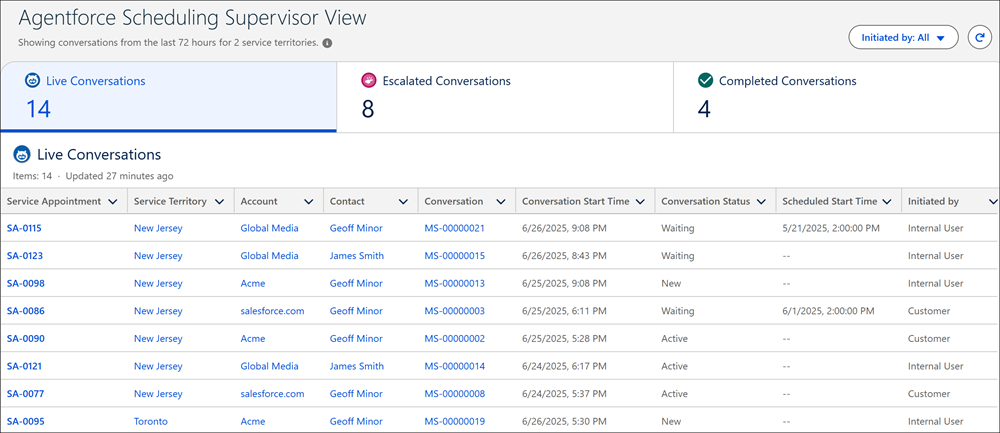
Agentforce Scheduling Supervisor View includes three tabs that show information related to
live, escalated, and completed conversations. For each conversation, it shows information
related to the linked service appointment, service territory, account, and contact. It also
shows the messaging session linked to the service appointment and other relevant details.
We use three kinds of cookies on our websites: required, functional, and advertising. You can choose whether functional and advertising cookies apply. Click on the different cookie categories to find out more about each category and to change the default settings.
Privacy Statement
Required Cookies
Always Active
Required cookies are necessary for basic website functionality. Some examples include: session cookies needed to transmit the website, authentication cookies, and security cookies.
Functional Cookies
Functional cookies enhance functions, performance, and services on the website. Some examples include: cookies used to analyze site traffic, cookies used for market research, and cookies used to display advertising that is not directed to a particular individual.
Advertising Cookies
Advertising cookies track activity across websites in order to understand a viewer’s interests, and direct them specific marketing. Some examples include: cookies used for remarketing, or interest-based advertising.