You are here:
Review Einstein Predictions for Asset Service Prediction
Review batch data transformations, model predictions, and metrics in Einstein Studio to better understand how your data is being used and how your models are performing.
Review and Refine Your Model
- Go to Einstein Studio to access your newly created prediction model.
- Assess Model Performance: Review the model metrics to understand its accuracy and effectiveness. If the performance isn't meeting your expectations, the next steps are to check your data.
- Ensure Sufficient Data: AI models require enough data to learn effectively.
Einstein Studio needs a minimum of 400 records (historical asset repairs) to
generate a model.
If you have fewer than 400 records, go to the AssetServiceActionCreation data transform and adjust the filters to broaden the date range, pulling in more historical repair data.
- Improve Model Quality:
- Data Quality is Key: Investigate your source data for any inconsistencies or errors that could be impacting model performance.
- Optimize Variables:: For better results, enhance your model by editing it in Einstein Studio to exclude variables that are not necessary for making predictions.
Retrain the Model: After making any changes to your data or model configuration, re-run the relevant Batch Data Transforms (BDTs) to retrain the model with the updated information.
Interpretation of Results
The Predicted Is Subsequent Likely score indicates the probability of the outcome is true.

For example, if the outcome for the model was set as Maximize isSubsequentLikely and the score = 0.7, there’s a 70% chance that the set of inputs achieve the desired outcome.
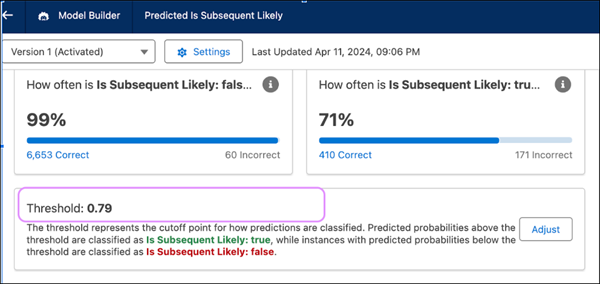
Binary classification models also have a Threshold parameter that allows you to interpret the score as true or false.
In the below example, if the threshold was set at 0.79, then a score of 0.3 = FALSE, and a score of 0.79 or greater = TRUE.