Troubleshooting Steps for Agentforce Scheduling in the Legacy Agentforce Builder
Use the Agent Builder’s event logs to locate the name of the action that failed, or to
view the last action that was triggered. Then use the Flow Builder to debug the flow that this
action triggers.
Required Editions
Available in: Lightning Experience
Available in: Enterprise, Performance, Unlimited, and
Developer Editions with Field Service and Foundations, or Einstein 1 Field
Service Edition or Agentforce 1 Field Service Edition.
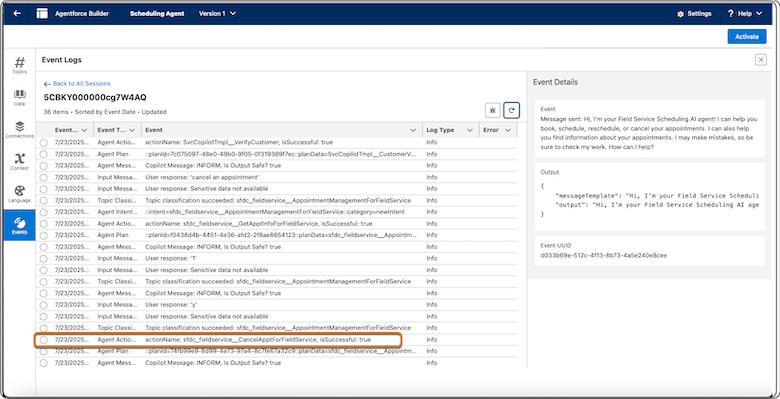
Open the latest session, scroll until you see the last event whose type is Agent Action and
note the name of the action that was triggered. It may take several minutes to see events of
type Agent Action. Refresh the window until you see all events. In this example, a problem
occurred while trying to cancel an appointment and the last action that was triggered is
fieldservice_CancelApptForFieldService.
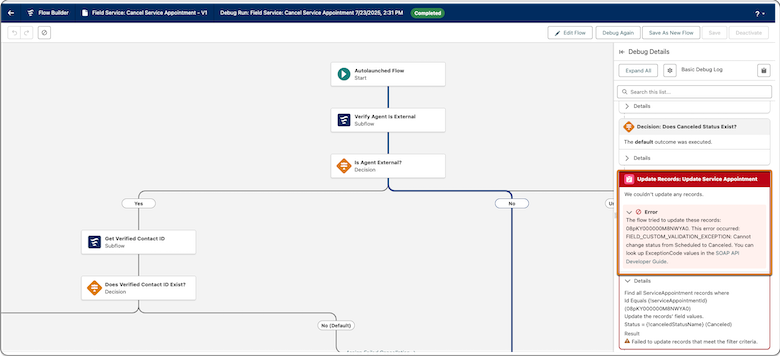
Access the Flow Builder and open the flow corresponding to the action that failed. In our
example, the flow is called Field Service: Cancel Service Appointment.
Click Debug, and then select the Run flow as another user checkbox. See Debug a Flow in Flow Builder for information about
enabling this option.
Choose the AI agent user, for example, EinsteinServiceAgent user and run the flow.
If the flow fails, check the error message for more information. If the error message
doesn’t help locate the issue, continue to the next step.
If the flow succeeds, the problem isn't in this flow. In our example, the error shows that
there was a problem changing the status from Scheduled to Canceled.
We use three kinds of cookies on our websites: required, functional, and advertising. You can choose whether functional and advertising cookies apply. Click on the different cookie categories to find out more about each category and to change the default settings.
Privacy Statement
Required Cookies
Always Active
Required cookies are necessary for basic website functionality. Some examples include: session cookies needed to transmit the website, authentication cookies, and security cookies.
Functional Cookies
Functional cookies enhance functions, performance, and services on the website. Some examples include: cookies used to analyze site traffic, cookies used for market research, and cookies used to display advertising that is not directed to a particular individual.
Advertising Cookies
Advertising cookies track activity across websites in order to understand a viewer’s interests, and direct them specific marketing. Some examples include: cookies used for remarketing, or interest-based advertising.