Understanding Proactive Asset Service Scheduling in the Legacy Agentforce Builder
Free up your operations managers to deal with other tasks by streamlining the process of
scheduling maintenance appointments. Agentforce autonomously contacts the customer so that they
can coordinate the appointment and makes sure assets are scheduled for maintenance on time.
Required Editions
Available in: Lightning Experience
Available in: Enterprise, Performance, Unlimited, and
Developer Editions with Field Service and Foundations, or Einstein 1 Field
Service Edition or Agentforce 1 Field Service Edition.
By default, Proactive Asset Service Scheduling works as described here. However, you can
configure the solution to suit your needs.
Maintenance plans have an associated service appointment that has a due date but hasn't
been scheduled.
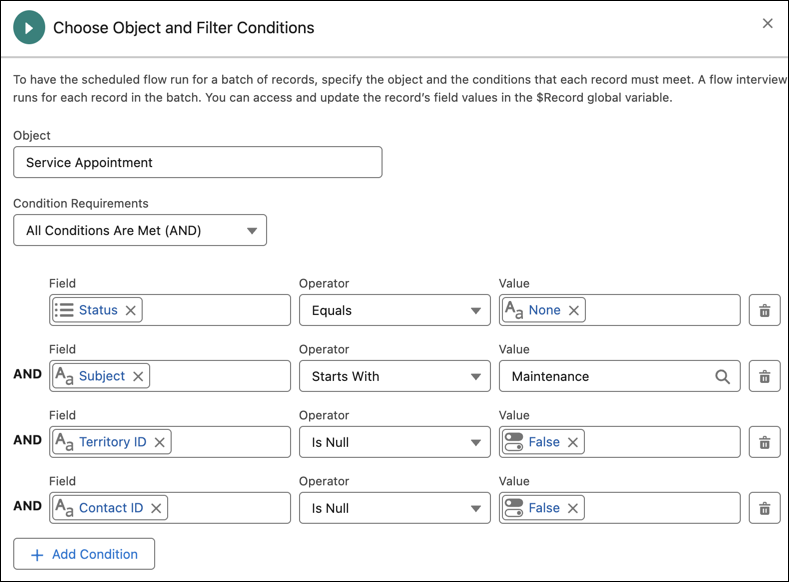
The Field Service: Schedule Asset Maintenance Appointment flow
checks all of these appointments on a daily basis and only starts if the appointment:
Doesn’t have an assigned status
Has a subject that starts with “Maintenance”
Has a service territory
Has a contact
If all of these checks pass, it checks the due date. If the due date is within a month from
today, the appointment is considered eligible for scheduling.
The flow then checks the following for the appointment:
Doesn't have an assigned resource
Has a work order
Came from a maintenance plan that has an associated asset
Doesn't already have an engagement topic
If all of these checks pass, it triggers the Field Service: Notify
Customer subflow.
The notification flow performs the following checks to see if the appointment:
Still exists
Has a contact
Has a related messaging channel
Has a related messaging user who hasn’t opted out of this service
If all of these checks pass, a message is sent to the customer to let them know that their
asset is due for maintenance. The message itself is stored in the messaging component.
The omni-channel flow recognizes that this is an inbound messaging session and directs the
request to the Customer Outreach agent. The agent doesn’t show a welcome message and doesn’t
verify the customer’s identity.
An engagement topic that connects between the messaging session and the service appointment
is created.
If the customer replies and proceeds with scheduling the appointment, Agentforce uses the
Appointment Management for Field Service subagent to find a time slot
and schedule the appointment.
If the customer confirms, the appointment is scheduled. If the customer doesn’t reply,
after 80% of the time between the due date and the time that the initial message was sent
transpires, we send the customer a reminder message. If the customer still doesn’t reply, after
an additional 2 hours, the conversation is escalated to a representative.
If Agentforce manages to find a time slot that the customer confirms, the appointment is
then scheduled.
We use three kinds of cookies on our websites: required, functional, and advertising. You can choose whether functional and advertising cookies apply. Click on the different cookie categories to find out more about each category and to change the default settings.
Privacy Statement
Required Cookies
Always Active
Required cookies are necessary for basic website functionality. Some examples include: session cookies needed to transmit the website, authentication cookies, and security cookies.
Functional Cookies
Functional cookies enhance functions, performance, and services on the website. Some examples include: cookies used to analyze site traffic, cookies used for market research, and cookies used to display advertising that is not directed to a particular individual.
Advertising Cookies
Advertising cookies track activity across websites in order to understand a viewer’s interests, and direct them specific marketing. Some examples include: cookies used for remarketing, or interest-based advertising.