
Work in the Field Service Scheduling Console
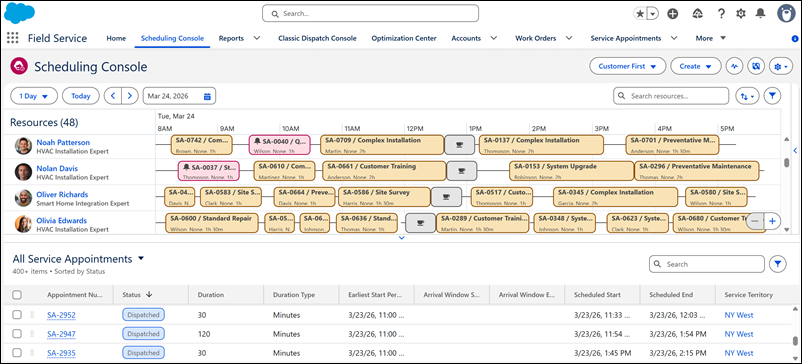
The Scheduling Console provides a seamless, accessible dispatching experience by focusing on usability, productivity, and high performance. As of Summer '26, it replaces the original Classic Dispatch Console in Agentforce Field Service and Operations (formerly Field Service).
Required Editions
| Available in: Lightning Experience |
| The Field Service core features, managed package, and mobile app are available in Enterprise, Unlimited, and Developer Editions. |
 This is a Field Service managed package feature.

Watch the video to see how the Scheduling Console transforms dispatchers from reactive schedulers into strategic orchestrators.

- The Scheduling Console is available to Experience Cloud site users. LWR sites aren't supported.
- The Scheduling Console doesn't support Government Cloud environments.
Built using Lightning Web Components and developed with extensive customer input, the Scheduling Console features an intuitive, sleek UI that reduces cognitive load and ensures easy navigation. To maximize output, the console supports high-performance workflows and multi-screen configurations, allowing dispatchers to manage dynamic Field Service environments with fewer clicks and zero friction. This efficiency is underpinned by a powerful Core Java and GraphQL backend that delivers a lightning-fast experience, utilizing server-side filtering and lazy loading to maintain rapid responsiveness even when processing thousands of service appointments and service resources simultaneously.
- Get Started with the Scheduling Console
The Scheduling Console is the new dispatching workspace for Field Service, built to replace the Classic Dispatch Console. The two consoles can coexist during the transition period, giving you time to migrate before the Classic Dispatch Console is retired. - Set Up the Scheduling Console
Set up the Scheduling Console using Salesforce Go or by completing the steps manually. Salesforce enables the Scheduling Console for you. - Migrate Service Appointment Lists
Migrate your existing custom service appointment lists from the Classic Dispatch Console to the Scheduling Console. The migration copies your lists and doesn't affect the originals. - Customize the Scheduling Console
Adjust the layout, features, and policies of the Scheduling Console to give dispatchers the tools they need to work efficiently. - Custom Actions in the Scheduling Console
Extend the Scheduling Console with custom actions that give dispatchers quick access to org-specific automations and workflows directly from the Gantt, service appointment list, map, and console header. - Features of the Scheduling Console
Learn how the Scheduling Console works in Agentforce Field Service and Operations (formerly Field Service). - Actions in the Scheduling Console
Learn about the actions available in the Scheduling Console to manage service appointments, service resources, and resource absences. - Service Appointment List in the Scheduling Console
View service appointments in the Scheduling Console using a standard list view that supports global search and other functionalities. - Map Views and Routes in the Scheduling Console
The map in the Scheduling Console gives dispatchers a clear geographical view of service resources and service appointments, with routes displayed directly. - Popovers in the Scheduling Console
Popovers consolidate key information and actions into one unified view, giving dispatchers quick access to service resource details without navigating away. - Optimization in the Scheduling Console
Use optimization to automate scheduling decisions, resolve conflicts, and maximize resource efficiency directly from the Scheduling Console. - Activity Tracker in the Scheduling Console
The Activity Tracker gives dispatchers a centralized, real-time view of all scheduling and optimization processes running in the Scheduling Console, so they can stay informed and in control while continuing their dispatching work.
