
Create a Scheduling Objective for Shifts
Planners and administrators can optimize the shift scheduling process by adding Scheduling Objectives, which apply various business goals to the scheduling process.
Required Editions
| Available in: Lightning Experience |
| The Field Service core features, managed package, and mobile app are available in Enterprise, Unlimited, and Developer Editions. |
| User Permissions Needed | |
|---|---|
| To set scheduling objectives: | Field Service Standard AND Customize Application |
Create scheduling objectives that reflect your shift scheduling goals. When a planner schedules shifts for service resources, the shift scheduling engine gives each objective equal weight. For each objective, potential service resources are assigned a score to reflect how well the objective is met. The service resource with the highest score is prioritized for shift scheduling.
-
Access the Scheduling Objectives
page.
-
From Setup, in the Quick Find box, enter
objectives, and then select
Scheduling Objectives.
From the Scheduling Objectives page, you can:
- Select, customize, or create your own view of the data.
- Create, edit, and delete scheduling objectives.
-
From Setup, in the Quick Find box, enter
objectives, and then select
Scheduling Objectives.
-
Create a Scheduling Objective.
- From the Scheduling Objective page, click New.
- Enter a name and description.
-
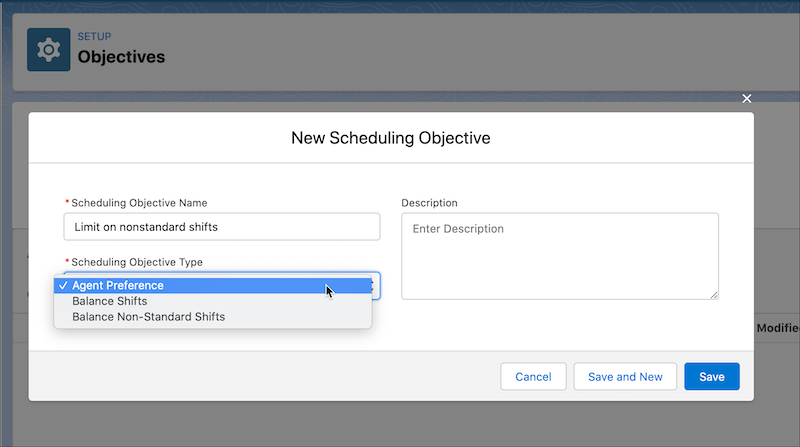
Select the Scheduling Objective Type.
We predefine these objective types.
Service Resource (Call Center Rep) Preference—Service resource preferences allow you, the call center rep, to take ownership of your schedule. Each call center rep can define service resource preferred working hours as operating hours in the Preferences related list in the service resource records. When planners schedule shifts, Field Service shift scheduling tools consider each service resource's availability preference when identifying candidates for shifts.
For example, a service resource can work from 8:00 AM to 8:00 PM every day of the week, but prefers working on weekdays. You can create an operating hours record with time slots as weekdays, from 8:00 AM to 8:00 PM. Associate the record to the service resource via a related Service Resource Preference record to make sure the shift scheduling engine takes the preference into consideration.
Balance Shifts— Scheduling balances the number of shifts across call center reps within the specified time period.
Balance Non-Standard Shifts—Scheduling balances the number of non-standard shifts across call center reps within the specified time period.
- Save your work.
- To edit a scheduling objective, open the dropdown action menu and select Edit.
- To delete a scheduling objective, open the dropdown action menu and select Delete.
