Complete Work with Work Plans Lightning Web Component
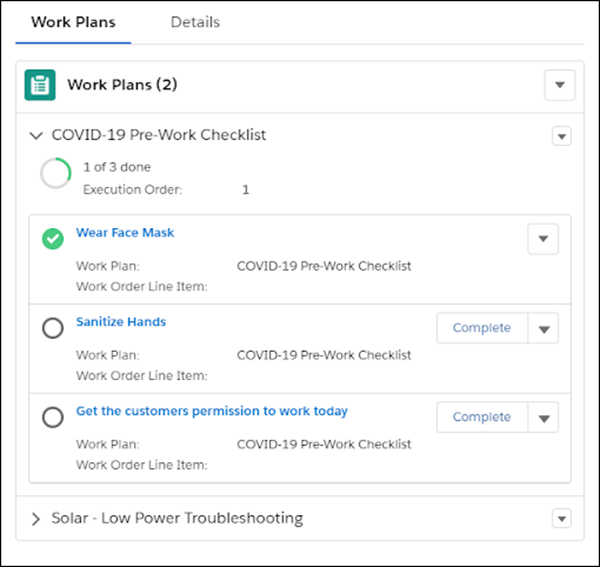
The Work Plans component displays the work plans and work steps associated with the work
order or work order line item. You can use it to view and complete assignments quickly and
accurately.
Required Editions
Available in: Lightning Experience
The Field Service core features, managed package, and mobile app are available in
Enterprise, Unlimited, and Developer Editions.
User Permissions Needed
To view the work plan record:
Read on Execution Order, Name, and Work Order Line Item fields
To view the work step record:
Read on Execution Order, Action Definition, and Action Type fields
To update the work step record:
Update on Status and Status Category fields
On the Work Plans component, expand the relevant work plan record to view its details and
its associated work steps.
Note You can load only the first two fields from the Work Steps related list on the Work
Plan.
On the work plan record, view the progress of the work plan on the progress ring. The
progress ring is updated based on the real-time progress of the work plan.
On the work step record, view the status of the step on the step’s status icon.
To mark a step’s status completed, click Complete on the work step
record, or select Complete on the action menu of the step.
Note You can also mark a step Not Applicable on the work step’s action menu.
If the step is a simple instruction, such as “Put on your safety gear”, we mark the step’s
status as completed. If the step includes a quick action or a field service mobile flow,
selecting Complete starts it. When a quick action starts, we change the
work step’s status to Complete when the action is completed. When a flow starts, the status
changes according to the way the flow is configured. Completed work steps remain on the work
plan record.
We use three kinds of cookies on our websites: required, functional, and advertising. You can choose whether functional and advertising cookies apply. Click on the different cookie categories to find out more about each category and to change the default settings.
Privacy Statement
Required Cookies
Always Active
Required cookies are necessary for basic website functionality. Some examples include: session cookies needed to transmit the website, authentication cookies, and security cookies.
Functional Cookies
Functional cookies enhance functions, performance, and services on the website. Some examples include: cookies used to analyze site traffic, cookies used for market research, and cookies used to display advertising that is not directed to a particular individual.
Advertising Cookies
Advertising cookies track activity across websites in order to understand a viewer’s interests, and direct them specific marketing. Some examples include: cookies used for remarketing, or interest-based advertising.