
Manage Work Step Templates
Manage the work plan template entries that store the work step templates associated with your work plan template.
Required Editions
| Available in: Lightning Experience |
| The Field Service core features, managed package, and mobile app are available in Enterprise, Unlimited, and Developer Editions. |
| User Permissions Needed | |
|---|---|
| To manage work plan template entries: | Create, Update, and Delete on work plan templates |
| To add work plan template entries: | Create on work plan templates |
| To reorder work plan template entries: | Update on work plan templates |
| To remove work plan template entries: | Update and Delete on work plan templates |
-
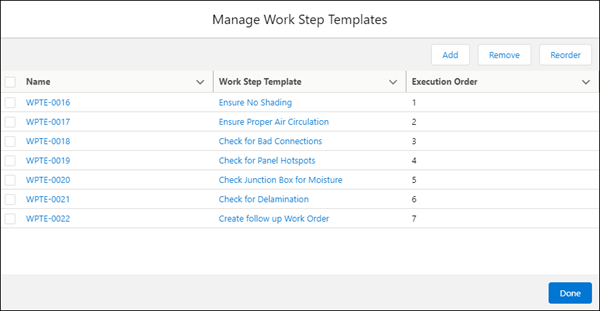
On the work plan template, open the Related tab. On the Work Plan Template Entries related
list, click Manage.
-
To add steps to the work plan template, click Add, and select work
step templates from the list.
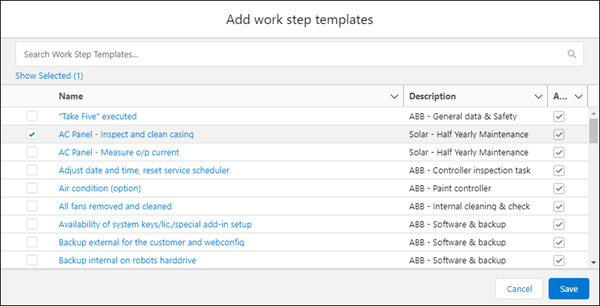
- Save your work.
- To remove steps from the work plan template, select the relevant work step templates, and click Remove Selected.
- To confirm the action, click Remove.
-
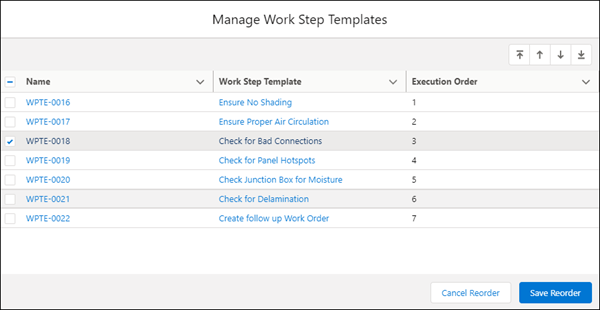
To reorder the work step templates, click Reorder, and select the
relevant work step templates.
-
To reorder the steps, click Move to Top
 , Move Up
 , Move Down
 , or Move to Bottom
 , and then click Save Reorder.
- If you’re done, click Done.
Did this article solve your issue?
Let us know so we can improve!
