
Loading
Upcoming Mandatory Changes to Public Key Infrastructure (PKI)Read More
Salesforce Enforces New Security Requirements in Summer 2026Read More
Table of Contents
Select Filters

          No results
          No results
          Here are some search tips

          Check the spelling of your keywords.
          Use more general search terms.
          Select fewer filters to broaden your search.

          Search all of Salesforce Help
          Provision CMDB and Service Graph for IT Services

          Provision CMDB and Service Graph for IT Services

          Provision CMDB and Servicegraph to create the required CMDB environment and prepare your org for configuration. Provisioning creates a dedicated CMDB tenant and enables the required licenses, and services. Complete provisioning before configuring CMDB in Salesforce Go. Manual provisioning gives visibility into provisioning status and provides a clear recovery path if a previous attempt failed.
          Required Editions

          Available in: Lightning Experience
          Available in: Enterprise, Performance, and Unlimited Editions with Agentforce IT Service.
          User Permissions Needed
          To provision CMDB: View Setup and Configuration

          Provisioning creates the CMDB tenant required for setup. Until provisioning completes, CMDB configuration and related features remain unavailable.

          Provisioning runs in the background and you can leave the page while the job runs.

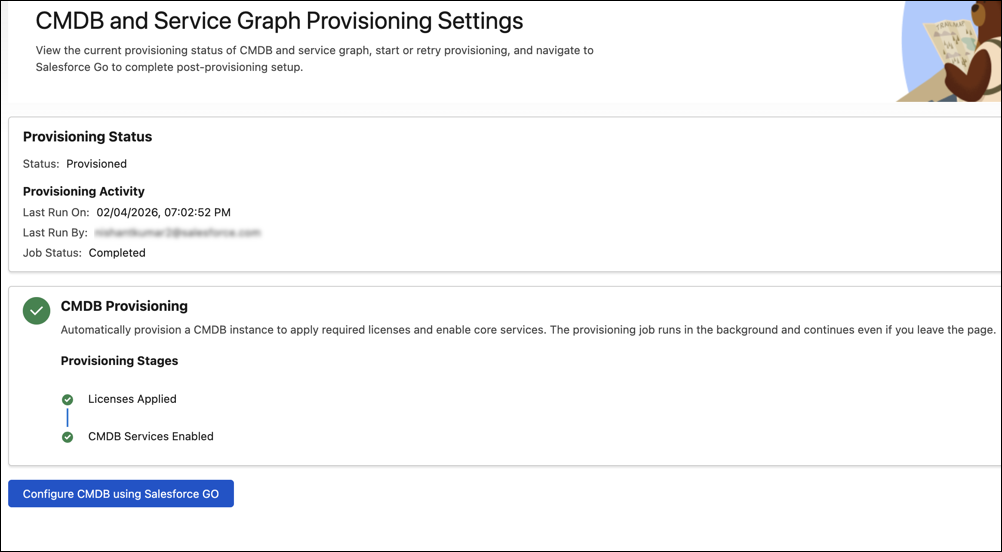
          The page shows the current Provisioning Status and the stages of the job:

          • Licenses Applied
          • CMDB Services Enabled

          If provisioning fails at any stage, the status shows Failed. You can rerun the provisioning job from this page.

          1. From Setup, enter CMDB in the Quick Find box.
          2. Select CMDB and Service Graph in Feature Settings.
          3. Review the Provisioning Status section.
          4. If the status is Not Provisioned or Failed, click Provision CMDB.
          5. Wait until the status changes to Provisioned.
            Provisioning can take a few minutes. You can leave the page while the job runs.

          When the status shows Provisioned, the details are populated in the Provisioning Activity section.

          Provisioned status for CMDB tenant

          You can then click Configure CMDB using Salesforce Go to complete the CMDB setup. In Salesforce Go, you can turn on the CMDB feature, discovery options, and configure data population rules. Provisioning prepares the environment. Salesforce Go configures how your CMDB works. For more information, see Set Up CMDB Using Salesforce Go.

           
          Loading
          Salesforce Help | Article
