Create Problems Automatically from Incidents with Einstein
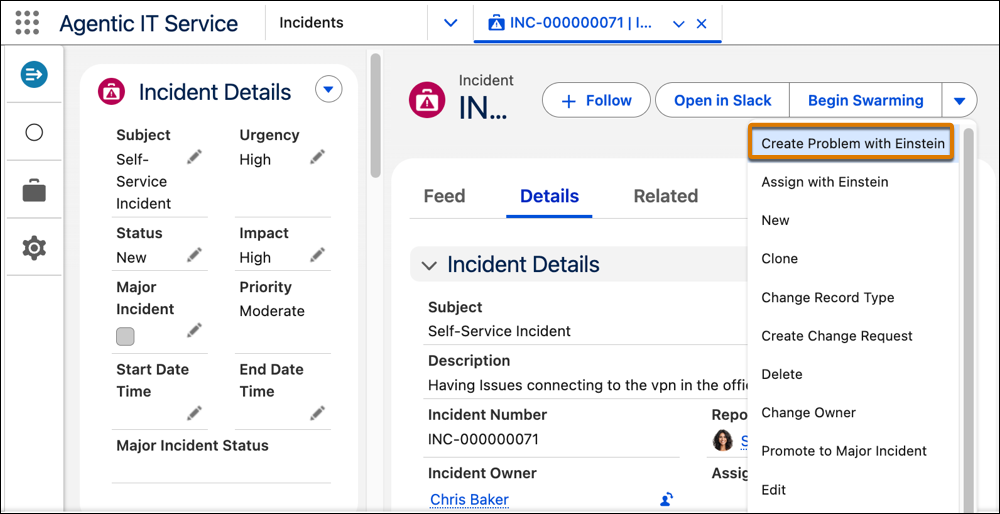
IT fulfillers initiate can use Create Problem with Einstein action to efficiently
generate a problem record from the related incident. Agentforce creates the draft problem record
by analyzing the source incident and its associated data, including communication history and
related tickets. IT fulfillers can quickly review and save the problem.
Required Editions
Available in: Lightning Experience
Available in: Enterprise, and Unlimited Editions with Agentforce IT
Service.
User Permissions Needed
To create problems using Einstein:
Prompt Template User permission set
From App Launcher, go to Agentic IT Service Desk.
On the Incidents tab, open a record from the All list view.
From the quick actions menu, select Create Problem with Einstein
from quick actions menu.
Einstein analyzes the incident and its related records to automatically draft a
problem record.
Review the problem record generated by Einstein to make sure the accuracy of key fields,
including Subject, Category, Subcategory, Description, Impact, Urgency, and Priority.
Click Save.
The problem record is created successfully.
Example
Sarah is an IT Fulfiller at Cumulus Bank. An employee creates a record with these details:
Incident Number: INC0002
Subject: CRM Application is Unavailable
Based on assignment rules set up by the admin, the incident INC-0002 is initially assigned to
IT Support group. Sarah, an IT fulfiller, reviews the incident and recognizes the incident as
part of a larger related issue to recent CRM server maintenance, given the recurring "Error 503
Service Unavailable" messages.
Sarah decides to initiate a formal problem investigation. She clicks Create Problem
with Einstein on the incident record. Einstein analyzes the incident details and
associated incidents, giving weight to the error message and description that mentions "CRM
application is unavailable".
Einstein drafts a new problem record automatically, which includes key details such as
category, subcategory, subject, description, impact, urgency, and priority. The new problem
record is created (PRB-0023), saving Sarah the manual effort of drafting it from scratch and
helping her to immediately begin the investigation.
Did this article solve your issue?
Let us know so we can improve!
Loading
Salesforce Help | Article
Cookie Consent Manager
Cookie Consent Manager
General Information
Required Cookies
Functional Cookies
Advertising Cookies
General Information
We use three kinds of cookies on our websites: required, functional, and advertising. You can choose whether functional and advertising cookies apply. Click on the different cookie categories to find out more about each category and to change the default settings.
Privacy Statement
Required Cookies
Always Active
Required cookies are necessary for basic website functionality. Some examples include: session cookies needed to transmit the website, authentication cookies, and security cookies.
Functional Cookies
Functional cookies enhance functions, performance, and services on the website. Some examples include: cookies used to analyze site traffic, cookies used for market research, and cookies used to display advertising that is not directed to a particular individual.
Advertising Cookies
Advertising cookies track activity across websites in order to understand a viewer’s interests, and direct them specific marketing. Some examples include: cookies used for remarketing, or interest-based advertising.