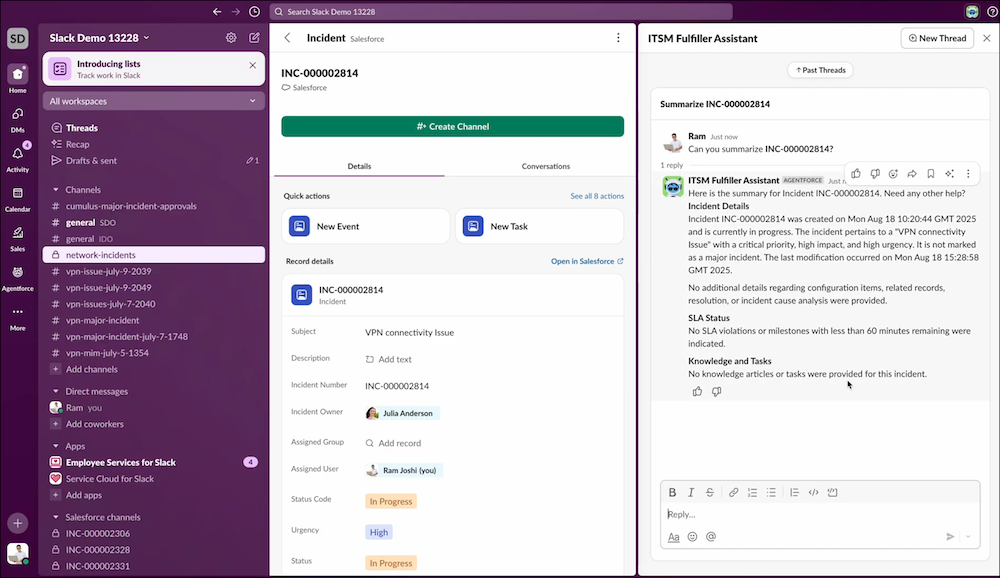
Automate the most repetitive parts of ticket management so that fulfillers can focus on
what matters. With Agentforce IT Service, fulfillers can triage new tickets directly in Slack,
achieving a faster and more efficient workflow.
Required Editions
Available in:
Business Challenge
Fulfillers spend a significant portion of their day manually triaging tickets repetitively.
For every new ticket, they must read the description, identify the service, set the
priority, and then assign the ticket to the correct team. This process is laborious,
time-consuming, and error-prone.
Solution
Triaging with Agentforce in Slack automates this tedious work, allowing fulfillers to be
more efficient.
Automated Assessment: Agentforce handles the initial assessment of each ticket,
automatically identifying key information and suggesting the right category, priority, and
assignment.
Increased Efficiency: Fulfillers are freed up to focus on actual problem-solving,
customer interaction, and higher-value tasks.
Reduced Errors: The automated triage process reduces the potential for human error,
ensuring tickets are routed correctly and efficiently from the start.
For a list of all the agent actions that fulfillers can access in Slack, see Agentforce for IT Desk.
Did this article solve your issue?
Let us know so we can improve!
Loading
Salesforce Help | Article
Cookie Consent Manager
Cookie Consent Manager
General Information
Required Cookies
Functional Cookies
Advertising Cookies
General Information
We use three kinds of cookies on our websites: required, functional, and advertising. You can choose whether functional and advertising cookies apply. Click on the different cookie categories to find out more about each category and to change the default settings.
Privacy Statement
Required Cookies
Always Active
Required cookies are necessary for basic website functionality. Some examples include: session cookies needed to transmit the website, authentication cookies, and security cookies.
Functional Cookies
Functional cookies enhance functions, performance, and services on the website. Some examples include: cookies used to analyze site traffic, cookies used for market research, and cookies used to display advertising that is not directed to a particular individual.
Advertising Cookies
Advertising cookies track activity across websites in order to understand a viewer’s interests, and direct them specific marketing. Some examples include: cookies used for remarketing, or interest-based advertising.