
You are here:
Knowledge Scalability
Every Salesforce Knowledge article can have several versions: one draft, one published, and several archived versions, and each of these versions can have multiple translations. Thus, the total number of article versions in an org can be much higher than the number of articles. When scaling your org, pay attention to both the total number of article versions and edition-specific limits on articles.
Required Editions
| Available in Salesforce Classic and Lightning Experience. View supported editions. |
Each Salesforce edition has its own limits on Knowledge articles, versions, and language translations. Also, all editions share a maximum limit of total article versions allowed. Additionally, Classic Knowledge has a maximum limit of 25 article types, while Lightning Knowledge uses record types with a maximum limit of 200 per object. Keep all of these limits in mind when scaling your org.
The total number of Knowledge articles in an org is calculated as follows.
Total # of versions = (# of articles) x (# of retained1 versions per article) x (# of translations per version)
For example, if you have 100,000 articles, each with a total of 5 versions (1 draft, 1 published, 3 archived), and 5 translations of each of those versions, you have 2,500,000 total article versions.
So in calculating your capacity needs, and determining which edition you need, think versions. Do you have a multilingual customer base with lots of translations? Do you have a rigorous editing process with many drafts? Do you keep archived versions of articles around for a long time?
Knowledge Base Allocations by Edition
The following table lists the total minimum number of languages, articles, and versions per article permitted for each Salesforce edition by default. Each Salesforce edition also has a default maximum number of languages, articles, and versions per article, as well. You can view the default maximum limits here. For orgs created before the Spring '18 release, the default limit for all editions is 16 languages. To request an extension for these allocations, contact Salesforce support.

| Edition | Article, Version, and Language Allocations |
|---|---|
| Essentials | 500 articles, 10 versions per article, 1 language |
| Professional | 500 articles, 10 versions per article, 1 language |
| Enterprise | 50,000 articles, 10 versions per article, 5 languages |
| Developer | 50,000 articles, 10 versions per article, 5 languages |
| Unlimited | 150,000 articles, 10 versions per article, 10 languages |
If you require more than the allocated default maximum, you can ask Salesforce Support to increase the article limits. Limits on versions retained per article don’t include versions linked to objects such as cases, work items, and undeletable lookup fields. So, for example, an article might have 25 versions, even if the default limit is 10 versions per article, if 15 of those versions are linked to cases. However, versions attached to objects such as cases count towards the total number of versions per org.
Monitoring Article and Version Counts
To see how many versions and articles you have:
- Go to Settings.
- In the Search box, type Storage Usage.
- Select Storage Usage.
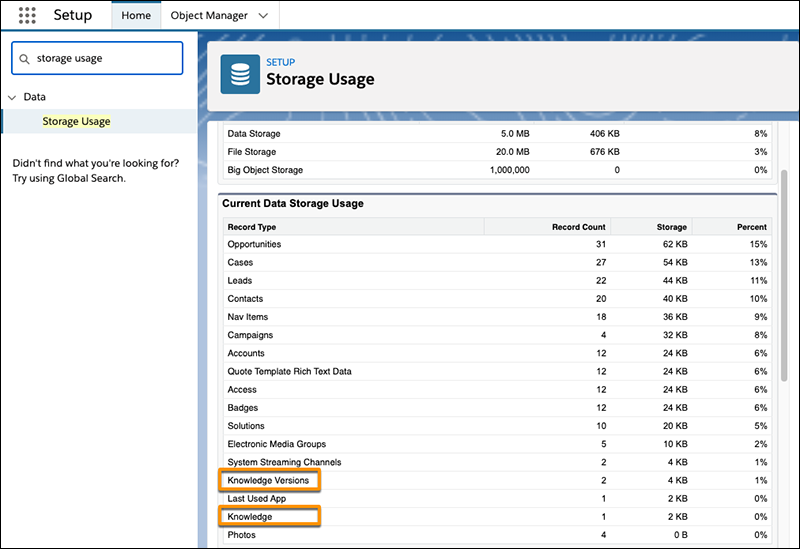
The total number of versions in the org is listed under “Knowledge Versions.” The number of articles in the org is listed under “Knowledge.”
