
You are here:
Tips for Creating Macros
How you name and design your macro can impact its usefulness to support reps. Keep these tips in mind when creating macros.
Required Editions
| View supported editions. |
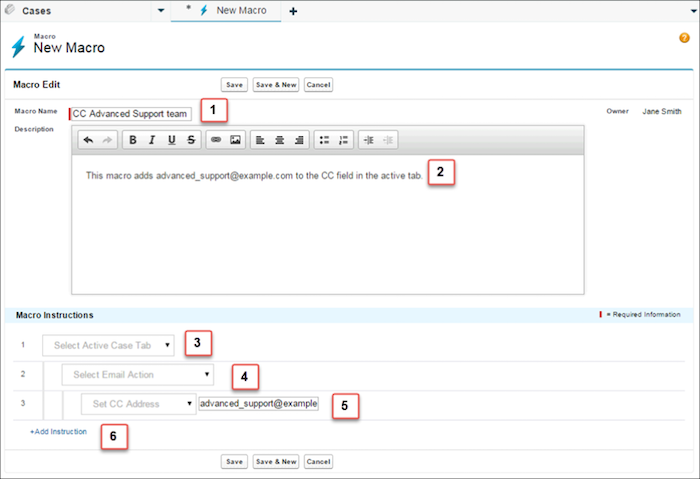
- The Macro Name helps support reps decide which macro to use. The name is used when support reps search for macros. It’s useful to use a short name (so that support reps can see it in the macros list) that succinctly identifies the macro’s purpose. (1)
- Although Description is optional, it is useful for helping support reps to understand what the macro does. (2)
- The macro instructions are like a little computer program, so you must tell the macro each step to perform. Each instruction is equivalent to a click that the support rep makes when manually performing the task. The first macro instruction selects the object that the macro acts upon, such as the Active Case Tab. (3)
- The second macro instruction specifies the context, or component of the Salesforce Console
for Service, in which the macro works. For example, the Email Action context allows the
macro to set fields and perform actions within the Email Publisher. (4)
If a Salesforce Console for Service component isn’t enabled and configured, then you can’t create a macro for it.
- The third macro instruction specifies the action that the macro performs. For example, the macro in the screenshot changes the value for the CC Address field in an email action in the active case tab. (5)
- You can add an extra set of instructions in the same context or in a different context. A simple macro just performs one task. Create more complex macros by adding instructions. (6)
If you use the International Components for Unicode (ICU) library instead of the Java Development Kit (JDK) library, review and manually update your Salesforce Classic macros that set the date, time, or currency. Otherwise, your macros can fail or introduce errors.
- Date and Time: Ensure that the date and time format is supported in the ICU library. For
example, for the US locale, add a comma in between the date and time.
- Valid format before ICU library:
01/09/2018 00:00 - Valid format after ICU library:
01/09/2018,
            00:00
- Valid format before ICU library:
- Currency: Ensure that the comma and decimal are valid for your currency. Errors can be introduced if your org’s currency locale is different from your user's locale.
Did this article solve your issue?
Let us know so we can improve!
