
Add Real-Time Location to Your Experience Builder Site
To enable Appointment Assistant Real-Time Location, add it to your Experience Builder site.
Required Editions
| Available in: both Salesforce Classic (not available in all orgs) and Lightning Experience |
| The Field Service core features, managed package, and mobile app are available in Enterprise, Unlimited, and Developer Editions. |
| The Field Service Appointment Assistant managed package and permission set license are required. |
| User Permissions Needed | |
|---|---|
| To add components to sites: | Create and Set Up Experience Sites AND View Setup and Configuration |
- From Setup, in the Quick Find box, enter Digital Experiences, and then select All Sites.
- In the row for your site, click Builder.
-
From Experience Builder, click Components
 .
.
- From Custom Components, locate the Real-Time Location component.
-
Drag the component onto the site.
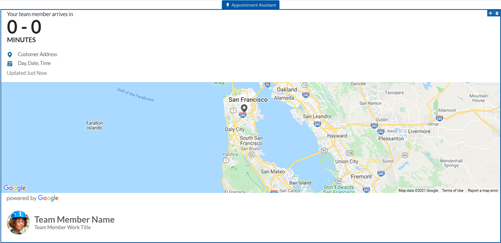
If you can’t see the map in the Appointment Assistant component, add the https://maps.a.forceusercontent.com URL to your trusted URLs with a CSP context of All. Select the connect-src (scripts), frame-src (iframe content), and img-src (images) CSP directives. See Manage Trusted URLs.
 Note For the LWR Experience Cloud Site template, the map isn’t fully supported.
- Manage What Customers See About Field Service Mobile Workers
You can control how much information is shared about your mobile workers and their location. - Add Custom Icons to the Real-Time Location Component
Add your own icons to mark the team member’s and the customer’s locations on the map. - Set Up Masked Phone Calls for Real-Time Location
Using masked phone calls requires setting up Salesforce Voice with Amazon Connect. - Let Customers Reschedule and Cancel Appointments in the Real-Time Location Component
Let your customers reschedule and cancel appointments even if the mobile worker is on the way to the appointment.
Did this article solve your issue?
Let us know so we can improve!
