
Manage What Customers See About Field Service Mobile Workers
You can control how much information is shared about your mobile workers and their location.
Required Editions
| Available in: both Salesforce Classic (not available in all orgs) and Lightning Experience |
| The Field Service core features, managed package, and mobile app are available in Enterprise, Unlimited, and Developer Editions. |
| The Field Service Appointment Assistant managed package and permission set license are required. |
| User Permissions Needed | |
|---|---|
| To customize component settings: | Create and Set Up Experience Sites AND View Setup and Configuration |
-
To open the settings panel, click anywhere in the Real-Time Location component.
-
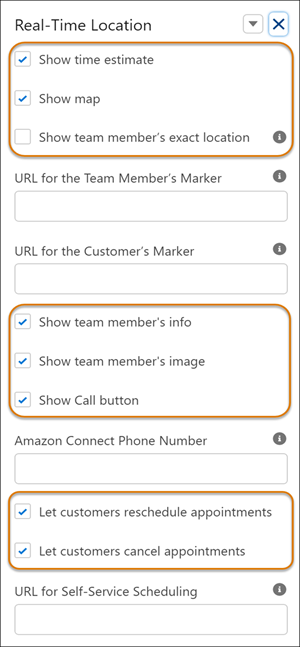
Select what information to show the customers.
- Show time estimate—Information related to the appointment’s address, the
appointment’s start and end times, and the estimated arrival time.
The appointment’s start and end times are taken from the ArrivalWindowStartTime and ArrivalWindowEndTime fields.
The Estimated arrival time is calculated based on the mobile worker’s current location relative to the service appointment's location. The estimated arrival time is available from 12 hours before the appointment and is refreshed every 5 minutes.
- Show map—A map with the mobile worker’s location and the service appointment location. The map is refreshed every 60 seconds.
- Show team member’s exact location—When selected, the team member’s exact location is shown. Otherwise, the worker’s location is shown within a 500-meter radius.
- Show team member’s info—The mobile worker’s first name, the first initial of their last name, and their title.
- Show team member’s image—The mobile worker’s Chatter picture that’s saved in Salesforce.
- Show Call button—Give your customers a button for calling the team member directly. The phone number is from the Phone field of the user that’s connected to the service resource. If the phone number isn’t populated, the Call button doesn’t appear.
- Let customers reschedule appointments and Let customers cancel appointments—Customers can reschedule and cancel appointments even if the mobile worker is on the way to the appointment. See Let Customers Reschedule and Cancel Appointments in the Real-Time Location Component.
- Show time estimate—Information related to the appointment’s address, the
appointment’s start and end times, and the estimated arrival time.
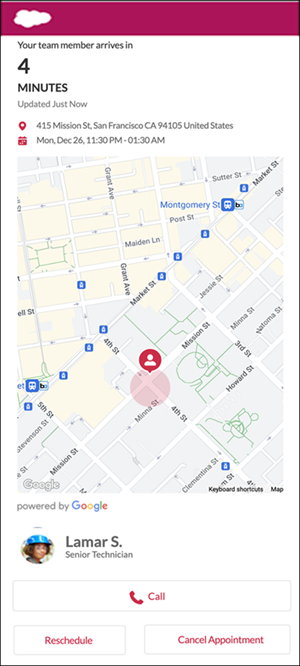
If you use all the options, your customer sees something like this.
Did this article solve your issue?
Let us know so we can improve!
