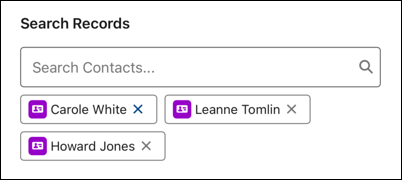
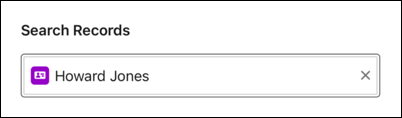
Lets users search for and select one or more Salesforce records, even when working
offline. For example, mobile workers can look up a contact and the flow can use the value to
populate another field, such as the contact’s address. Alternatively, mobile workers can look up
an asset, capture data about the asset in the form, and the flow can update the asset’s record
with these details.
Required Editions
Available in: Lightning Experience in the Enterprise, Unlimited and Developer
Additions.
Single Value Lookup
Multiple Value Lookup
Use Case
A flow can automatically update the lookup field. For example, an org uses work orders with
related work order line items, where each work order line item relates to a specific asset. A
mobile worker initiates a data capture flow directly from the work order line item, and the flow
automatically populates the asset’s lookup component.
Configure the Lookup Component
When you define values, you can select
resources from the flow, such as variables or global constants, or enter them manually.
Attribute
Description
Label
The label that the user sees. For example, Search Contact.
Object API Name
The object to search in. You can select resources from the flow, such as variables or
global constants, or you can manually enter a value.
Record ID
Defines the default value when Multi Selection is set to False.
Record IDs Collection
Defines the default value when Multi Selection is set to True.
Searched Fields
Defines the object’s fields that users can search. By default, users search the
object’s name field. Enter the API names of the fields that you want to use instead of the
name field, using a comma-separated list. For example, enter
SerialNumber to search by serial number instead of by name. Enter
Name, SerialNumber to search for both. You can add up to two
fields.
Multi Selection
Defines whether the user can select single or multiple values.
Required
Determines whether the user must enter text.
Disabled
Determines whether the user can change the default text.
Read-Only
Determines whether the user sees the date as read-only.
We use three kinds of cookies on our websites: required, functional, and advertising. You can choose whether functional and advertising cookies apply. Click on the different cookie categories to find out more about each category and to change the default settings.
Privacy Statement
Required Cookies
Always Active
Required cookies are necessary for basic website functionality. Some examples include: session cookies needed to transmit the website, authentication cookies, and security cookies.
Functional Cookies
Functional cookies enhance functions, performance, and services on the website. Some examples include: cookies used to analyze site traffic, cookies used for market research, and cookies used to display advertising that is not directed to a particular individual.
Advertising Cookies
Advertising cookies track activity across websites in order to understand a viewer’s interests, and direct them specific marketing. Some examples include: cookies used for remarketing, or interest-based advertising.