Allow End Users to Download a Transcript of a Messaging Session
While Enhanced Chat shows messaging history in the conversation window to verified end
users, unverified end users want to review messaging history. Now, unverified and verified end
users can download a PDF conversation transcript after the session ends.
Enhanced In-App Chat and Enhanced Web Chat channels
This article doesn’t apply to:
Enhanced WhatsApp, Standard and Enhanced Facebook Messenger, Standard and
Enhanced SMS, Enhanced Apple Messages for Business, Enhanced LINE, and Bring Your Own
Channel
Turn On Download Transcripts
Before an end user can download a transcript of their Enhanced Chat conversation, an
admin must enable it:
From Setup, enter Messaging Settings, and select Messaging
Settings.
Click the downward arrow to the right of your channel, and select
Edit.
Select Let customers download their conversation
transcripts.
Save your changes.
You can't download a transcript from an app built on Mobile Publisher.
Download a Transcript
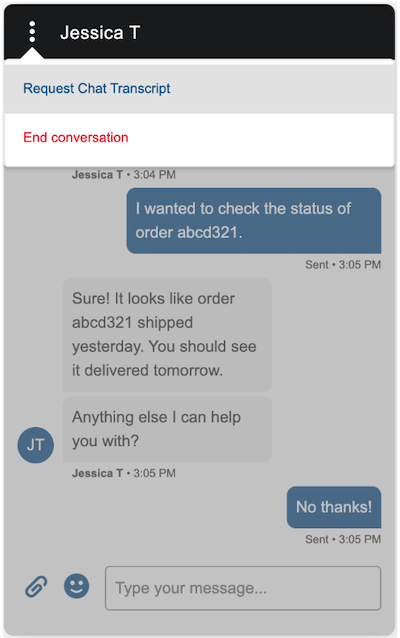
To download a transcript of the chat conversation, an end user clicks the Menu icon, then
selects Request Chat Transcript.
What’s Included in a Downloaded Transcript
A transcript can contain up to 200 conversation entries. A conversation entry is defined
as a single block of text that was initiated by a service rep, end user, bot,
Service agent, or auto-response.
If chatting with a service rep, a conversation entry includes updates
about a service rep's status, such as joining or leaving the
conversation.
We use three kinds of cookies on our websites: required, functional, and advertising. You can choose whether functional and advertising cookies apply. Click on the different cookie categories to find out more about each category and to change the default settings.
Privacy Statement
Required Cookies
Always Active
Required cookies are necessary for basic website functionality. Some examples include: session cookies needed to transmit the website, authentication cookies, and security cookies.
Functional Cookies
Functional cookies enhance functions, performance, and services on the website. Some examples include: cookies used to analyze site traffic, cookies used for market research, and cookies used to display advertising that is not directed to a particular individual.
Advertising Cookies
Advertising cookies track activity across websites in order to understand a viewer’s interests, and direct them specific marketing. Some examples include: cookies used for remarketing, or interest-based advertising.