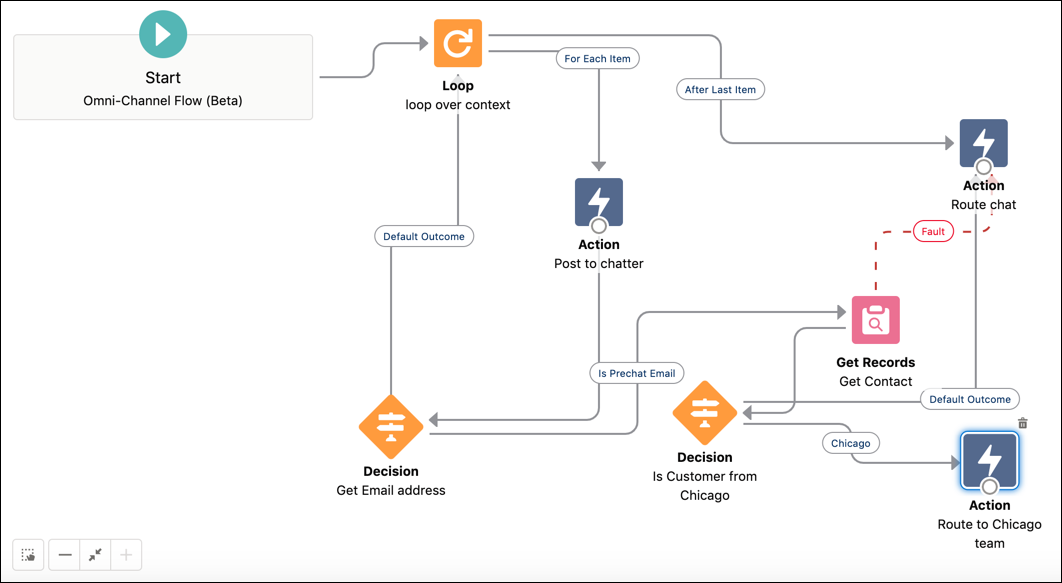
You are here:
Create the prechat
To build a flow that routes chats based on information captured in a pre-chat form, add a prechat record collection variable. Set up the variable to pull pre-chat details from the Conversation Context Entry object.
- In the Flow Builder Toolbox, click Manager and then click New Resource.
- For Resource Type, select Variable.
- For API Name, enter prechatInfo.
- For Data Type, select Record.
- Select Allow multiple values (collection).
- For Object, select Conversation Context Entry.
- Under Availability Outside the Flow, select Available for input.
-
Click Done.
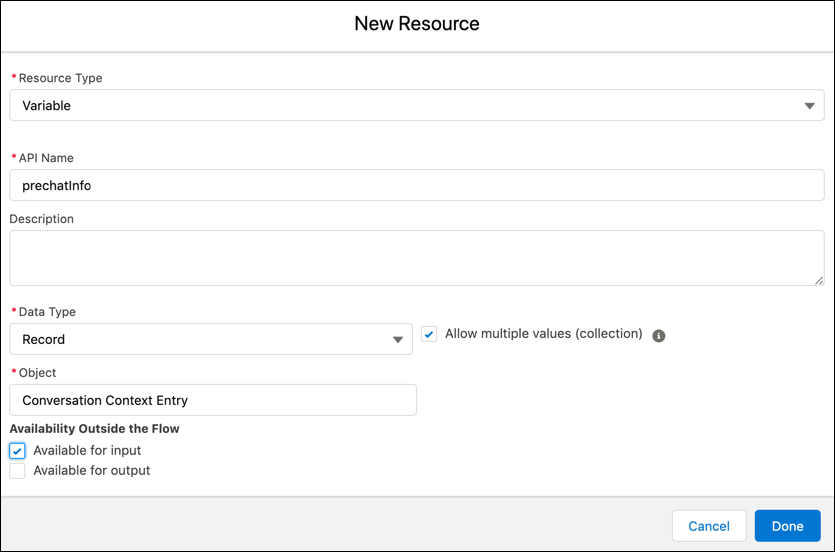

You want to route chats based on the customer’s city. If the customer is from Chicago, then route the chat to the Chicago team. Otherwise, route it to a default queue. To automate this process before the chat begins, customers fill out a pre-chat form, where they provide their names and email addresses.
To use this pre-chat information in a flow, start by defining a pre-chat collection variable based on the Conversation Context Entry object. Then create a flow that loops through the pre-chat records to get the customer’s email address. If found, the flow gets the customer record from the Contact object based on the provided email address. Finally, the flow routes the chat to the Chicago team if the customer record city is Chicago. Else, it routes the chat to the default queue.