You are here:
Prioritize with Interruptible Capacity
When service reps handle both time-sensitive and long-running work, Omni-Channel can route time-critical work items so that customers receive faster response times. Define less pressing work items as interruptible so that Omni-Channel can route more urgent work to service reps right away.
You can designate work items as either primary or interruptible. A primary work item is one that is considered uninterruptible. Voice phone calls and chats are examples of tasks that shouldn’t be interrupted. An interruptible work item, by contrast, can be put aside in favor of more immediate work. A case that takes a long time to resolve is an example of an interruptible work item.
Similarly, you can define service reps’ primary and interruptible capacities—how much uninterruptible and interruptible work, respectively, that each service rep can handle at a time. When Omni-Channel routes work, it looks at a work item’s size and interruptibility and then searches for service reps whose available capacities suit that work item.
As an example, suppose service reps can handle one voice call and four cases at a time. Assuming each work item is one unit of capacity, set the service rep’s primary capacity at one work item and their interruptible capacity at four work items. Configure service channels so that voice calls are uninterruptible and cases are interruptible.
If Omni-Channel assigns four cases to a service rep, that service rep is at full capacity for interruptible work and isn’t offered another case. But when a voice call, which is primary work, comes in, Omni-Channel sees that the service rep still has available primary capacity and assigns the call.
Here’s a summary of Omni-Channel routing rules with respect to primary and interruptible capacity.
| When the Work Is ... | … Omni-Channel Follows These Rules |
|---|---|
| Primary (Uninterruptible) | Omni-Channel assigns a primary work item only if the service rep has available primary capacity. When routing uninterruptible work, Omni-Channel doesn’t consider interruptible work that’s assigned to the service rep. |
| Interruptible | When routing interruptible work, Omni-Channel considers only those service reps who have both sufficient primary and interruptible capacity. This way, if a service rep is busy with primary work such as a phone call, Omni-Channel doesn’t assign interruptible work that the service rep can’t get to. |
Examples
For the following scenarios, assume that service reps can handle up to five leads and five cases at a time, so primary and interruptible capacities are set to five relative work units. Each lead or case consumes one unit of work. In the respective service channels, we set leads as uninterruptible and cases as interruptible.
- Service rep Erika is working on five cases, so she has no available interruptible capacity. She’s 100% available, though, for uninterruptible leads. When Omni-Channel receives a lead, it sees that Erika has available primary capacity and assigns the lead.
- Service rep Lucas is working on five leads, so he has no available primary capacity. He has no cases, so he’s 100% available for interruptible work. When Omni-Channel receives a case, it checks if Lucas has both enough primary and interruptible capacity for the work item. Because Lucas has no primary capacity, Omni-Channel looks for another service rep who has capacity of both types available.
Setting Up Interruptible Capacity
Before Omni-Channel can route work items based on interruptibility, you must do the following:
- Set up service reps’ work capacities. See Set Up Support Reps’ Capacities.
- Set up work items as primary or interruptible. See Configure Work Items as Primary or Interruptible.
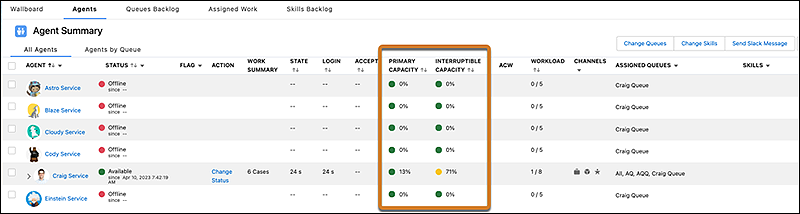
To view primary and interruptible capacity for each service rep, go to the Agents tab.