Support reps’ work can be either primary — that is, not to be interrupted, like a
Voice call—or interruptible, like a case. By setting up support reps’ primary and
interruptible work capacities, you give support reps the ability to pause long-standing or
less urgent work to take on more pressing tasks.
For simple setups, in particular setups
with a single channel, primary capacity for reps usually suffices. For more complex setups,
especially where you want to blend real-time and asynchronous channels, consider
interruptible capacity. For more on interruptible capacity, see Prioritize with Interruptible Capacity.
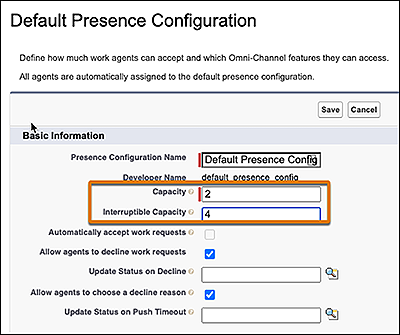
In Setup under Presence Configurations, define primary and interruptible capacity.
These values represent the maximum amount of primary and interruptible work that a rep can
handle at a time. You can specify available capacity using relative work unit values or a
percentage.
A value is required for primary capacity in the Capacity field. If you define only primary
capacity, interruptible capacity is set to the same value by default.
We use three kinds of cookies on our websites: required, functional, and advertising. You can choose whether functional and advertising cookies apply. Click on the different cookie categories to find out more about each category and to change the default settings.
Privacy Statement
Required Cookies
Always Active
Required cookies are necessary for basic website functionality. Some examples include: session cookies needed to transmit the website, authentication cookies, and security cookies.
Functional Cookies
Functional cookies enhance functions, performance, and services on the website. Some examples include: cookies used to analyze site traffic, cookies used for market research, and cookies used to display advertising that is not directed to a particular individual.
Advertising Cookies
Advertising cookies track activity across websites in order to understand a viewer’s interests, and direct them specific marketing. Some examples include: cookies used for remarketing, or interest-based advertising.