Customize Summary Categories for Agentforce in Field Service
When a dispatcher asks Agentforce for a summary, by default, the summary looks at
today’s schedule. You can add, remove, or modify the summary’s categories to suit your needs.
For example, show all the unscheduled appointments for the upcoming two weeks or show all the
incomplete appointments from the past week.
Required Editions
Einstein generative AI is available in Lightning Experience. Setup for Einstein
generative AI is available in Lightning Experience.
The Field Service core features and managed package are available in
Enterprise, Performance, Unlimited, and Developer
Editions.
For purchasing options, contact your Salesforce account executive.
User Permissions Needed
To use Field Service Scheduling Summary and Create Filter actions:
Access Agent Topics and Actions for Field Service
This is a Field Service managed package feature.
The standard summary includes five categories. These three categories can be
modified or removed:
Unscheduled appointments due today
Emergencies
In-jeopardy appointments
These two categories are added to the summary if Enhanced Scheduling and Optimization
is enabled and can’t be modified or removed:
Appointments with rule violations
Overlapping appointments
The first three categories are based on reports in a predefined dashboard. To modify,
remove, or add additional categories, you need to create a new dashboard.
From the App Launcher, find and select Dashboards.
Open the Agentforce: Summary of Scheduling Issues Dashboard
dashboard.
Save the dashboard in the Agentforce for Field Service Dashboards folder.
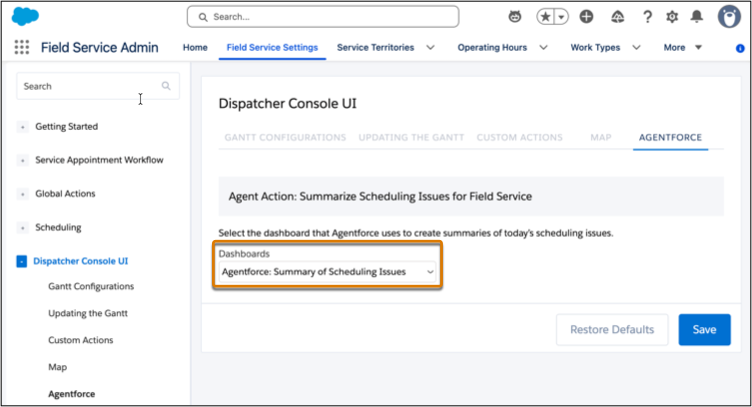
From the App Launcher, find and select Field Service
Admin.
From the Field Service Settings tab, select Dispatcher Console
UI.
Open the AGENTFORCE tab.
From the Dashboards list, select the dashboard you created.
Click Save.
Considerations:
When defining reports, don't define a date.
Due to performance issues, use selective report conditions and avoid conditions such as
NOT IN or NOT EQUAL TO. See Write Efficient Queries in Trailhead for more
information.
We use three kinds of cookies on our websites: required, functional, and advertising. You can choose whether functional and advertising cookies apply. Click on the different cookie categories to find out more about each category and to change the default settings.
Privacy Statement
Required Cookies
Always Active
Required cookies are necessary for basic website functionality. Some examples include: session cookies needed to transmit the website, authentication cookies, and security cookies.
Functional Cookies
Functional cookies enhance functions, performance, and services on the website. Some examples include: cookies used to analyze site traffic, cookies used for market research, and cookies used to display advertising that is not directed to a particular individual.
Advertising Cookies
Advertising cookies track activity across websites in order to understand a viewer’s interests, and direct them specific marketing. Some examples include: cookies used for remarketing, or interest-based advertising.