The Work Capacity Apex work rule type sets limits for the work capacity of service
resources in a given service territory according to specified criteria. This work rule is
available only when you’re using Enhanced Scheduling and Optimization.
Required Editions
Available in: both Salesforce Classic (not available in all orgs) and Lightning
Experience
The Agentforce Field Service and Operations core features, managed package, and
mobile app are available in Enterprise, Unlimited, and Developer
Editions.
This is a Field Service managed package feature.
This rule enables adding capacity limits to scheduling policies. If you add a Work
Capacity work rule to your scheduling policy, the Work Capacity Limit records defined
for the service territories are considered. These records allow you to set limits on the
amount of specific types of work that you can book within a territory. For example, you
can limit installation work to 80% of the total capacity of the service territory. Total
capacity refers to the combined working hours availability for all service resources in
that territory for a given time frame.
Create work rules from the Work Rules tab. To view or add work rule
fields open the Object Manager in Setup and select the
Work Rule custom object. Add work rules to a scheduling policy from
the Customize Scheduling Policies page in Guided Setup or from the
Scheduling Policy Work Rules related list on a scheduling policy.
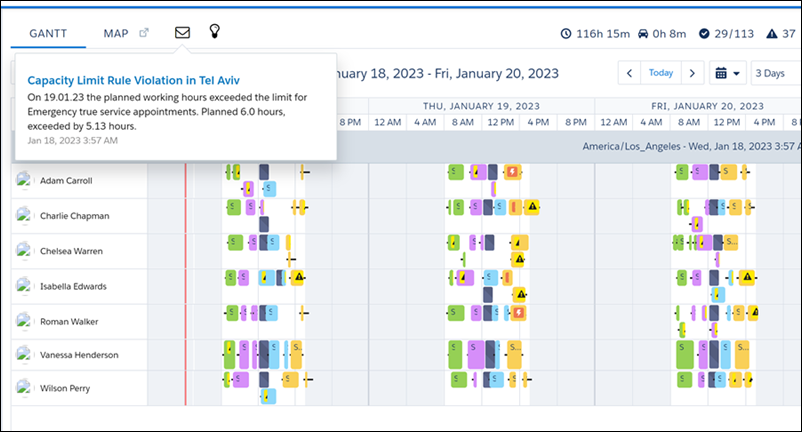
Check Work Capacity Rule Violations
You can see notifications for Work Capacity rule violations for all service
appointments in a service territory in the Notification Center. The violations for
individual service appointments aren’t shown on the Gantt.
We use three kinds of cookies on our websites: required, functional, and advertising. You can choose whether functional and advertising cookies apply. Click on the different cookie categories to find out more about each category and to change the default settings.
Privacy Statement
Required Cookies
Always Active
Required cookies are necessary for basic website functionality. Some examples include: session cookies needed to transmit the website, authentication cookies, and security cookies.
Functional Cookies
Functional cookies enhance functions, performance, and services on the website. Some examples include: cookies used to analyze site traffic, cookies used for market research, and cookies used to display advertising that is not directed to a particular individual.
Advertising Cookies
Advertising cookies track activity across websites in order to understand a viewer’s interests, and direct them specific marketing. Some examples include: cookies used for remarketing, or interest-based advertising.