The Match Boolean work rule type enforces scheduling preferences based on a checkbox
(Boolean) field on service resources. If you're using Enhanced Scheduling and Optimization, the
Match Boolean work rule is a Field Service database work rule type. If you're not using Enhanced
Scheduling and Optimization, this is an Apex work rule type.
Required Editions
Available in: both Salesforce Classic (not available in all orgs) and Lightning
Experience
The Agentforce Field Service and Operations core features, managed package, and
mobile app are available in Enterprise, Unlimited, and Developer
Editions.
This is a Field Service managed package feature.
Work rules of this type contain two key settings.
Field Name
Description
Resource Property
The API name of the checkbox field on service resources that defines
the scheduling requirement. For example,
IsActive.
Value is True
If selected, the Resource Property must be True (selected) for a
service resource to be assigned to a service appointment. If not
selected, the Resource Property must be false (deselected) for a
resource to be assigned to an appointment. When using Enhanced
Scheduling and Optimization, if the Boolean field on the service
resource is empty, the rule isn't applied.
To control which checkbox fields are available as resource properties:
Add the API name of any checkbox field as a picklist value in the Resource Property
field on the Work Rule custom object in Setup.
Make sure that the value has been enabled for the record type.
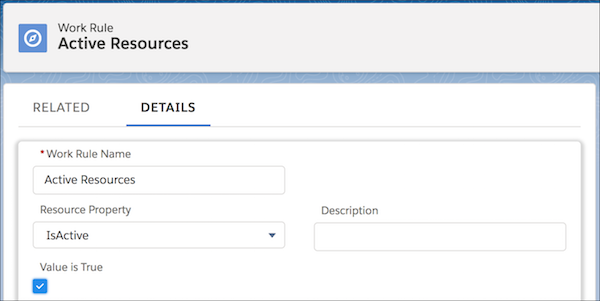
Field Service includes a standard Match Boolean work rule named Active Resources. This
work rule:
Assures that only active service resources are considered for scheduling.
Lets you preserve historical data on the Gantt. When a service resource leaves your
company, their assignment data remains.
Doesn’t make sure that the optimization engine reschedules appointments for inactive
service resources. You must manually unschedule these appointments.
NoteA scheduling policy can contain up to five Match Boolean work
rules.
Create work rules from the Work Rules tab. To view or add work rule
fields open the Object Manager in Setup and select the
Work Rule custom object. Add work rules to a scheduling policy from
the Customize Scheduling Policies page in Guided Setup or from the
Scheduling Policy Work Rules related list on a scheduling policy.
We use three kinds of cookies on our websites: required, functional, and advertising. You can choose whether functional and advertising cookies apply. Click on the different cookie categories to find out more about each category and to change the default settings.
Privacy Statement
Required Cookies
Always Active
Required cookies are necessary for basic website functionality. Some examples include: session cookies needed to transmit the website, authentication cookies, and security cookies.
Functional Cookies
Functional cookies enhance functions, performance, and services on the website. Some examples include: cookies used to analyze site traffic, cookies used for market research, and cookies used to display advertising that is not directed to a particular individual.
Advertising Cookies
Advertising cookies track activity across websites in order to understand a viewer’s interests, and direct them specific marketing. Some examples include: cookies used for remarketing, or interest-based advertising.