Guidelines for Setting Up a Scheduling Policy
To automate a schedule, you must first configure a scheduling policy that reflects your business's scheduling requirements and preferences. Learn how to create a scheduling policy.
Required Editions
| Available in: both Salesforce Classic (not available in all orgs) and Lightning Experience |
| The Agentforce Field Service and Operations core features, managed package, and mobile app are available in Enterprise, Unlimited, and Developer Editions. |
 This is a Field Service managed package feature.
To create an effective scheduling policy, follow the process covered in this topic.
- Defining your Requirements for Scheduling with Work Rules
- Defining your Preferences for Scheduling with Service Objectives
- Ranking the Selected Service Objectives
- Determining Relative Importance of Service Objectives
- Setting Service Objective Weights
- Testing Schedule Policy Effectiveness Through Simulation
Defining your Requirements for Scheduling with Work Rules
To create a valid schedule, you must define the rules that scheduling must follow. Consider factors such as when to schedule breaks during the day and what criteria from the work order or service appointment to match to a service resource. Also, consider the date and time constraints for the appointment. Work rules help reduce the complexity of the scheduling problem by reducing the number of candidates, allowing the engine to focus on the best solutions. For example, you can limit the radius that a service resource can travel.
To find out how to configure work rules to meet your business’s scheduling requirements, see Field Service work rules.
To get started on configuring work rules, review some scenarios.
| SCHEDULING REQUIREMENTS SCENARIOS | CONFIGURATION CONSIDERATIONS |
|---|---|
|
|
|
|
|
|
|
|
|
|
|
|
|
|
|
|
|
|
|
|
|
|
|
|
|
|
|
|
|

Defining your Preferences for Scheduling with Service Objectives
After you’ve defined a valid schedule using work rules, you need to define what your preferences are for an optimal schedule. For example, given a set of possible valid schedules, which schedule does Field Service choose based on scheduling preferences?
Consider factors such as minimizing travel, reducing overtime, and scheduling as soon as possible. Go through the Service objectives to find out how to configure objectives to meet your business’s scheduling requirements. Try to include only those service objectives that are important to your business to avoid overcomplicating your scheduling criteria.
Ranking the Selected Service Objectives
After you’ve defined a valid schedule using work rules, you need to define what your preferences are for an optimal schedule. For example, given a set of possible valid schedules, which schedule does Field Service choose based on scheduling preferences?
The next step is to prioritize your scheduling preferences. Rank the service objectives from most important to least important. Some can be similar in importance, but consider which preference is more desirable if all other factors remain the same.
For example:
| Service Objective | Rank |
|---|---|
| Minimize Travel | 2 |
| Schedule ASAP | 3 |
| Preferred Resources | 1 |
Compare rankings with other service managers and discuss any differences to understand the reasons behind them.
Determining Relative Importance of Service Objectives
If you know which service objectives are most important, you can go a step further to determine how much more important a service objective is over another. For example, minimizing travel can be more important than scheduling as soon as possible, but that’s not necessarily always true.
For example, scheduling an appointment tomorrow can add 30 minutes of travel, but if you schedule the same appointment today to fill in an available gap in the schedule, it can add 45 minutes of travel. While scheduling the appointment tomorrow does save on travel time, you can prefer to schedule the service appointment today with slightly more travel so the service resource isn't left idle.
Understanding how much more important one service objective is over another would helps define the actual values of the service objective weights.
Setting Service Objective Weights
There are many ways to derive service objective weights in a scheduling policy. A simple method is to use an allocation system. This approach gives you a starting point for your weights and helps you understand the trade-offs between scheduling objectives and how the weight, or sum of weights, can affect each objective.
First, decide how many points you can distribute. Let's use 500 points. (If you're not using Enhanced Scheduling and Optimization, choose a maximum value of 500 to make sure the sum of the weights of all the objectives doesn't go over 500. Then, weight points on each service objective based on how important it is to your business. You must distribute all the points.
Here’s an example of how to distribute points based on how you ranked your service objectives and how important each service objective is.
| Service Objective | Weight |
|---|---|
| Minimize Travel | 210 |
| Schedule ASAP | 50 |
| Preferred Resources | 240 |
Here's an example of how you choose these values.
- Scheduling an appointment to a preferred resource is most important to my business, even if it’s at the expense of longer travel and scheduling at a later time rather than earlier.
- The best case scenario for minimizing travel is if there’s is zero travel and the best case scenario for scheduling as soon as possible (ASAP) is scheduling right now. If an appointment can be scheduled right now with zero travel, I'd rather that option than scheduling to a preferred resource. Adding up the combined weight of Minimize Travel and Schedule ASAP (210+50=260) is more than the bonus of scheduling the appointment to a preferred resource (260>240).
- My business prefers to minimize travel over scheduling an appointment as soon as possible since we want to reduce the travel time and the time not spent being productive. However, if traveling to a service appointment today isn't too bad, I don’t mind scheduling it today to get it done earlier rather than waiting to save some travel time tomorrow.
Testing Schedule Policy Effectiveness Through Simulation
It’s important to understand that there’s no one solution for balancing service objective weights that will solve all scenarios and businesses when it comes to a non-deterministic problem like workforce scheduling. Going through a process to tune a schedule policy helps you understand the schedule quality results for different scenarios and come up with a schedule policy that reacts to differing needs.
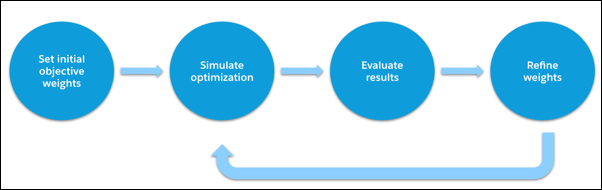
The best way to evaluate the effectiveness of a scheduling policy is to try it out and measure the results. See Fine-Tune the Scheduling Policy for a methodology on how to perform optimization simulations.
Review the Gantt in the Classic Dispatch Console to inspect the schedule created by the optimizer. Does it make sense? Did service appointments get scheduled to the right service resources and time? If not, review the work rules in your scheduling policy to see if something needs to be added or updated.
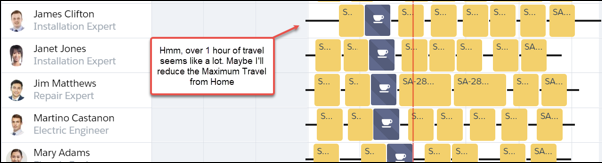
If the service appointment assignments are correct, you can then evaluate the quality of the schedule.
Use Optimization Hub (when you’re using Enhanced Scheduling and Optimization) or Optimization Insights (when you’re not using Enhanced Scheduling and Optimization) to measure the results of optimization. These results represent your baseline.
Unless you were lucky with choosing the service objective weight values, there’s usually room for improvement. Change the weight values slightly while keeping the total sum of weights the same and rerun the simulation. Are the results better or worse? Continue this process until you’re satisfied with the results.