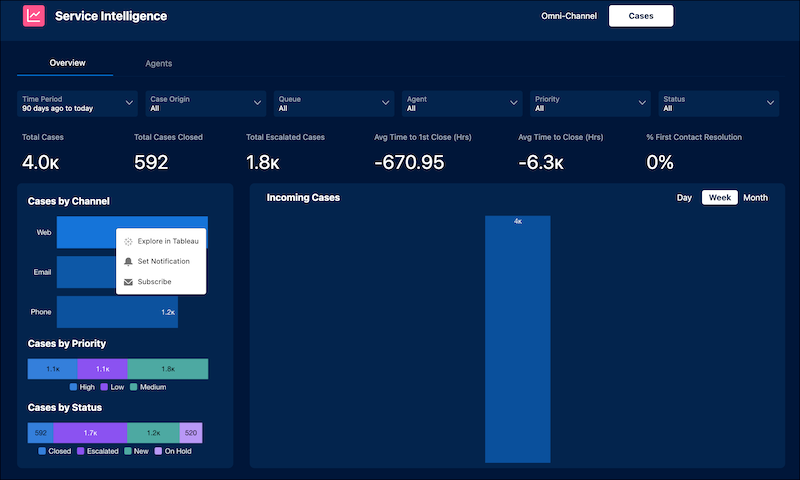
The Service Intelligence dashboards contain rich data. But if you want a deeper dive
into your data or to create your own visualizations, you can do so in Tableau.
Connect Tableau to Service Intelligence data model objects using the built-in
Explore in Tableau option in your dashboards.
Analyze your data in near real-time with a live connection to Data 360.
Publish new analyses to Tableau Cloud to share with your colleagues.
Data 360 Requirements and Considerations
To use Tableau with Service Intelligence data, the following Data 360 requirements must
be met:
You must have read permissions for the dataspace definition (Located in Object
settings > DataSpaceDefinition):
entityPermission.DataSpaceDefinition.Read
You must have access to Data 360 (Located in Permission Set > System
Permissions):
Allows user access Data 360
Tableau Requirements and Considerations
To use Tableau with Service Intelligence data, the following Tableau requirements must be met:
The Tableau user must have at least an Explorer license. If the user wants to publish
to other Tableau users, they must also have an Explorer (can publish) site role.
To access the DMO, Tableau verifies that you have permissions to view the data.
The query must exclusively reference objects that come from the DMO.
View Service Intelligence Data in Tableau
To view Service Intelligence Data in Tableau, click Explore in Tableau
from the dashboard component you want to explore in Tableau.
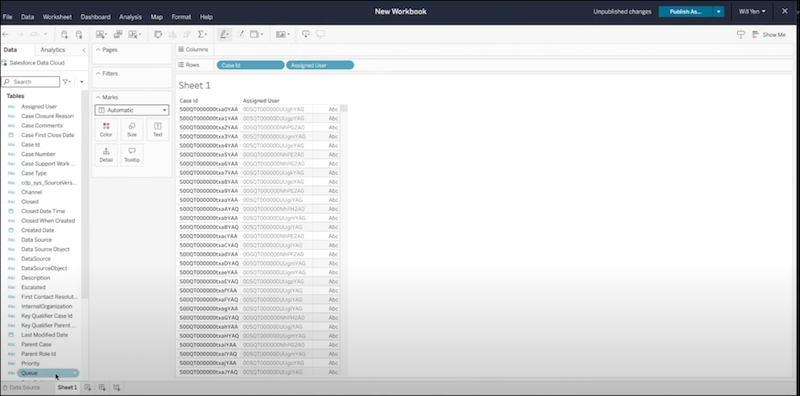
When you click Explore in Tableau, you sign into the Tableau Cloud site
and authenticate to the data source. Tableau Cloud opens the web authoring experience populated
with your data source, which allows you to explore your Service Intelligence data.
We use three kinds of cookies on our websites: required, functional, and advertising. You can choose whether functional and advertising cookies apply. Click on the different cookie categories to find out more about each category and to change the default settings.
Privacy Statement
Required Cookies
Always Active
Required cookies are necessary for basic website functionality. Some examples include: session cookies needed to transmit the website, authentication cookies, and security cookies.
Functional Cookies
Functional cookies enhance functions, performance, and services on the website. Some examples include: cookies used to analyze site traffic, cookies used for market research, and cookies used to display advertising that is not directed to a particular individual.
Advertising Cookies
Advertising cookies track activity across websites in order to understand a viewer’s interests, and direct them specific marketing. Some examples include: cookies used for remarketing, or interest-based advertising.