
You are here:
Determining Your Setup Pathway
Your Service Catalog site setup steps are specific to your affiliation with Experience Cloud. Use the provided guidance to determine your setup steps.
Required Editions
| View supported editions. |
Whether you create an Experience Cloud site or have a site that is already configured, you have access to the Service Catalog pages and components with the Service Catalog Access permission set license and the Service Catalog User permission set. Setup steps are applicable for both cases. The latter case takes streamlined setup steps while the former must take all steps provided in this documentation.
You can also integrate Service Catalog with sites alternative to Experience Cloud, such as Salesforce and externally built sites. See Alternative Sites Setup Pathway.
Here’s an overview of your setup steps based on your site framework. Use the provided table for direct navigation to your specific setup steps.
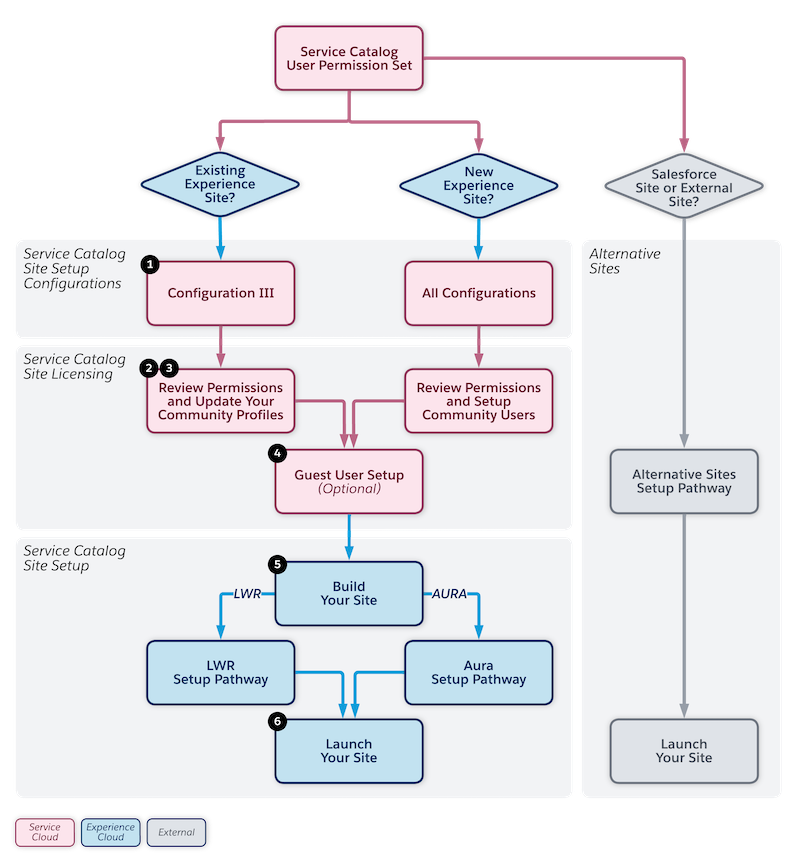
| Experience Site Status | Site Setup Steps |
|---|---|
| The Service Catalog Access permission set license is added to an Experience Site that has community users. | |
| The Service Catalog Access permission set license is added to a newly generated Experience Cloud site. | A. Set the Service Catalog site Setup configurations. B. Review permissions and setup community users. C. Set Up Service Catalog Guest Users |
| The Service Catalog Access permission set license is added to a Salesforce or External Site. | Alternative Sites Setup Pathway |
