
You are here:
How Service Catalog Works in Agent (Beta)
Familiarize yourself with the functionality of Service Catalog actions, Agent output types, and their relation to catalog items.
Required Editions
| View supported editions. |
Actions in Service Catalog have a specific processing and output framework compared to standard Agent actions. Here are a few details to keep in mind.
Standard Actions and Service Catalog Actions
Agent uses standard actions to accomplish key tasks in Salesforce, such as summarizing records. Service Catalog actions complete catalog item requests for customers in your help site so they don’t have to search your catalog or contact support.
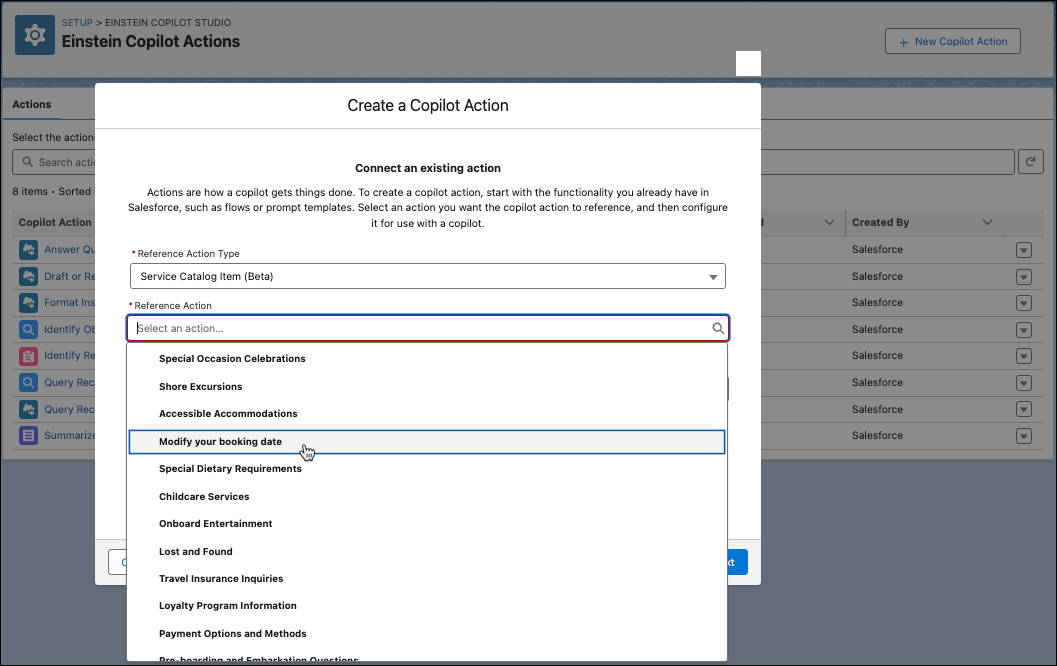
Service Catalog actions aren’t included in the Agent Actions page with the rest of the standard actions. To use actions in Service Catalog, you must create custom actions using the Agent custom action guided setup and selecting Service Catalog Item as the reference action type.
The Service Catalog Item reference type provides Service Catalog specific processing and outputs for all your catalog items. When the reference action type is selected, you then choose which catalog items to turn into actions.

Actions, Items, and Outputs
Actions tell Agent how to accomplish tasks for users. In Service Catalog, an action is associated with a catalog item. Agent uses the LLM to identify a catalog item that resolves the customer's contact reason and then uses an action to execute the item for the customer. Agent removes the need for customers to search the catalog or contact support.
For example, if a customer asks Agent for help with updating their phone number or email, an action associated with a catalog item for the related service is called that executes the item for the customer. Item execution is where Agent provides the item to the customer using one of these methods.
| Execution Method | What’s Provided to the User (Agent Output) |
|---|---|
| Actionable | A Service Catalog request ID for the item |
| Shareable | A URL link to the catalog item in your Service Catalog site |
Items provided to customers as Service Catalog request outputs are actionable by Agent. An actionable item means Agent executes the item for the customer by opening a Service Catalog request and then provides them a recordID for the request.
Items provided as URL outputs are shareable by Agent. In this execution method, Agent generates and shares a URL for the catalog item in your site that customers request on their own.
What Determines the Output?
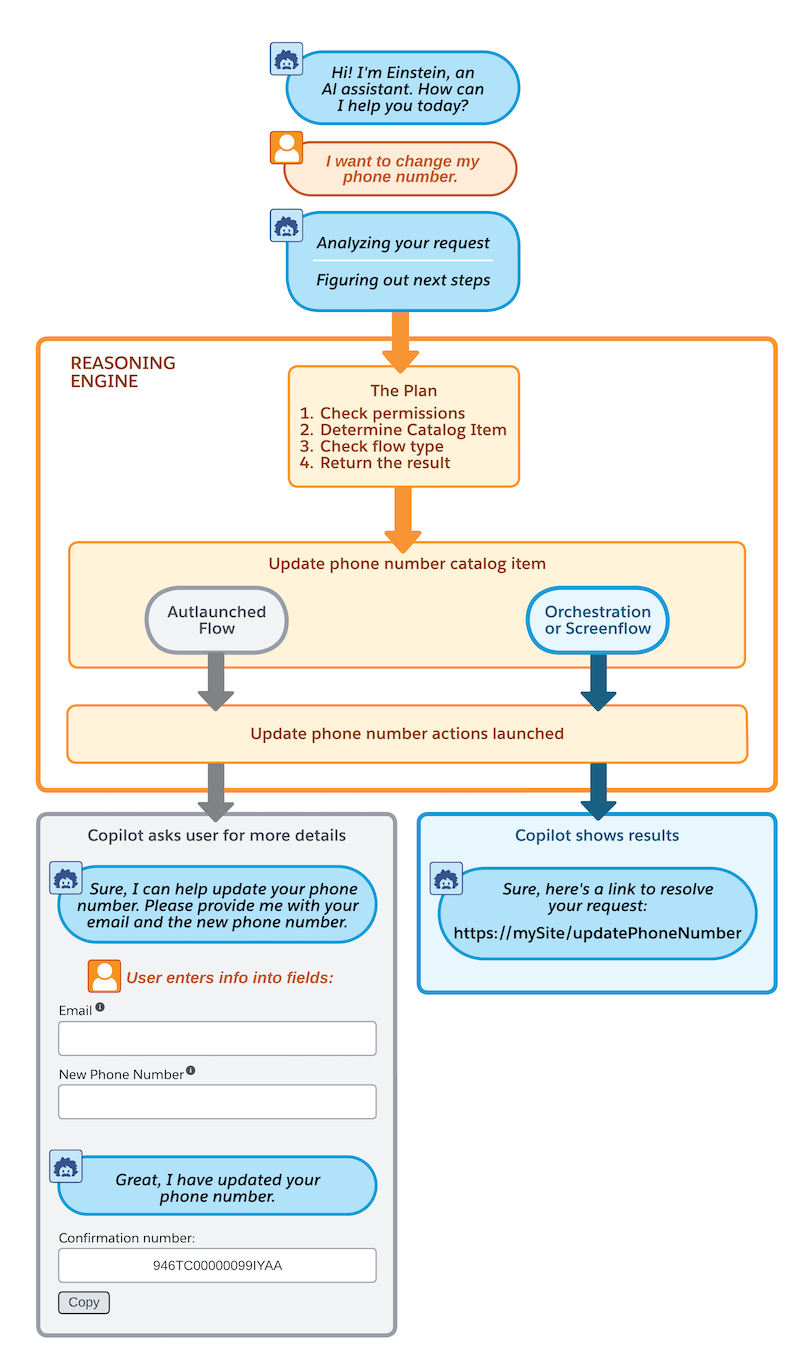
All catalog items require a fulfillment that contains one of these flows: Autolaunch, Orchestration, or Screen. Each flow type is associated with one of the execution methods, which then determines the output type.
Here’s a table outlining the Agent output types for Service Catalog items based on the flow included in their fulfillment. These outputs apply to any item that has an action associated with it.
| Flow Included in Fulfillment | Execution Method | Agent Output |
|---|---|---|
| Autolaunched | Actionable | A record ID created for the catalog item request formatted as a 27-digit string with letters and numbers |
| Orchestration or Screen | Shareable | A URL link to the catalog item in your Service Catalog site |
Here's a summary of Agent processing in Service Catalog.
Getting Started with Service Catalog Actions
We’ve provided three catalog items for common contact reasons that are available for download. See Build Service Catalog Actions (Beta).
- Update Email Address
- Update Phone Number
- Open a Support Case
Each item contains an autolaunched flow, which makes them actionable by Agent. The outputs are Service Catalog requests in the form of a record ID.
The provided sample items expedite your Agent setup for Service Catalog. These items are associated with actions of the same name that are automatically populated in the Agent custom action guided setup. Service Catalog actions are set up like custom actions, but they’re ready for you to use right away, with no configuration required.
To access the sample Service Catalog items and associated actions, download the sample items, launch the Agent actions guided setup, and then select Service Catalog Item as the Reference Action Type. Then choose which catalog items to turn into actions in the Reference Action field. See Build Service Catalgo Actions (Beta).
Actions for Other Items in Your Catalog
To use Agent for other items in your catalog, you can create custom actions using the Agent actions guided setup. All published items in your catalog automatically populate in the model's Reference Action field so you can quickly create custom actions. However, you must specify the instructions for the actions and its input and output settings. See Best Practices for Agent Action Instructions.
As you build actions for your catalog items, be sure to keep the flow, execution method, and output type parameters presented above in mind.
