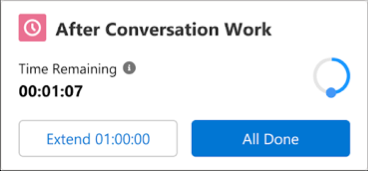
Most customer service calls or messaging sessions require closing work after it
ends—for example, you can send an email, update a case, or finalize your notes. When a
conversation ends, you have a set amount of time to wrap up your work before you move on to the
next customer. The After Conversation Work (ACW) component on a call or messaging record shows a
countdown to help you manage your time.
Required Editions
This article applies to:
Salesforce Voice with Amazon Connect
Salesforce Voice with Partner Telephony
Salesforce Voice with Partner Telephony from Amazon Connect
You have a set number of seconds to complete wrap-up tasks before you’re available for a new
conversation. When time is up, your work is considered complete whether you close the
record.
Note To wrap up a call faster, use
Einstein Work Summaries to generate your call summaries for you.
If You’re Done Early
If you finish your wrap-up work before an ACW period runs out, click All
Done or close the record tab in the console to show that you’re ready to help the
next customer. Making an outbound conversation or changing your status during the ACW period
also ends the countdown and closes the agent work. If you log out of Salesforce during an ACW
period without marking it done, the ACW period continues for a little over a minute.
Extend Wrap-Up Time
If you need more time to finish your wrap-up work, click Extend. Your
admin sets the extension time and how many extensions you can make on your work. An extension
pauses the ACW timer to prevent you from being put back into available status before completing
after conversation work.
If a Call is Transferred
When a call is transferred from one rep to
another, each rep’s ACW period begins the moment they exit the call. This behavior applies
to both warm and cold transfers.
For Amazon Connect contact centers, a call can be
transferred to a rep during active After Conversation Work time. The transferred call
interrupts and ends ACW, and Omni-Channel no longer lists the previous call in a rep’s
active work.
If an Inbound or Outbound Call is Canceled
When a caller cancels an inbound call that hasn’t been connected to a rep or you cancel an
outbound call, you don’t enter the After Conversation Work flow. Although the Voice Call tab
can still be open and lower your rep capacity, the ACW component doesn’t appear. If the
Respect Rep Capacity option is enabled, you don’t receive another call until you close the
record tab in the console.
Don’t see the ACW component, Extend button, or timer on a call or messaging
record?
If you don’t see the ACW component or Extend button on a call or messaging record, your
admin likely hasn’t set up the features. In this case, there’s no wrap-up work time limit or
extend wrap-up work option. Keep the call record open in the console until you complete your
work for the call. Then close the record so you’re available for another customer.
If you don’t see the timer, your org might have Omni-Channel Fallback Mode enabled. In this
mode, ACW isn’t supported. To free up your capacity after a call or messaging session
completes, click All Done.
We use three kinds of cookies on our websites: required, functional, and advertising. You can choose whether functional and advertising cookies apply. Click on the different cookie categories to find out more about each category and to change the default settings.
Privacy Statement
Required Cookies
Always Active
Required cookies are necessary for basic website functionality. Some examples include: session cookies needed to transmit the website, authentication cookies, and security cookies.
Functional Cookies
Functional cookies enhance functions, performance, and services on the website. Some examples include: cookies used to analyze site traffic, cookies used for market research, and cookies used to display advertising that is not directed to a particular individual.
Advertising Cookies
Advertising cookies track activity across websites in order to understand a viewer’s interests, and direct them specific marketing. Some examples include: cookies used for remarketing, or interest-based advertising.