Some companies automatically record calls for training and quality purposes. Your
customers and your company sometimes prefer not to record certain information for privacy and
legal compliance reasons. Honor your customer’s privacy and protect your company when a call is
recorded by pausing the recording when sensitive information is exchanged. Resume the recording
when it’s appropriate.
Required Editions
This article applies to:
Salesforce Voice with Amazon Connect
Salesforce Voice with Partner Telephony
Salesforce Voice with Partner Telephony from Amazon Connect
The default setting for call recording depends on your telephony provider and its
configuration. For Amazon Connect, call recording is turned on by default. If your company
is using the sample Amazon Connect contact flows that Salesforce provides, then call
recording begins when the call is connected to a rep. An administrator can configure when
calls are recorded in the contact flows in Amazon Connect.
Important For data protection reasons, all users with access
to Salesforce Voice call recordings must agree to being recorded. The first time a user tries
to listen to a call recording or make or receive a call, they see a message asking them to agree
to being recorded. If the user doesn’t agree, they can’t make or receive calls or listen to call
recordings, and they’re prompted again the next time they log in.
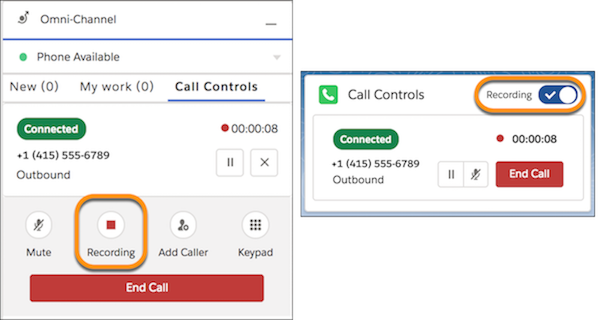
To pause the recording, click Recording in the Omni-Channel utility
or the Recording radio button in the Phone component.
We use three kinds of cookies on our websites: required, functional, and advertising. You can choose whether functional and advertising cookies apply. Click on the different cookie categories to find out more about each category and to change the default settings.
Privacy Statement
Required Cookies
Always Active
Required cookies are necessary for basic website functionality. Some examples include: session cookies needed to transmit the website, authentication cookies, and security cookies.
Functional Cookies
Functional cookies enhance functions, performance, and services on the website. Some examples include: cookies used to analyze site traffic, cookies used for market research, and cookies used to display advertising that is not directed to a particular individual.
Advertising Cookies
Advertising cookies track activity across websites in order to understand a viewer’s interests, and direct them specific marketing. Some examples include: cookies used for remarketing, or interest-based advertising.