
You are here:
Salesforce Reports for Amazon Connect Usage and Billing
View Amazon Connect usage, minutes, and costs, and Amazon Lex usage with Salesforce reports. Quickly generate the reports using Salesforce Voice’s packaged report types.
Required Editions
This article applies to:
- Salesforce Voice with Amazon Connect
| View supported editions. |
- Salesforce Voice Minutes Report
This report shows charges for Salesforce Voice minutes only. It doesn’t include charges for telephony minutes. To create and view this report, you must be assigned the Contact Center Admin permission set. - Salesforce Voice Usage and Cost Report
This report shows charges for telephony minutes only. It doesn’t include charges for Salesforce Voice minutes. If you have the Salesforce Voice Additional AWS Services add-on license, this report shows usage and charges for additional AWS services. To create and view this report, you must be assigned the Salesforce Voice Contact Center Admin permission set. - Service Cloud IVR Report
This report shows IVR usage that specifies the number of IVR utterances. - Salesforce Voice Calls Report
In addition to the standard reports, you can create a custom report type based on the Voice Calls object. The Voice Calls report provides information about the voice calls in your Salesforce Voice contact centers. The report provides details such as caller phone numbers, timestamps, and duration for the voice calls. - Considerations for Amazon Connect Usage and Billing Reports
When viewing reports, keep these considerations in mind.
Salesforce Voice Minutes Report
This report shows charges for Salesforce Voice minutes only. It doesn’t include charges for telephony minutes. To create and view this report, you must be assigned the Contact Center Admin permission set.
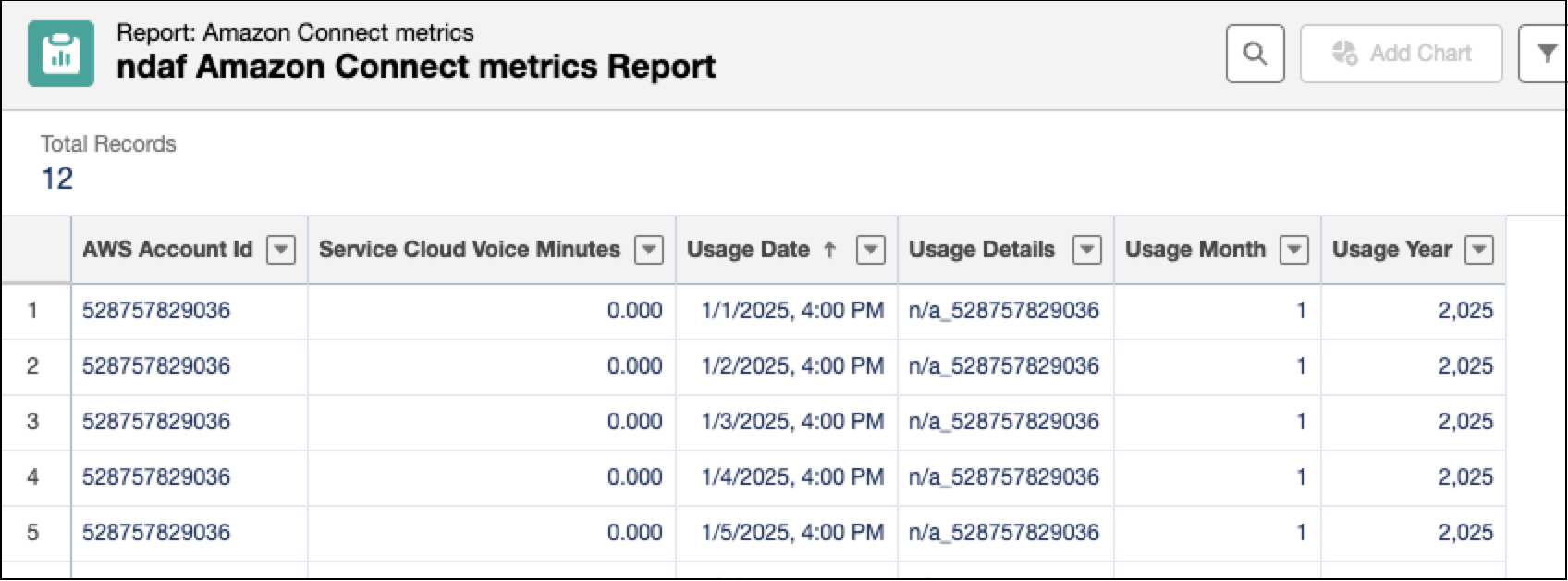
In the Salesforce Voice Minutes report:
- The AWS Account Id helps to identify all the AWS sub-accounts created within both your production and sandbox orgs, and these sub-accounts are cumulative.
- The Salesforce Voice Minutes indicates the number of Salesforce Voice minutes used for the specified AWS account on the usage date. These values are based on the Voice minutes that you have purchased, and if you use more Voice minutes than what is included in your plan, it contributes towards overage based billing.
- The Usage Details is usually a combination of the region and org id, concatenated with underscore "_".
To get the Salesforce Voice minutes consumption for the current month, sum up the entries of the Salesforce Voice Minutes column in the report for the current month. In the report, the usage data has a two-day delay, for example, to see the data for January 31 in the report, wait until February 2.
Salesforce Voice Usage and Cost Report
This report shows charges for telephony minutes only. It doesn’t include charges for Salesforce Voice minutes. If you have the Salesforce Voice Additional AWS Services add-on license, this report shows usage and charges for additional AWS services. To create and view this report, you must be assigned the Salesforce Voice Contact Center Admin permission set.
To better understand these telephony charges, let’s look at a few examples.
| Scenario | Charged Telephony Minutes |
|---|---|
| A one-minute inbound call that uses the IVR system only–it never requires a rep | 1 minute |
| A one-minute outbound call from the rep, regardless if the customer answers | 1 minute |
| A one-minute call that’s initially handled by the IVR, transferred to a rep for one minute, and then transferred to another rep for one more minute | 3 minutes:
|
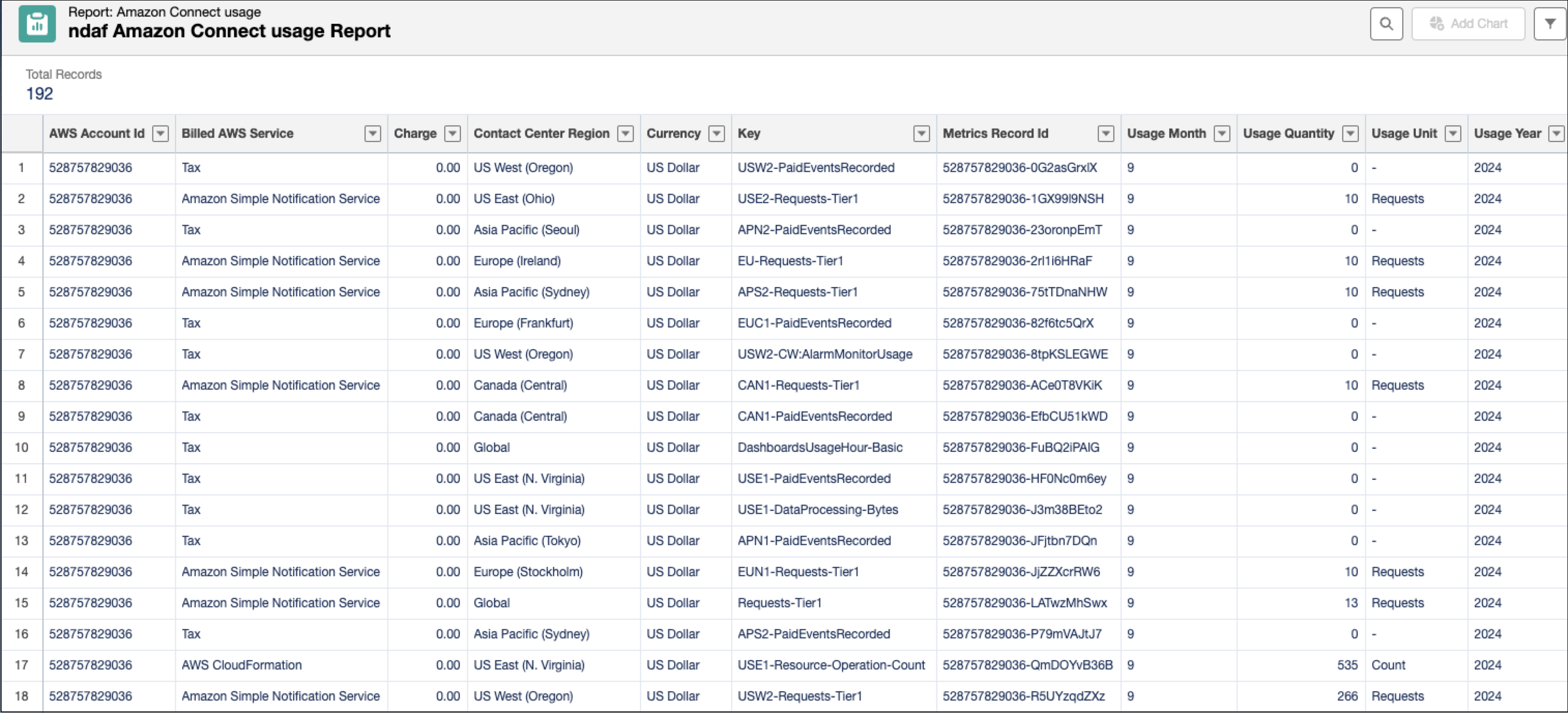
In the Salesforce Voice Usage and Cost report:
- AWS Account Id: Your AWS account id corresponding to the usage and cost specified in that row.
- Billed AWS Service: The AWS service associated with the specified AWS account id, for which the usage and cost details are specified in that row.
- Charge: The charges associated with your telephony minutes usage for a billed AWS service such as Contact Center Telecommunications minutes. If you have signed up for any additional services that are part of the Salesforce Voice Additional AWS Services Add-on License, the charges are shown against that service in the report.
- Contact Center Region: The region of the contact center associated with the telephony minutes usage specified in that row.
- Currency: The currency in which the corresponding charge has been billed.
- Key: The Key value varies depending on the AWS Service. For example, for Contact Center
Telecommunications or telephony minutes, the key value is a combination of these parameters
separated by a hyphen.
- Contact center region, for example, USW2
- Two-letter country code associated with the calls, for example, US
- Phone number type such as Direct Inward Dial (DID) or tollfree
- Call type such as inbound, or outbound concatenated with minutes
- Optional numeric value representing your day charge or fixed cost related to the telephony charges
If you export this data to your spreadsheet or analytics tool, use this key value to analyze the report to get insights such as countries driving the most call volumes and costs, changes in cost patterns between DID and Toll Free numbers, and cost changes due to shifts in inbound and outbound call volumes.
- Metrics Record ID: A combination of the AWS account id and a random 10-character string. This value is a unique identifier for that particular row.
- Usage Quantity and Usage Unit: Represents different values such as the number of requests, the number of minutes used, or the number of notifications depending on the AWS Service used.
The usage and billing data for the previous month is available in the Salesforce Voice Usage and Cost report on the fifth day of the current month. For example, the billing data for June is available in the Salesforce Voice Usage and Cost report on July 5.
Service Cloud IVR Report
This report shows IVR usage that specifies the number of IVR utterances.
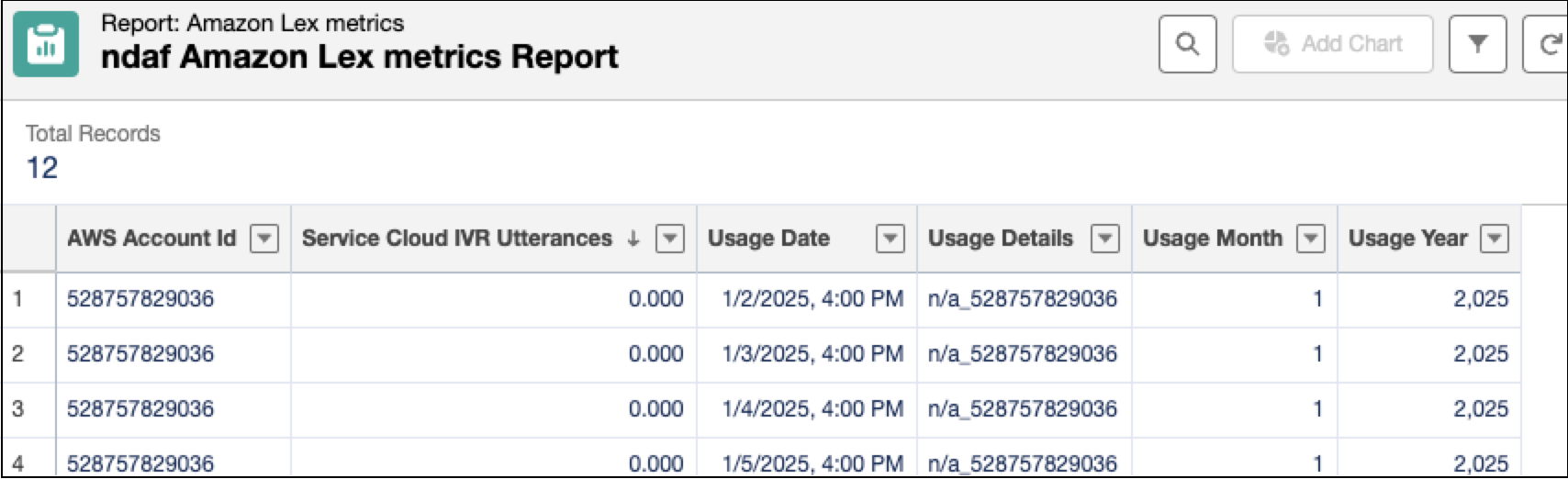
In the Service Cloud IVR report:
- AWS Account Id: The AWS account id for which the IVR utterances and the cost are specified in that row.
- Service Cloud IVR Utterances: The number of service cloud IVR utterances consumed on the usage date for the specified AWS account.
- Usage Date: The date on which the IVR utterances were consumed.
- Usage Details: A combination of region and Orgid concatenated with an underscore.
To get the service cloud IVR utterances balance in your Salesforce org, sum up the Service Cloud IVR Utterances entries in the report for the current month and subtract it from the remaining IVR utterances provided in the bill for previous month. The usage data in the report has a two-day delay. For example, to get the usage data for January 31 in the report, wait until February 2.
Salesforce Voice Calls Report
In addition to the standard reports, you can create a custom report type based on the Voice Calls object. The Voice Calls report provides information about the voice calls in your Salesforce Voice contact centers. The report provides details such as caller phone numbers, timestamps, and duration for the voice calls.
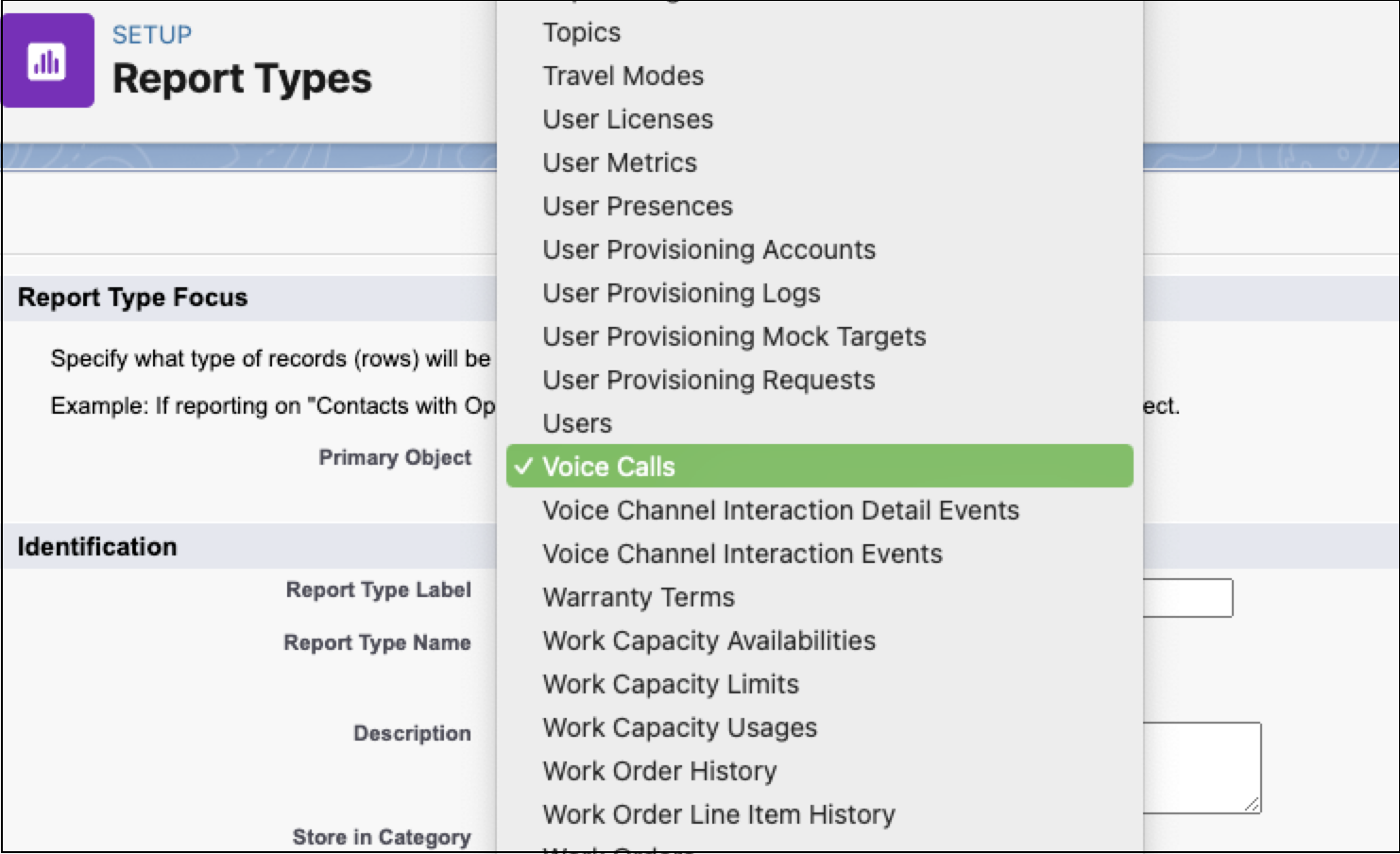
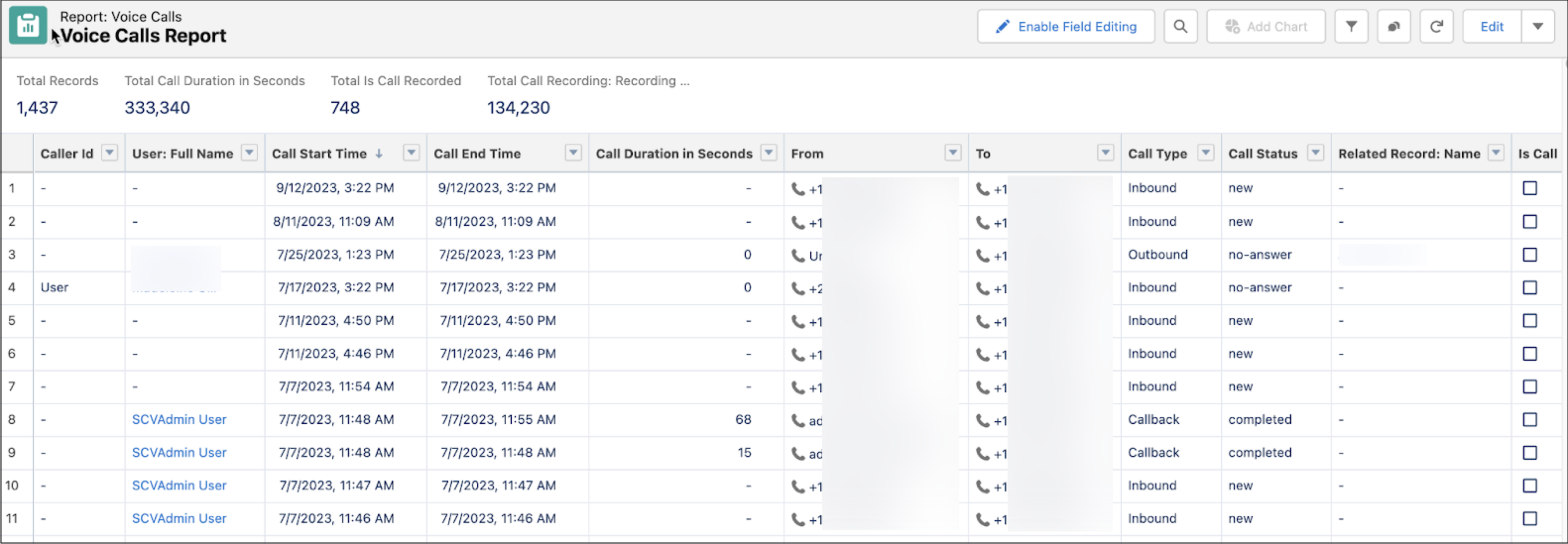
Create a report type for the Voice Call object, and use this report type to create the Salesforce Voice Calls report. See Generate a Salesforce Report for Amazon Connect Usage and Billing.
Considerations for Amazon Connect Usage and Billing Reports
When viewing reports, keep these considerations in mind.
- Salesforce reports usage data based on information passed from Amazon Web Services (AWS) Cost Explorer. For information, see the AWS Cost Explorer documentation.
- Usage Quantity and Usage Unit have replaced the Telephony Minute field. Use quantity and unit together to understand measurements.
- Report data is aggregated in the active org and can be viewed only from the active org. If you’re using a sandbox or trial org, create the report in the active org that the sandbox or trial org is linked to.
- The billable minutes in Salesforce reports that come from AWS might be different from
minutes calculated from Salesforce voice calls records. Why don’t the minutes match? These
discrepancies can be due to multiple reasons, including:
- Modification of timestamps for Salesforce voice calls. By shifting the timestamps, the calls might be billed on different days.
- Time zone differences when reporting and timestamping of AWS data. Usage data from
Amazon Cost Explorer is reported in Greenwich Mean Time (GMT) without a timestamp.
Salesforce stores this AWS data, but adds midnight as the timestamp. The Salesforce
reports show data based on the user’s time zone. Due to the time zone differences, the
reporting can be a bit confusing. Here’s an example.
- A rep answers a call on June 3 at 6 PM PST (Pacific Standard Time), which is June 4 at 1 AM GMT.
- The Amazon Cost Explorer logs the call as occurring on June 4, but without a timestamp.
- Salesforce receives the data from Amazon Cost Explorer and logs the call as occurring on June 4 and adds 12 AM GMT (00:00 GMT) as the timestamp.
- A Salesforce report run by a California user shows that the call happened on June 4. However, the Salesforce voice call record shows that the call happened on June 3. As a result, minutes for June 3 and June 4 will be inconsistent depending if you get the results from the Salesforce voice call records or from data that came from AWS.
- Usage data from AWS has a processing delay of approximately two days. For example, to view usage data for January 31, you have to wait until February 2 for it to appear in the report.
- Don’t compare the Telephony Usage report with the Service Cloud Voice Minutes report because these reports measure different metrics and are mutually exclusive.
