Salesforce Voice License Transition and Mixed License Options
Salesforce Voice offers flexible licensing options, which allows you to use multiple
Voice licenses or transition to Agentforce 1 Service Edition from the Salesforce Voice with
Amazon Connect license.
In the mixed model, you can use the Salesforce Voice with Partner Telephony license in
addition to your Salesforce Voice with Amazon Connect license to meet use cases such as
seasonal staffing needs in your contact center. The mixed license and upgrade to Agentforce 1
Edition integrate seamlessly with your Salesforce Voice setup, including your Amazon Connect
setup, without disrupting your contact center or current functionality. No additional
configuration for Partner Telephony is required.
After moving
to a mixed license model or upgrading your Salesforce edition, you can turn on voice with
partner telephony and add users to the contact centers.
Make sure the license or edition, such as Agentforce 1 Service Edition, and the Service
Cloud Voice with Partner Telephony license are enabled.
Make sure the Salesforce Voice Contact Center Admin (Partner Telephony) and Salesforce Voice Contact Center Rep (Partner
Telephony) permission sets are added.
If these licenses or permission sets don’t show up, contact the Salesforce Accounts
team.
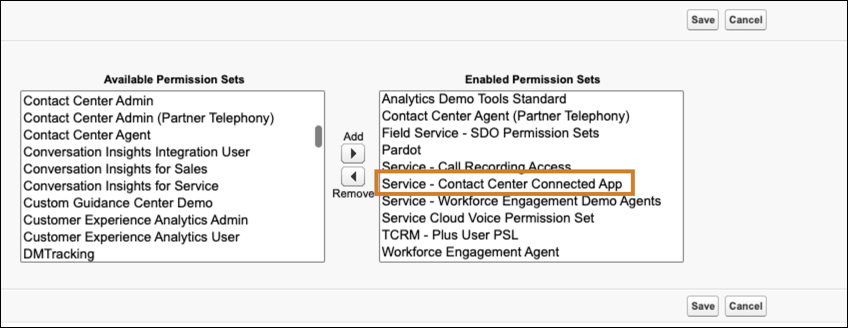
Add the Service - Contact Center Connected App to the Enabled Permission Sets. This
permission set is auto enabled during contact center creation if it uses connected apps. You
don't need to assign it to individual users.
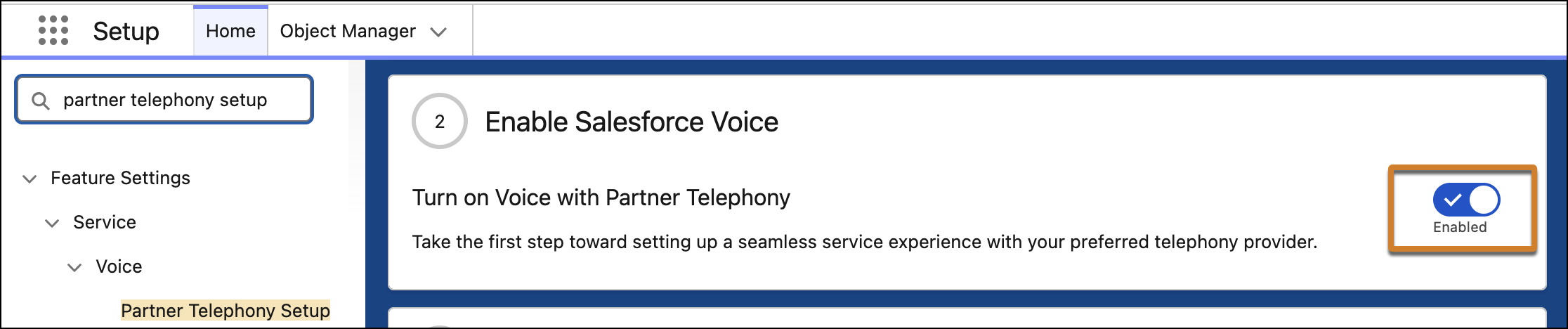
From Setup, go to the Partner Telephony Setup page, and enable the Turn on Voice with
Partner Telephony option.
After enabling this option, there’s no need to create a contact center, and you can
continue using your contact centers. To add new admins to the contact centers, assign the
Salesforce Voice Contact Center Admin (Partner Telephony) permission set to these users. To add service reps
(agents) to the contact center, assign the Salesforce Voice Contact Center Rep (Partner Telephony) permission
set to these users.
Note When you transition to Agentforce 1 Service Edition,
there’s no impact to reps or supervisors who are already logged in or for ongoing voice
calls.
You must retain your Salesforce Voice with Amazon Connect license to retain access
to your Amazon Connect contact centers. Contact your account executive to obtain a courtesy
Salesforce Voice with Amazon Connect license.
Did this article solve your issue?
Let us know so we can improve!
Loading
Salesforce Help | Article
Cookie Consent Manager
Cookie Consent Manager
General Information
Required Cookies
Functional Cookies
Advertising Cookies
General Information
We use three kinds of cookies on our websites: required, functional, and advertising. You can choose whether functional and advertising cookies apply. Click on the different cookie categories to find out more about each category and to change the default settings.
Privacy Statement
Required Cookies
Always Active
Required cookies are necessary for basic website functionality. Some examples include: session cookies needed to transmit the website, authentication cookies, and security cookies.
Functional Cookies
Functional cookies enhance functions, performance, and services on the website. Some examples include: cookies used to analyze site traffic, cookies used for market research, and cookies used to display advertising that is not directed to a particular individual.
Advertising Cookies
Advertising cookies track activity across websites in order to understand a viewer’s interests, and direct them specific marketing. Some examples include: cookies used for remarketing, or interest-based advertising.