
You are here:
Route Voice Calls Directly to a Specific Rep with Omni-Channel Unified Routing
Route voice calls directly to a preferred rep by using Omni-Channel Unified Routing. For example, you can route sales calls from customers to their account executives.
Required Editions
This article applies to:
- Salesforce Voice with Amazon Connect
- Salesforce Voice with Partner Telephony from Amazon Connect
| View supported editions. |
| User Permissions Needed | |
|---|---|
| To view the Amazon Contact Centers page: | Customize Application AND Manage Call Centers |
| To create and manage a contact center: | Salesforce Voice Contact Center Admin |
- Route Calls Directly to a Rep with an Assigned Number
Route voice calls directly to and from a rep with Omni-Channel Unified Routing. This setup covers more basic routing and use cases where reps need their own number for direct inbound and outbound calls. - Route Calls Directly to a Rep with an Omni-Channel Flow and Omni-Channel Unified Routing
Route voice calls directly to a rep with an Omni-Channel flow and Unified Routing with Omni-Channel. This setup is best for use cases that require more advanced routing logic and a single phone number for incoming calls.
Route Calls Directly to a Rep with an Assigned Number
Route voice calls directly to and from a rep with Omni-Channel Unified Routing. This setup covers more basic routing and use cases where reps need their own number for direct inbound and outbound calls.
Before you begin:
- Configure Unified
Routing for a contact center.
- For direct-to-rep routing, your contact center must have a holding queue in Salesforce that’s mapped to a working queue in Amazon Connect.
- You don’t need to claim a phone number for your contact center. You will claim numbers for each rep during a later step.
- Prepare to route to reps.
- Set up rep statuses and capacity.
- Create service resources for reps.
- Add reps to the contact center.
- Map Salesforce users to telephony provider users.
- Edit an existing flow or use the Sample SCV Omni-Channel Subflow - Omni Routing for Direct To Agent. This sample flow is specially designed to meet Omni-Channel Unified Routing requirements.
- If editing an existing flow, note the requirements in the Configure Direct-to-Rep Routing with an Omni-Channel Flow in Amazon Connect section on this page.
Route Calls Directly to a Rep with an Omni-Channel Flow and Omni-Channel Unified Routing
Route voice calls directly to a rep with an Omni-Channel flow and Unified Routing with Omni-Channel. This setup is best for use cases that require more advanced routing logic and a single phone number for incoming calls.
Before you begin:
- Configure Unified
Routing for a contact center.
- For direct-to-rep routing, your contact center must have a holding queue in Salesforce that’s mapped to a working queue in Amazon Connect.
- Prepare to route to reps.
- Set up rep statuses and capacity.
- Create service resources for reps.
- Add reps to the contact center.
- Map Salesforce users to telephony provider users.
Configure Direct-to-Rep Routing with an Omni-Channel Flow in Salesforce
Start configuring voice calls direct-to-rep routing with Omni-Channel Unified Routing in Salesforce. These instructions explain how to route a voice call to a rep or queue with an Omni-Channel flow, a more advanced setup.
-
From Setup, enter and select
Omni-Channel Settings. Enable the Enable Skills-Based and Direct-to-Agent Routing option. - Follow the steps to create an Omni-Channel Flow.
- Drag the Route Work action onto the canvas.
- Give the action a label and an API Name and, optionally, a description.
- Under Set Input Values | Record ID, create and select a recordId variable.
- Under Route To, select Agent.
-
Under Agent, select an option.
- Select Agent: Specify the rep to route the work item to.
- Use Variable: Use a variable to find the appropriate rep. For example, you can determine the preferred rep associated with the customer’s Contact record.
-
To assign work to the preferred rep only when they become available, click
Required Agent and specify the Routing
Configuration to use for routing parameters.
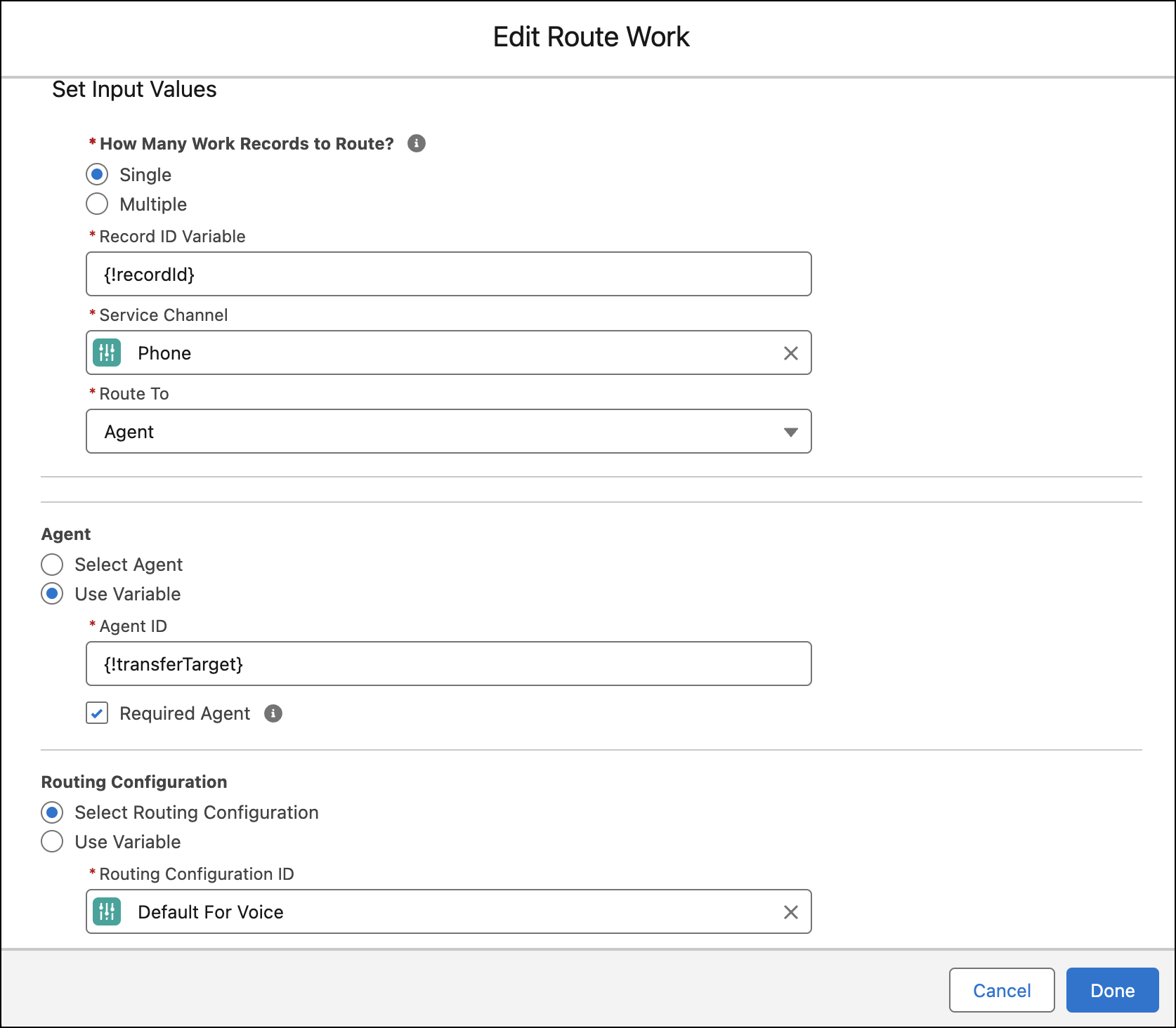
-
Alternatively, to route work to a queue when the preferred rep is unavailable,
deselect the Required Agent checkbox. Then, specify the backup
queue to route the work item to.
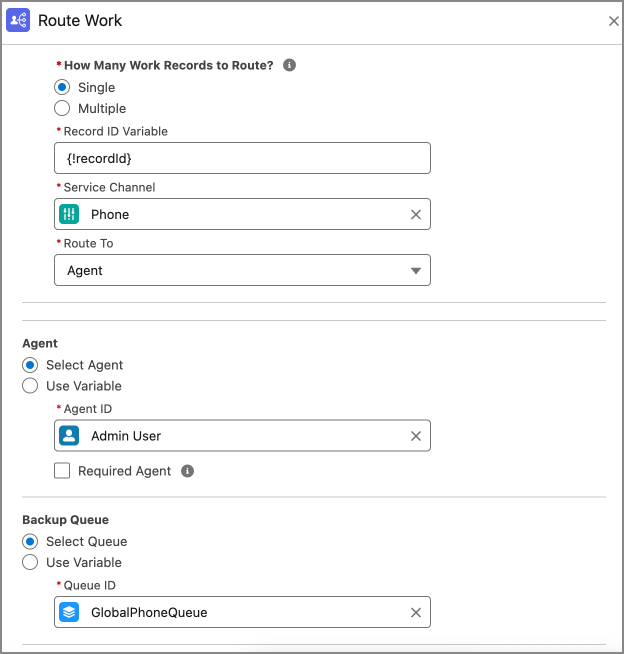
Configure Direct-to-Rep Routing with an Omni-Channel Flow in Amazon Connect
Finish configuring voice calls direct-to-rep routing with Omni-Channel Unified Routing in Amazon Connect.
- To go to the Amazon Connect Admin Dashboard associated with your contact center, go to the Contact Center Details section in Salesforce and click Telephony Provider Settings.
-
In Amazon Connect, select Routing, then
Flows.
 Note
Note- These instructions reference sample Amazon Connect flows for admins setting up Omni-Channel Unified Routing in a brand new contact center. For a contact center with preexisting flows, interpret the steps and referenced flows according to your current setup. For example, edit your inbound flow to meet the requirements below.
- If you’re using our sample flows end-to-end, edit the Sample SCV Inbound Flow to transfer to the Sample SCV Omni-Channel Subflow - Omni Routing for Direct To Agent subflow.
-
Edit the Sample SCV Omni-Channel Subflow - Omni Routing for Direct To Agent subflow
according to your business needs.
While Salesforce provides sample Amazon Connect flows as a reference, each organization usually adds unique business logic to their flow implementations. If you are updating an Amazon Connect flow to enable Omni-Channel Unified Routing directly to reps, reference the example flow (Sample SCV Omni-Channel Subflow - Omni Routing With Case Creation) and keep these considerations and requirements in mind.
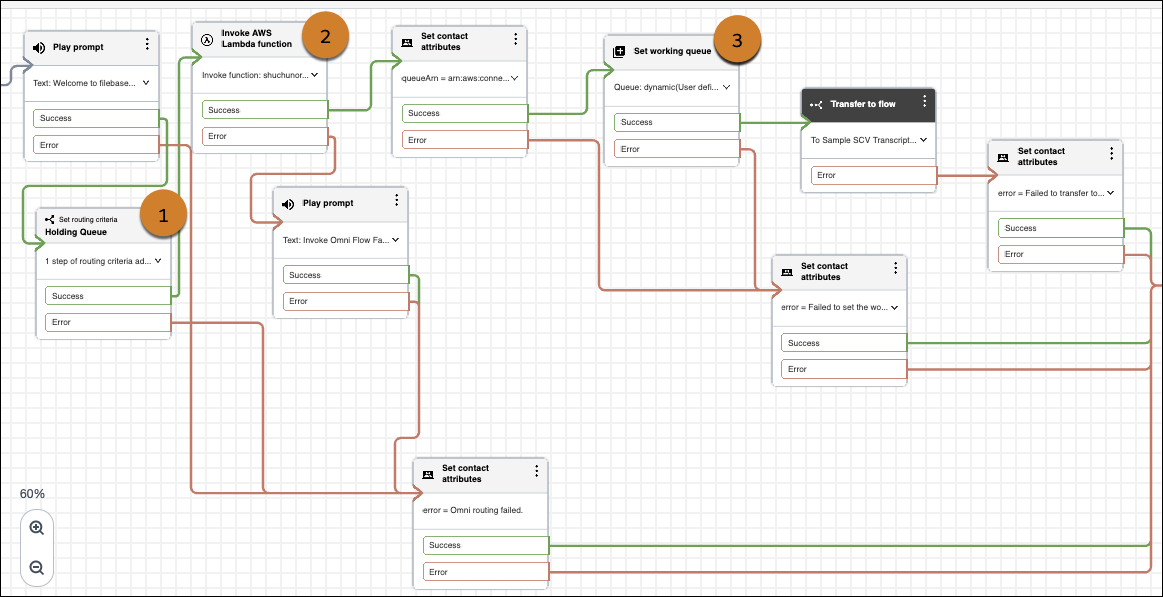
-
Include a Set routing criteria block (1) before the Invoke
AWS Lambda function block that invokes the executeOmniFlow method.
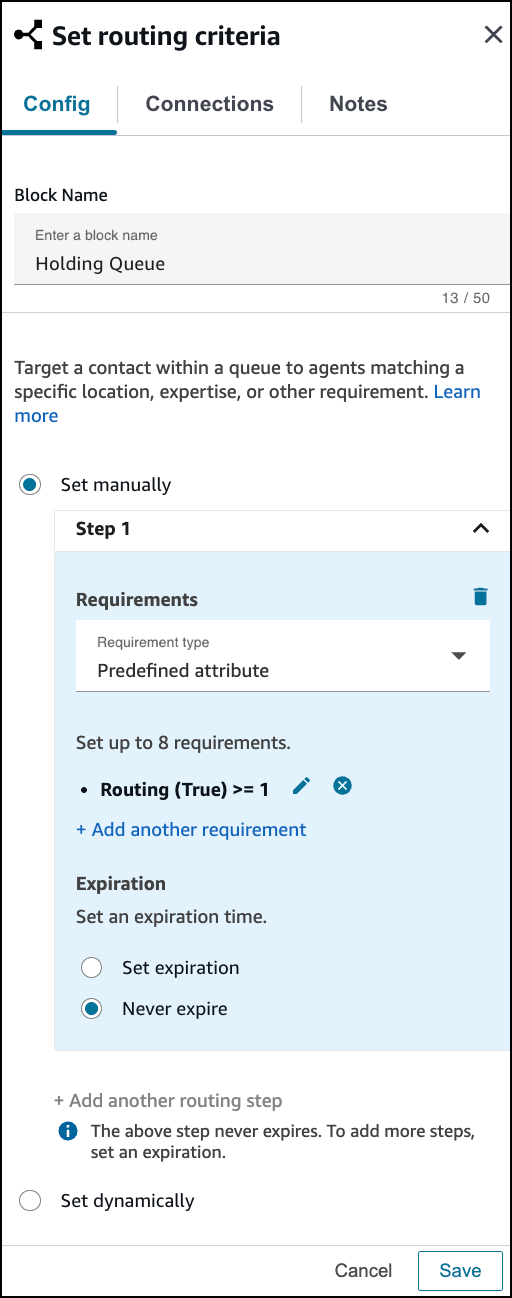
-
In the Invoke AWS Lambda function block that calls executeOmniFlow (2), edit the
Function input parameter with the Destination Key of
flowDevName. For Value, select Set manually, and set the value to the API name of the Omni-Channel flow that goes directly to a rep. -
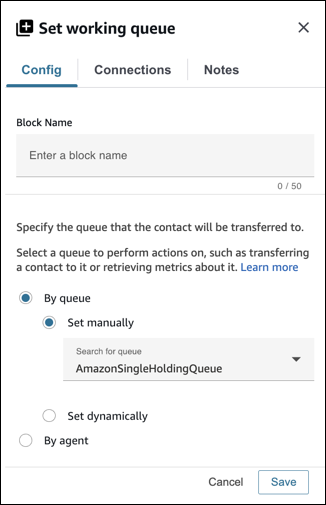
If you’re using the holding queue approach that we recommend, the Set
working queue block (3) should be set By Queue
manually to the working (holding) queue.
-
Include a Set routing criteria block (1) before the Invoke
AWS Lambda function block that invokes the executeOmniFlow method.
- Save your work and publish the flow.
