
You are here:
Set Up Queues for Calls
Create queues to route calls and voicemails to.
Required Editions
This article applies to:
- Salesforce Voice with Amazon Connect
- Salesforce Voice with Partner Telephony
- Salesforce Voice with Partner Telephony from Amazon Connect
| View supported editions. |
Before you create a queue:
- Create the routing configuration. See Create Routing Configurations for Your Queues.
- Routing configurations used in queues for voice calls must have Percentage of Capacity for In-Progress Work Items set to 100% or Units of Capacity for In-Progress Work Items set to a rep’s full capacity. Voice calls take up all of a rep’s capacity.
- To route calls using an Omni-Channel flow without Unified Routing, the routing model for the routing configuration should be set to External Routing.
- Create the queue. See Create Queues.
-
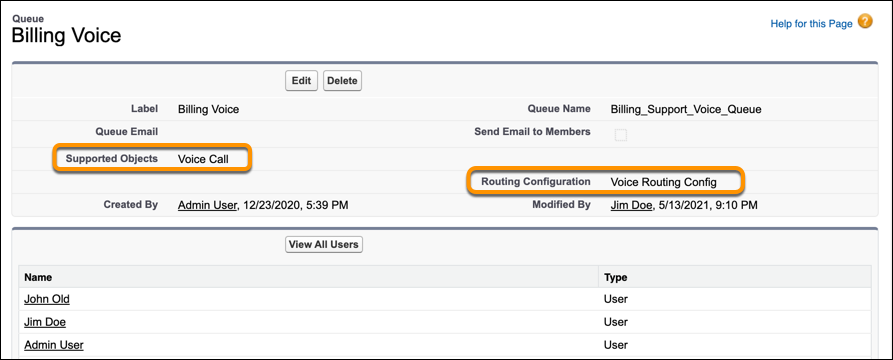
In the Queue page, assign the Voice Call object to the queue and assign a routing
configuration.
 If your telephony system supports groups, don’t add members to the queue. Instead add the members to groups. To learn about queues and groups, see Manage Contact Center Queues in Salesforce and Your Telephony Provider Using Groups.
When you set up a phone channel, you can select which queue to route its calls to.
Did this article solve your issue?
Let us know so we can improve!
