
Loading
Salesforce now sends email only from verified domains. Read More
Agentforce Contact Center
Table of Contents
Select Filters

          No results
          No results
          Here are some search tips

          Check the spelling of your keywords.
          Use more general search terms.
          Select fewer filters to broaden your search.

          Search all of Salesforce Help
          View the Sentiments of a Call Conversation

          View the Sentiments of a Call Conversation

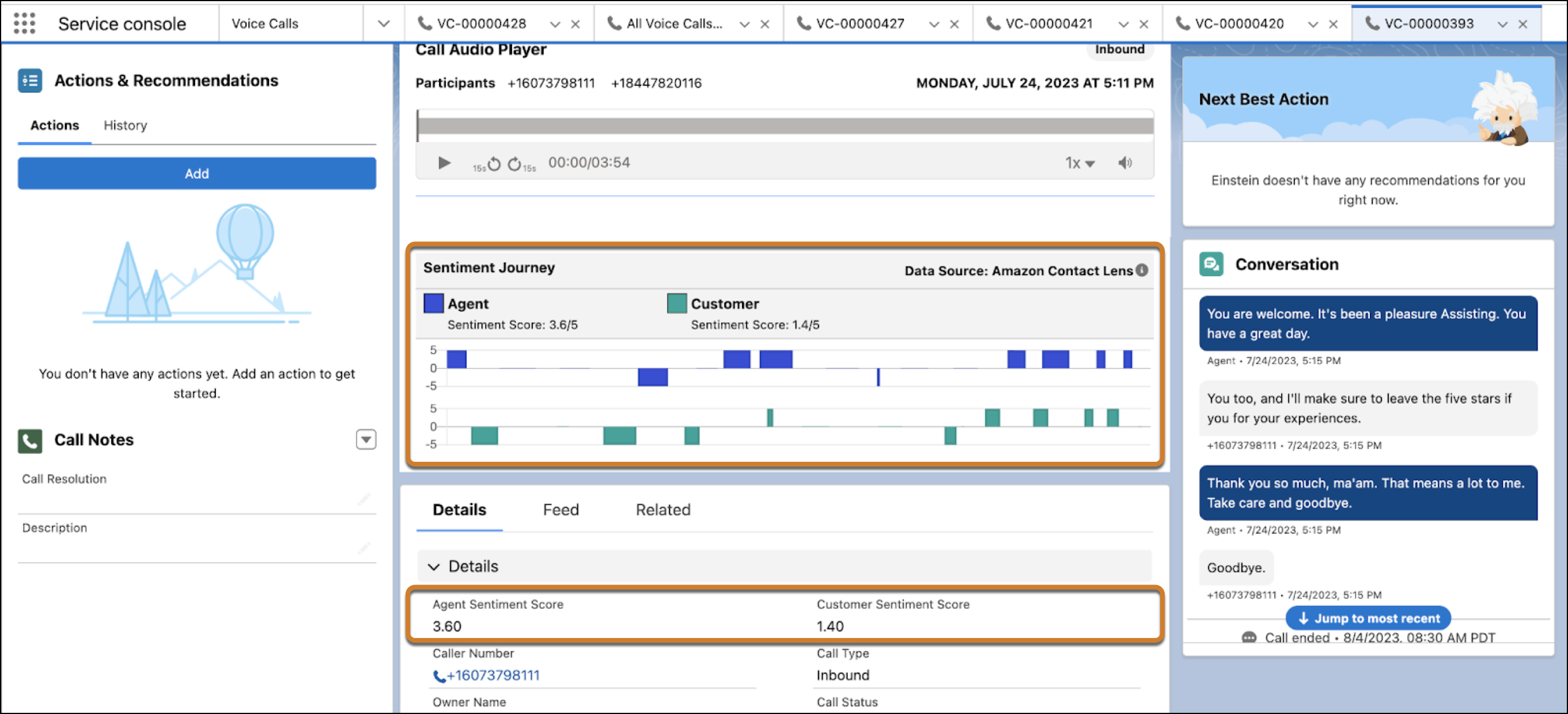
          After a call ends, view the customer and rep sentiments in the Call Audio Player. Each utterance can have a positive, negative, or neutral sentiment. To identify what was said when negative sentiments occur, play the recording at those moments. To turn a negative experience into a positive one, a rep can then follow up with the customer. A supervisor can also coach the rep to improve the way they handle calls.
          Required Editions

          This article applies to:

          • Service Cloud Voice with Amazon Connect
          • Service Cloud Voice with Partner Telephony
          • Service Cloud Voice with Partner Telephony from Amazon Connect
          View supported editions.
          1. Open the voice call.
          2. In the Call Audio Player component, view the sentiment of each rep and customer utterance alongside the call recording from a previous conversation. 
            The customer and agent sentiment scores show on the Voice Call record if configured that way.
          3. To hear what was said during the call, play the recording.
           
          Loading
          Salesforce Help | Article
