
You are here:
Shift Segments
Shift segments show team leads and support reps a granular breakdown of activities assigned during a shift.
Required Editions
| View supported editions. |

Planners or team leads can edit shift segments before or during a shift in response to fluctuating service demands. Support reps can view their assigned shift segments in Agent Home in Workforce Engagement or on the Shift record in a related list. In Workforce Engagement, shift segments work hand-in-hand with Intraday Management to monitor under- or overstaffing, make real-time adherence updates, and notify support reps when their schedule is changed.

Each shift segment represents an activity, such as phone calling, a meeting, or break, with a start and end time during a support rep’s shift. Each shift segment represents a specific type of work (chat, email, or phone call); non-work activity (meeting or training); or break (break or lunch). Create shift segments in 5-minute increments and add them to shifts.
How Support Reps Use Shift Segments
Support reps can begin their shift and check segments to see the breakdown of their workday.
- In Workforce Engagement, support reps can see shifts and shift segments in Agent Home.
- With Shift Scheduling, support reps can open their Service Resource record, click an assigned shift, and view the Shift Segments related list.
How Team Leads Use Shift Segments
A team lead’s experience with shift segments depends on whether you’re using Intraday Management in Workforce Engagement or using Shift Scheduling.
| Functionality | With Shift Scheduling or Without Intraday Management | With Intraday Management |
|---|---|---|
| Assign shifts and shift segments to support reps on the Shifts tab. | X | X |
| Update shift segments on the Shifts tab. | X | X |
| View staffing levels for the current business day in the Intraday Management dashboard, and adjust shift segments in response to fluctuating demands. | X | |
| View if a support rep is out of adherence with a shift segment in the Intraday Management Dashboard when using an Omni-Channel queue-based routing workflow, and adjust the shift segment in response. | X |
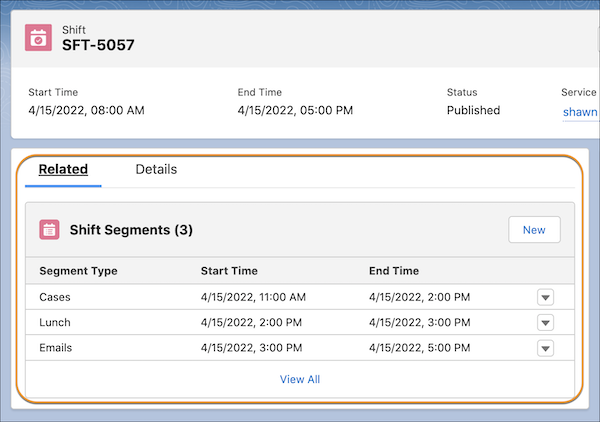
Planners who use Shift Scheduling or who aren’t using Intraday Management in Workforce Engagement can review and edit shift segments only in a shift’s related list.
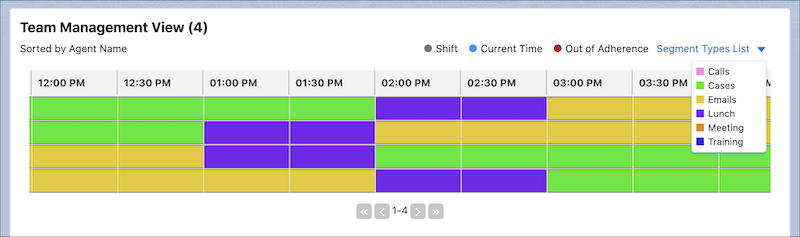
Team Management View in Intraday Management
Team leads who use Intraday Management in Workforce Engagement can review and edit shift segments in the Team Management View.
By combining shift segments with Intraday Management, you can notify support reps about assignment changes, and they can notify team leads when they’re out of adherence.
| Functionality | Without Intraday Management | With Intraday Management |
|---|---|---|
| View assigned shifts and shift segments in Agent Home. | X | X |
| Approve or reject shift segment assignments in Agent Home if the admin has applied an approval process and flow. | X | X |
| Receive an email when a shift or shift segment is assigned to them or changed. | X | |
| Trigger an out-of-adherence flag to the team lead when using the Omni-Channel widget to set a service presence status. If the status in the widget differs from the service presence status of the support rep’s assigned shift segment past a time threshold, the support rep is flagged as out of adherence. | X |
If your admin has set up an approval process and flow in Workforce Engagement, a service rep can click a pending shift in Agent Home to approve or reject it.
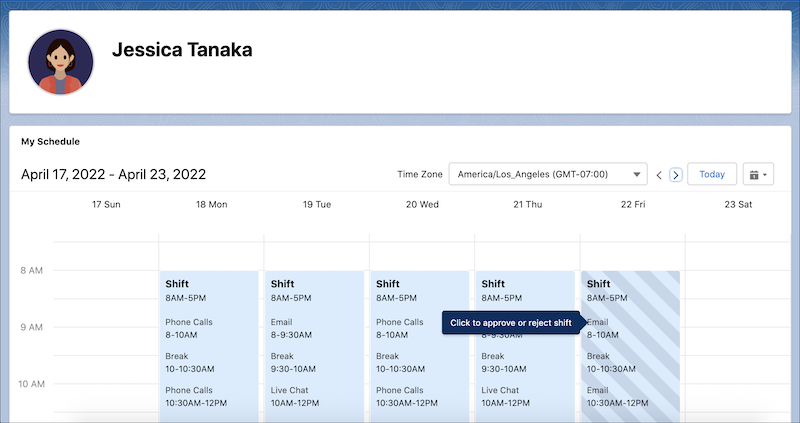
The Approval History page provides both options.

- Preparing to Use Shift Segments
Set up Salesforce to use shift segments in Shift Scheduling or Workforce Engagement. - Create a Shift Segment
Each shift segment represents a work activity with a start and end time during a support rep’s shift. Assign a shift segment to a support rep to let the support rep know how to spend that time.
