
You are here:
Collaborate on Your Leads and Referrals in Slack
Create, manage, and convert new potential business from anywhere by using Leads and Referrals in Slack. In the Financial Services Cloud for Slack App, your users have control of the entire lead and referral process. From creating a new lead, to viewing and updating existing leads, and converting successful leads, your users can save time by managing potential business and staying connected to conversations with their team members all from Slack.
Where: This change applies to Lightning Experience in Professional, Enterprise, and Unlimited editions where Financial Services Cloud is enabled.
Who: To use Leads and Referrals for Slack, users need the Financial Services Cloud Extension permission set. Users must have access to Slack.
Why: By using Leads and Referrals in Slack, there is a seamless handoff between team members when engaging with new business opportunities. For example, when a bank representative talks to an existing client about their checking account, the client expresses interest about opening a new savings account. In Slack, the bank representative creates a lead and assigns it to the financial manager.
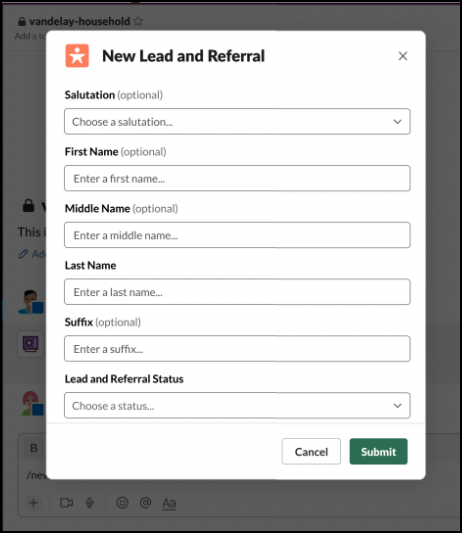
When the financial manager gets a notification in Slack about the lead, they open it, review the details, and update the status. In Slack, the financial manager sends a message to the lead creator for additional information. Finally, after contacting the customer and finalizing the details about the new savings account, the financial manager converts the lead in Slack.
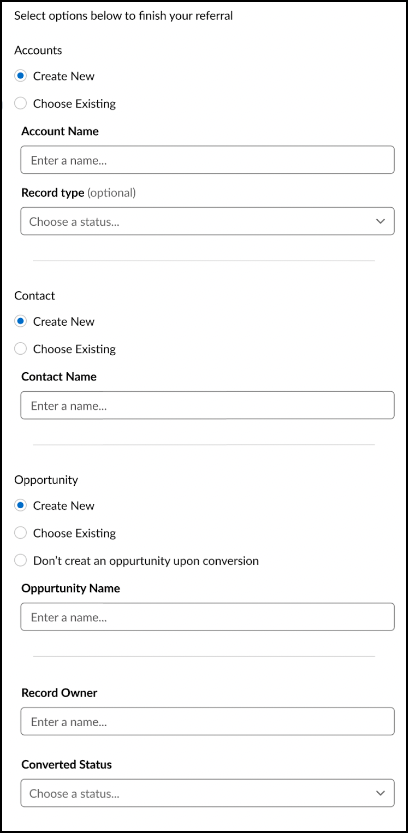
The user experience of creating, viewing, updating, and converting a lead or referral in Slack is similar to the experience in Salesforce, allowing your users to stay in the conversation while managing leads and referrals.
How: In Setup, enable Financial Services Cloud on Slack and turn on Slack for Leads and Referrals. Install the Financial Services Cloud Slack app in your Slack workspace and connect to Salesforce. In Slack, navigate to the Financial Services Cloud for Slack app and click View Your Leads and Referrals.
