You are here:
Identify Locales in Use by User
To gather information about the users for each locale, use a custom field to create a report that lists users by locale code.
To identify which users chose to use each locale, create a custom field on the User object.
- Click the App Launcher (
 ).
). - In the search box, enter Reports, and select Reports.
- Click New Report.
- In the Report Type search box, enter Users, and click Users.
- Click Continue.The report opens in edit mode and shows a preview. The default report contains commonly used fields for the User object.
- Group the users by locale code first. In the Outline pane, under Groups, enter Locale Code into the search box, and select Locale Code.
- Then group the users by the locale name. In the Outline pane, under Groups, enter locale into the search box, and select Locale.
- To see what the report looks like, click Refresh above the report
preview.
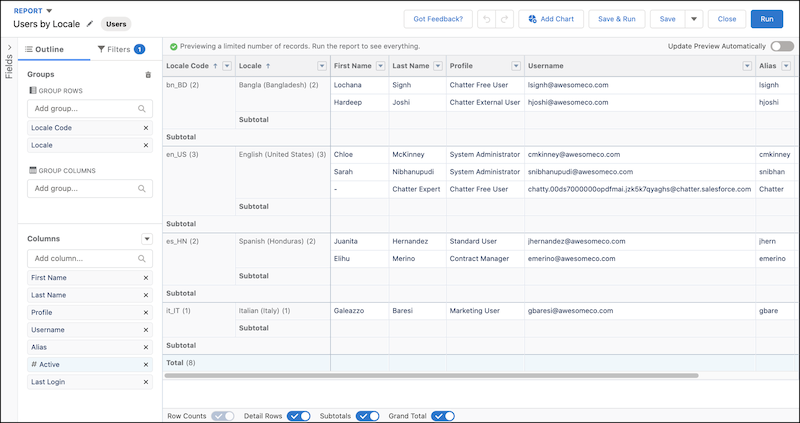
The preview shows the report grouped by locale code with the locale name beside it.
- Click Save & Run.
- Enter a name for the report such as Users by Locale Code, select a
folder to save the report, and then save your changes.Your report groups data by locale code and shows the full locale name for each code. This view can help you compare the locales in use in your org against the changes when you enable the ICU locale formats.
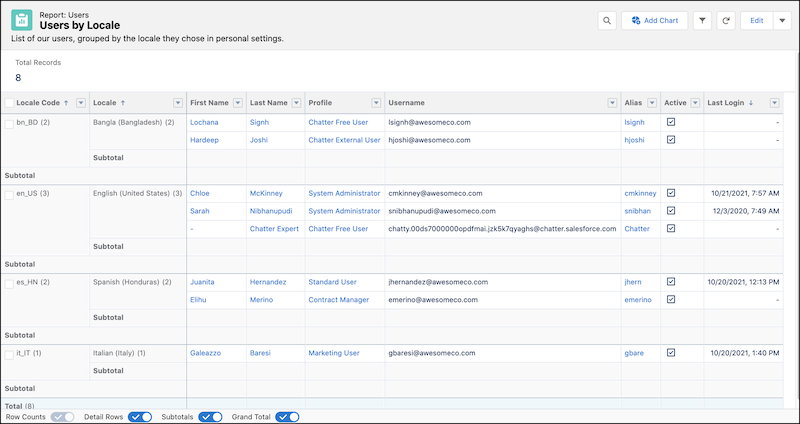
To view the users who chose one of the affected locales, filter the report by locale code.
Did this article solve your issue?
Let us know so we can improve!
