Update the API Version
API version 45.0 is the minimum required version for ICU.
Required Editions
| Available in: both Salesforce Classic and Lightning Experience |
| Available in: all editions |
| User Permissions Needed | |
|---|---|
| To define, edit, delete, set security, and set version settings for Apex classes: | Author Apex |
| To run Apex tests: | View Setup and Configuration |
| To view Apex triggers: | View Setup and Configuration |
| To edit Apex triggers: | Author Apex |
We recommend that you adopt the latest API version available, if possible. If your current API version is much earlier than the new API version, incremental upgrades can help you identify the relevant changes to test.
You can update the API version of Apex classes, Apex triggers, and Visualforce pages from the corresponding Setup page. Updating the API version can include structural and behavior changes for objects and other code components. For example, an API change can add or remove fields on an object, introduce new outputs, or change the behavior of a field. We recommend that you back up your code before you upgrade the API version. Perform the upgrade in a sandbox, and complete thorough testing of all related functionality before you update production.
To determine whether an item uses locales, look for fields and code returning these types of data. The JDK and ICU locale formats for these types differ.
- Date
- Time
- Datetime
- Number (Integer)
- Currency
- Accounting Currency
- Next to the component’s name, click Edit, then select the Version Settings tab.
If you have Visualforce pages, confirm that they’re being used before you analyze and update them. Next to the page name, click Edit, then click Where is this used?
- Go to the Apex Classes, Apex Triggers, or Visualforce Pages Setup page.
- Next to the component’s name, click Edit, then select the Version Settings tab.
- In the Version field for Salesforce.com API, select version 45.0 or later.
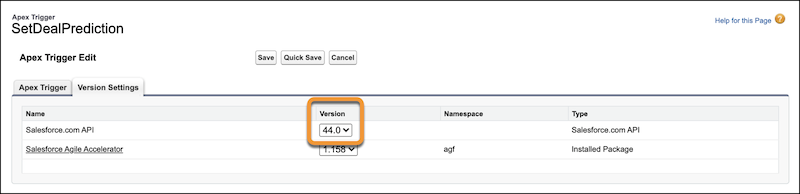
- Save your changes.
Test the class, trigger, or page, and verify that all related functionality works with the new API version.
